platm72
Inspiring
August 19, 2019
Answered

How to add element(s) to an existing group without ungrouping

  • August 19, 2019
  • 5 replies
  • 8765 views

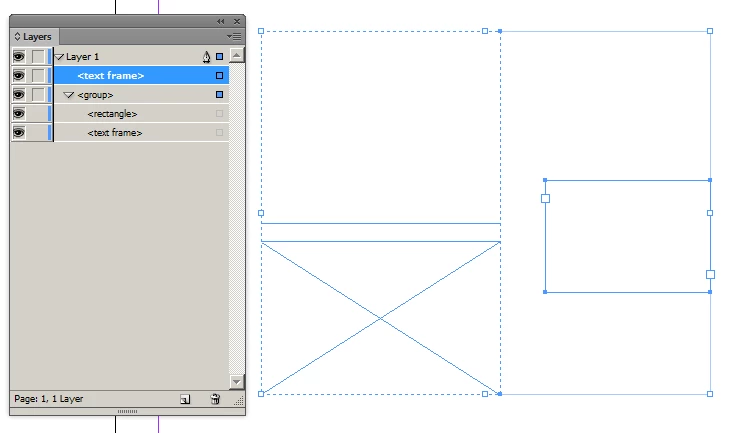
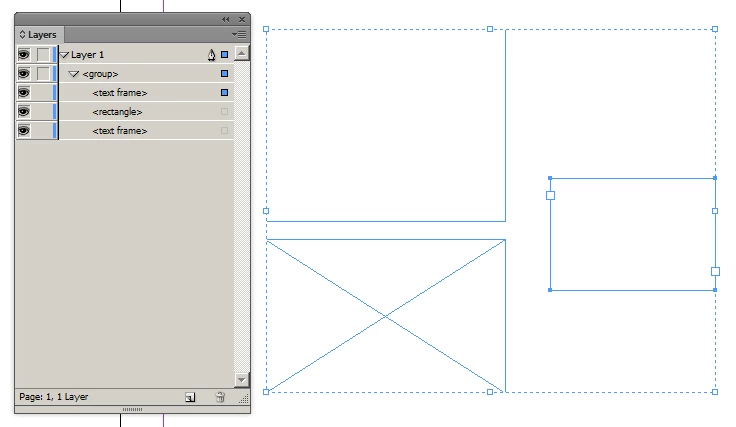
I would like to add, one or more elements, to an existing group by script, without ungrouping the group, as this is possible to do by hand, dragging new elements into a group in Layers Panel – see the srceens. The initial group has label, name and appliedObjectStyle, wich wanish during ungrouping ...

I'll be very pleased for any sugestion or solution ... I have no idea where to start ... 🙂

Many thanks

a.


This topic has been closed for replies.
Correct answer Laubender

Hi platm72 ,

to add an element to an existing group by dragging it inside the group using the Layers panel is the one method.

The other method is:

1. Convert the selected group to a new Multistate Object (MSO).

2. Select the MSO and the item you want to add to a group. Add it to the active state of the MSO.

3. Use Shift + Esc to select the active state instead the whole MSO.

4. Hold the alt key and drag the selected group part of the active state as duplicate out of the MSO.

Sounds complicated, but one could do it in seconds.

And it can be scripted without using any menu actions. :-)

By help of a temporary MSO.

Example:

Here we have two objects on the first spread of an InDesign document. The only items in the document:

A group of yellow rectangles where an effect is applied to the group, a drop shadow.

The second object is a magenta circle without any effect applied.
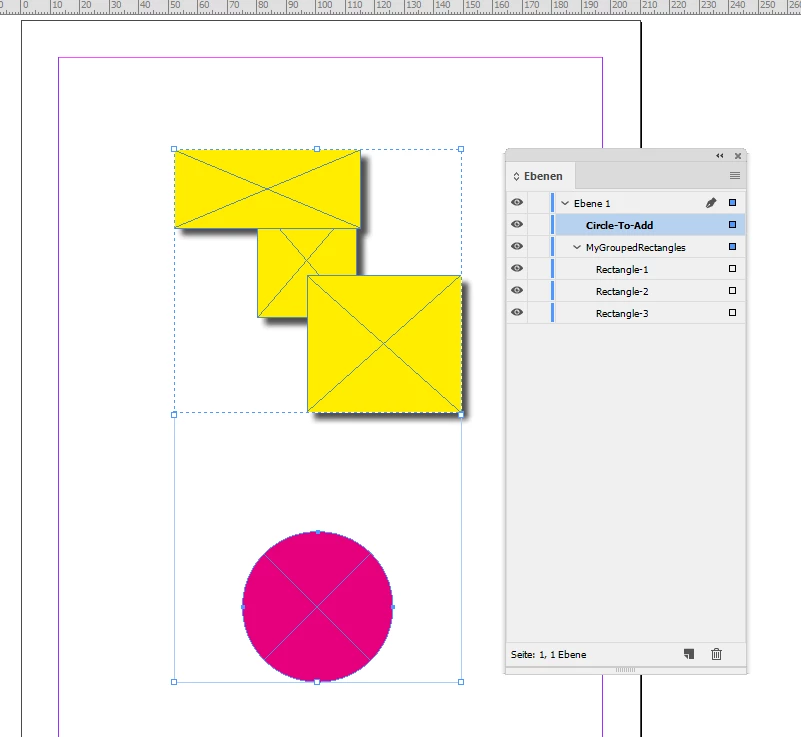
Then run this script snippet below that will add the magenta circle to the group WITHOUT ungrouping the group:

/**

* @@@BUILDINFO@@@ AddItemToGroup-WITHOUT-Ungrouping-USING-TEMP-MSO.jsx !Version! Tue Aug 20 2019 13:34:21 GMT+0200

*/

/*

    Script snippet by Uwe Laubender

    Posted at Adobe InDesign Scripting in thread:


    How to add element(s) to an existing group without ungrouping

    platm72 Aug 19, 2019

    https://forums.adobe.com/message/11219570#11219570


    Just an example to add one item to an existing group without ungrouping the group.

    The trick is to use a temp multistate object for this.


    All properties of the initial group are maintained.


    Two exceptions:


    1. name

    That could be restored easily.


    2. id

    Why? In the end we will work with a duplicate of the group.


*/

// Active document:

var doc = app.documents[0];

// First group on the first spread of the active document:

var myGroup = doc.spreads[0].groups[0];

// Name of that group ( OPTIONAL ):

var myGroupName = myGroup.name;

// First oval, the circle is an oval, on the first spread of the active document:

var myItemToAdd = doc.spreads[0].ovals[0];

// Add a new MSO on the same spread where the group and the circle is.

// Make its dimensions the same as the group's ( OPTIONAL ).

var myTempMSO = doc.spreads[0].multiStateObjects.add

(

    { geometricBounds : myGroup.geometricBounds }

);

// Add the group as new state to the MSO:

// It will add this as the third state in the MSO because the added MSO has to have two states if not specified otherwise:

myTempMSO.addItemsAsState( [myGroup] );

// Add the circle to the third state of the added MSO:

// FWIW: a state consists of two top items in scripting, a state object and a group object:

myTempMSO.states[2].addItemsToState( [myItemToAdd] );

// Duplicate the first group of the third state of the MSO that now contains the circle as well:

var newGroup = myTempMSO.states[2].groups[0].duplicate();

// Rename that new group ( OPTIONAL ) to the name of the inital group:

newGroup.name = myGroupName;

// Finally remove the MSO. It is not needed anymore:

myTempMSO.remove();

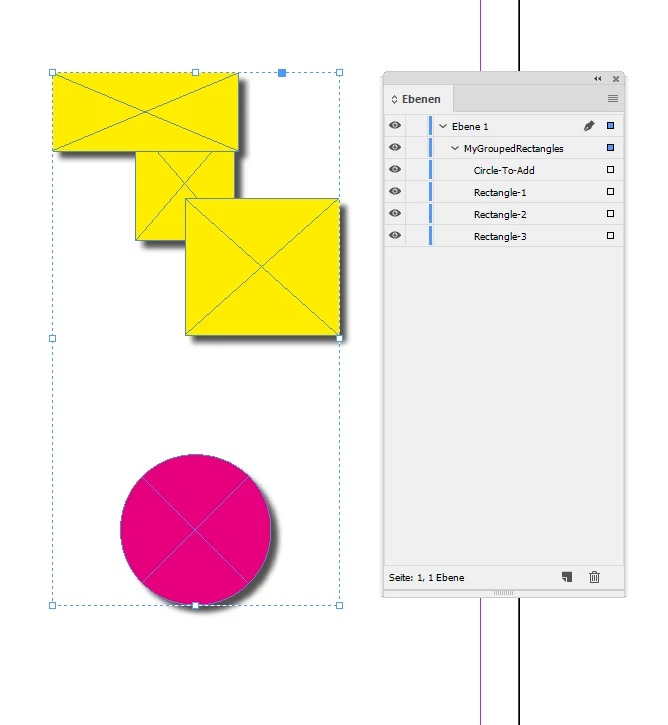
The result is this: The circle is added to the group. Hm. In fact it is a duplicate of the group. The effect on the group, the drop shadow, is applied as well:
Regards,
Uwe


5 replies

Community Expert
February 4, 2021

Hi Anton,

and there is another use case with this method:

You could also move any object inside a graphic frame as well.

Without the need of a duplicate of the original object that has a new ID number automatically assigned to it.


Here comes yet another trick how to move an object out of a group or a graphic frame:

Simply add a new text frame to the spread, anchor the object inside the group or a graphic frame to an insertion point of that helper text frame, release the anchored object and remove the helper text frame. This method will also retain the ID number of the object.


Regards,
Uwe Laubender

( ACP )

Anton Petrov
Known Participant
February 7, 2021

Two more cents about z-index. As a side effect of using this method, the augmented group keeps the original ID, but is put as a first child of it's parent. Moreover, the newly added item becomes top item in the group (on top of others in z-index). Lets assume following structure in the Layers:

extGroup

|-- subgroup2

|-- subgroup1

|-- subgroup0

|--|-- item1

|--|-- item0

itemToAdd


After addItemsToGroup(subgroup0, itemToAdd), the stack becomes:


extGroup

|-- subgroup0

|--|-- itemToAdd

|--|-- item1

|--|-- item0

|-- subgroup2

|-- subgroup1


I'd like 

extGroup

|-- subgroup2

|-- subgroup1

|-- subgroup0

|--|-- item1

|--|-- item0

|--|-- itemToAdd


Added some code for maintaining the z-orders. Not sure in case of adding 3 or more items in a one step, some above and others bellow the group in their relative z-indices, but should keep correct item-to-group and group-to-parent relations. Credits to commenters in the thread https://community.adobe.com/t5/indesign/stacking-order-of-pageitems-in-cs5/td-p/3845337 about stacking order.


function addItemsToGroup(/*Group*/grp,/*PageItem|PageItem[]*/items,  gName,mso,sta) {

  // --------------------------------
  // Based on Uwe Laubender's brilliant trick at forums.adobe.com/message/11220608#11220608
  // Use `State.releaseAsObject()` instead, which preserves the original Group specifier.
  // => grp

  // Backup the name of the Group.

  gName = grp.name;
  
  // Get initial siblings z-order
  var prevZOrderObj = getPrevZOrderObj(grp)

  // Create a MSO and convert `grp` into a new state.
  mso = grp.parent.multiStateObjects.add();
  mso.addItemsAsState( [grp] );
  sta = mso.states.lastItem();
  
  // States empty string name not allowed, so keep the default state name
  sta.name = gName || sta.name

  // In case of a single item
  items = items instanceof Array ? items : [items]
  // Inject `item` in the state.
  sta.addItemsToState( items );
  
  // Maintain item-in-group z-index
  // If an item has initially bigger z-index than the group, sandToBack in the sta
  for (var i=0; i<items.length; i++ ){
    if (prevZOrderObj[items[i].id] > prevZOrderObj[grp.id]){
      items[i].sendToBack()
    }
  }

  // Release the state "as object".
  // -> The `grp` specifier is fully restored (except for the name.)
  sta.releaseAsObject();
  mso.remove();
  // If grp name not specified, revert the default "State 3" name to empty string
  !gName && grp.name = gName;
  
  restoreZOrder(grp, prevZOrderObj)
  
}

// Return:  {id:zIndex} object
function getPrevZOrderObj(item){
  var result = {}
  var parent = item.parent
  var piIds = parent.pageItems.everyItem().id
  var piIndices = parent.pageItems.everyItem().index
  for (var i = 0; i < parent.pageItems.length; i++){
    result[piIds[i]] = piIndices[i]
  }
  return result
}

function restoreZOrder(item, prevZOrderObj){
  var newZOrderArr = getZOrderArr(item)

  for (var i = 0; i<newZOrderArr.length; i++){
    if (newZOrderArr[i].id == item.id) {continue}
    if (prevZOrderObj[newZOrderArr[i].id] < prevZOrderObj[item.id]){
      item.sendBackward()
    } else return
  }
}

// Return: Array of {id:number, zIndex: number} objects
function getZOrderArr(item){
  var result = []
  var parent = item.parent
  var piIds = parent.pageItems.everyItem().id
  var piIndices = parent.pageItems.everyItem().index
  for (var i = 0; i < parent.pageItems.length; i++){
    result.push({id:piIds[i], zIndex:piIndices[i]})
  }
  result.sort(sortByZOrder)
  return result
}

function sortByZOrder(a,b){
  return a.zIndex - b.zIndex
}


TᴀW
Legend
August 20, 2019

document.groups.add([o, g]);

where o is any PageItem (text frame, etc.) and g is an existing Group.

This seems to add PageItem o to Group g.

Ariel

Marc Autret
Legend
August 21, 2019

Hi Ariel,

The effect of doc.groups.add([o, g]) is to create a new group G formed of o and g, that is, G = { o ; g }. But the original group g is not extended. The challenge is to insert o into g itself, without destroying g in terms of specifier and id. The MSO trick solves that specific question in almost any context, including when g is already part of a supergroup. (The trick doesn't work if g is an anchored object though.)

Marc

TᴀW
Legend
August 21, 2019

Hi Marc,

Good point. So it's not identical to the UI drag-in-layer panel move.

Still, it does delete the old group, and seems to preserve the formatting of individual items in the old group, as well as their original IDs.

It also returns the new group, so it should be easy in most scripts to update the variable that is keeping track of the specifier or ID of the old group.

Although I haven't tested it, performance-wise it's almost certainly going to be considerably quicker.

So, although it has none of the brilliance of Uwe's brainwave, I think for mundane uses it's probably a better approach to adding an item to an existing group.

Ariel

Marc Autret
Legend
August 20, 2019

Hi platm72,

Uwe Laubender should have been credited for the correct answer, as my snippet is nothing but a slight enhancement of his original post. That's a bit unfair to him! The key idea (and the great discovery!) was to use a MSO state as a temporary container for addressing the historical problem of augmenting a group.

Marc

Trevor:
Legend
August 20, 2019

I don't think Uwe really need the points for keeping his ACP but I marked his question as correct because as you wrote he certainly deserves credit.

Marc Autret
Legend
August 21, 2019

Hi Trevor,

I don't think Uwe really need the points for keeping his ACP but I marked his question as correct because as you wrote he certainly deserves credit.

Indeed. [Moreover, increasing my points would be futile since our informed Adobe commissioners only reward valuable participants, experts and true professionals. If I had such a profile, they would have already realized it in 10 years.]

LaubenderCommunity ExpertCorrect answer
Community Expert
August 20, 2019

Hi platm72 ,

to add an element to an existing group by dragging it inside the group using the Layers panel is the one method.

The other method is:

1. Convert the selected group to a new Multistate Object (MSO).

2. Select the MSO and the item you want to add to a group. Add it to the active state of the MSO.

3. Use Shift + Esc to select the active state instead the whole MSO.

4. Hold the alt key and drag the selected group part of the active state as duplicate out of the MSO.

Sounds complicated, but one could do it in seconds.

And it can be scripted without using any menu actions. :-)

By help of a temporary MSO.

Example:

Here we have two objects on the first spread of an InDesign document. The only items in the document:

A group of yellow rectangles where an effect is applied to the group, a drop shadow.

The second object is a magenta circle without any effect applied.

Then run this script snippet below that will add the magenta circle to the group WITHOUT ungrouping the group:

/**

* @@@BUILDINFO@@@ AddItemToGroup-WITHOUT-Ungrouping-USING-TEMP-MSO.jsx !Version! Tue Aug 20 2019 13:34:21 GMT+0200

*/

/*

    Script snippet by Uwe Laubender

    Posted at Adobe InDesign Scripting in thread:


    How to add element(s) to an existing group without ungrouping

    platm72 Aug 19, 2019

    https://forums.adobe.com/message/11219570#11219570


    Just an example to add one item to an existing group without ungrouping the group.

    The trick is to use a temp multistate object for this.


    All properties of the initial group are maintained.


    Two exceptions:


    1. name

    That could be restored easily.


    2. id

    Why? In the end we will work with a duplicate of the group.


*/

// Active document:

var doc = app.documents[0];

// First group on the first spread of the active document:

var myGroup = doc.spreads[0].groups[0];

// Name of that group ( OPTIONAL ):

var myGroupName = myGroup.name;

// First oval, the circle is an oval, on the first spread of the active document:

var myItemToAdd = doc.spreads[0].ovals[0];

// Add a new MSO on the same spread where the group and the circle is.

// Make its dimensions the same as the group's ( OPTIONAL ).

var myTempMSO = doc.spreads[0].multiStateObjects.add

(

    { geometricBounds : myGroup.geometricBounds }

);

// Add the group as new state to the MSO:

// It will add this as the third state in the MSO because the added MSO has to have two states if not specified otherwise:

myTempMSO.addItemsAsState( [myGroup] );

// Add the circle to the third state of the added MSO:

// FWIW: a state consists of two top items in scripting, a state object and a group object:

myTempMSO.states[2].addItemsToState( [myItemToAdd] );

// Duplicate the first group of the third state of the MSO that now contains the circle as well:

var newGroup = myTempMSO.states[2].groups[0].duplicate();

// Rename that new group ( OPTIONAL ) to the name of the inital group:

newGroup.name = myGroupName;

// Finally remove the MSO. It is not needed anymore:

myTempMSO.remove();

The result is this: The circle is added to the group. Hm. In fact it is a duplicate of the group. The effect on the group, the drop shadow, is applied as well:

Regards,
Uwe

davidblatner
Community Expert
Community Expert
August 20, 2019

I love Uwe's crazy but effective approach to this. Amazing use of MSO.

Community Expert
August 20, 2019

I don't think you can add a page item to a group without ungrouping the group. But you can store the group's applied object style, label, and name, and its page items, ungroup, add the item to be added to the stored page-item array, re-group, and re-apply the properties you stored. Isn't that a possibility?

P.