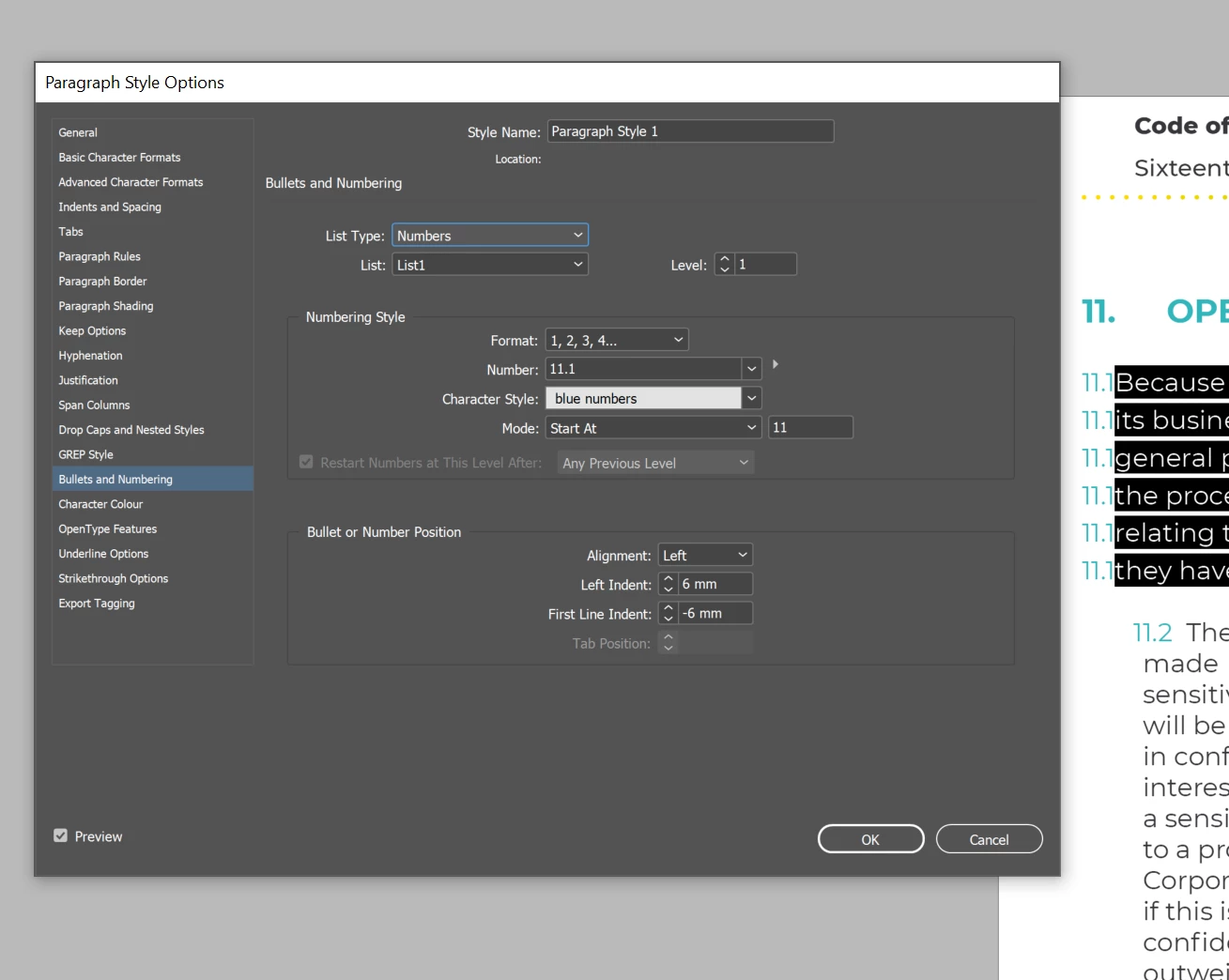
Thanks for your reply, How do I change the font size from regular to bold for the numbered list and how do I create a space between the numbered list and the text? please see photo
You need to insert the tab code in your number definition. The tab was automatically set to the left indent, but you still need to define the tab in the number field's pop-out menu.
If you are new to InDesign, you may want to look for training/consultation here:
You haven't given us much to go on but I have two comments in addition to Uwe's comment on removing the suspected hard returns at the end of every line:
Autonumbering is used to increment numbers automatically for lists and heads, etc. It uses building blocks to do this. In place of the usual numbering building blocks (ie., ^1.^2.^t) you have an actual number: 11.1. This is akin to manually numbering the heads on the page. Here is some information on setting up auto-numbering correctly: https://www.rockymountaintraining.com/adobe-indesign-numbering-headings/
As for the spacing, you can set it up something like this to add space above and below the list (top row in the large orange rectangle) and space between the list entries (bottom row in the large orange rectangle):
Thanks for your reply, How do I change the font size from regular to bold for the numbered list and how do I create a space between the numbered list and the text? please see photo



 AdChoices