


Participant
February 15, 2021
Answered

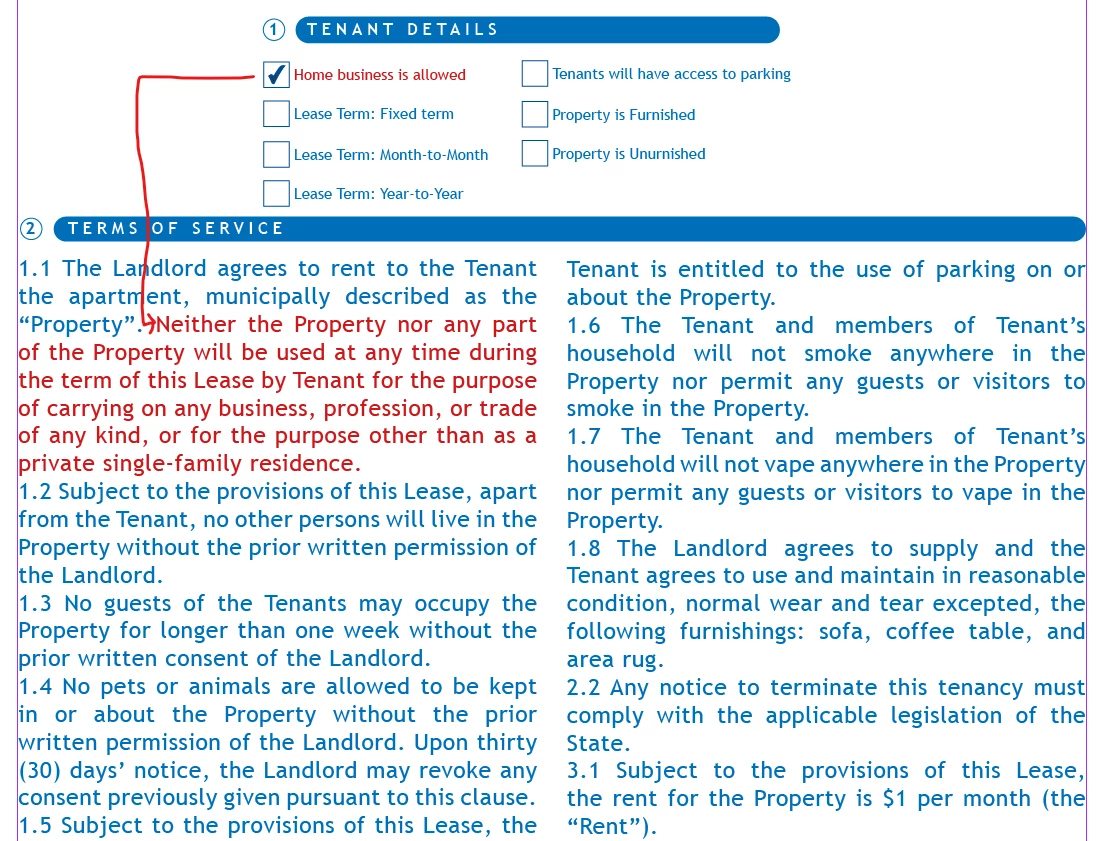
How to add Text if a Checkbox is ticked? See screenshot attached

  • February 15, 2021
  • 2 replies
  • 723 views

I am trying to create a one-contract fit all.... and I am trying to find a solution where I can add Text if a Checkbox is ticked? Please see screenshot attached to understand what I mean.


I am looking to create a one Contract and based on answer to adjust the contract with additional terms. Anyone knows how I can achieve this? I couldn't find anything on google, youtube or here. Any help is much appreciated 


[ attachment inserted as inline image by moderator ]

This topic has been closed for replies.
Correct answer TᴀW

It probably could be done in Acrobat somehow. Acrobat has page templates, so they perhaps could be used.

Alternatively, you could have the actual contract text as one or more big text fields. A script in Acrobat could then insert the desired text in the text field. If the formatting is fairly conservative, as appears in the screenshot, a text field could handle it.

Not so simple, especially if the whole contract doesn't fit on a single page. But probably doable if it's very important to do it that way.

2 replies

TᴀW
TᴀWCorrect answer
Legend
February 16, 2021

It probably could be done in Acrobat somehow. Acrobat has page templates, so they perhaps could be used.

Alternatively, you could have the actual contract text as one or more big text fields. A script in Acrobat could then insert the desired text in the text field. If the formatting is fairly conservative, as appears in the screenshot, a text field could handle it.

Not so simple, especially if the whole contract doesn't fit on a single page. But probably doable if it's very important to do it that way.

Participant
February 15, 2021

hope someone can help please

BobLevine
Community Expert
Community Expert
February 16, 2021

This is not something you can accomplish with InDesign the way you're referring to it. What you can do, is use conditional text, but that will require the use of InDesign to create the document.

Participant
February 16, 2021

If I export as PDF (Interactive) I can then apply conditional text on Acrobat Pro? Or is there need for Javascript or any sort of scripts?