


Copy link to clipboard
Copied
Is this a bug? Document Setup won't adjust margins. Only in the Margins and Columns box can I change the margins.
/Henrik

<Title renamed by MOD>


 1 Correct answer


Short answer: it’s not a bug; you can only change this for an existing document in Margins and Columns.
Long answer:
I am not in my office and am on my iPad, but that does not look like the dialog box you get from File > Document Setup. How did you get it? Is it the one from changing a Document Preset? When you go to File > Document Setup, Margins and Columns is not an option.
You can select Margins and Columns when you create the document in File > New. To change them, they need to be changed on e
...
 17
Replies
17
17
Replies
17


Copy link to clipboard
Copied
What happens if you press OK ?
Or if you turn off Preview and turn it on again?
Regards,
Uwe
Copy link to clipboard
Copied
Does not help.
I just discovered that the first time I adjust margins via Document Setup in a new document it works as expected. Once I adjust the margins via Margins and Columns and THEN try it via Document Setup it does'nt respond.
So:
- New doc
- Adjust via DS works
- Adjust via M&C works
- Adjust via DS fails
Regards,,
Henrik
Copy link to clipboard
Copied
Henrik_Huus_Mikkelsen wrote
…
So:- New doc
- Adjust via DS works
- Adjust via M&C works
- Adjust via DS fails
Hi Henrik,
just tested this on my Windows 10 version of InDesign CC 2019 German.
It works as expected.
What is your operating system?
Regards,
Uwe
Copy link to clipboard
Copied
Hi Uwe,
It is MacOS Sierra 10.12.6
Regards,
Henrik
Copy link to clipboard
Copied
Just tried on my collegues iMac with same hardware and software setup - same result. Only works the first time.
Copy link to clipboard
Copied
Hi Uwe,
Can you show your dialog for File > Document Setup?
Here is what Help says:
Copy link to clipboard
Copied
See screen dump in my comment above.
Copy link to clipboard
Copied
jane-e wrote
Hi Uwe,
Can you show your dialog for File > Document Setup?
Here is what Help says:
Of course. But I am on Windows 10. I suspect an issue with the OS X version of InDesign CC 2019.
File > Document Setup:
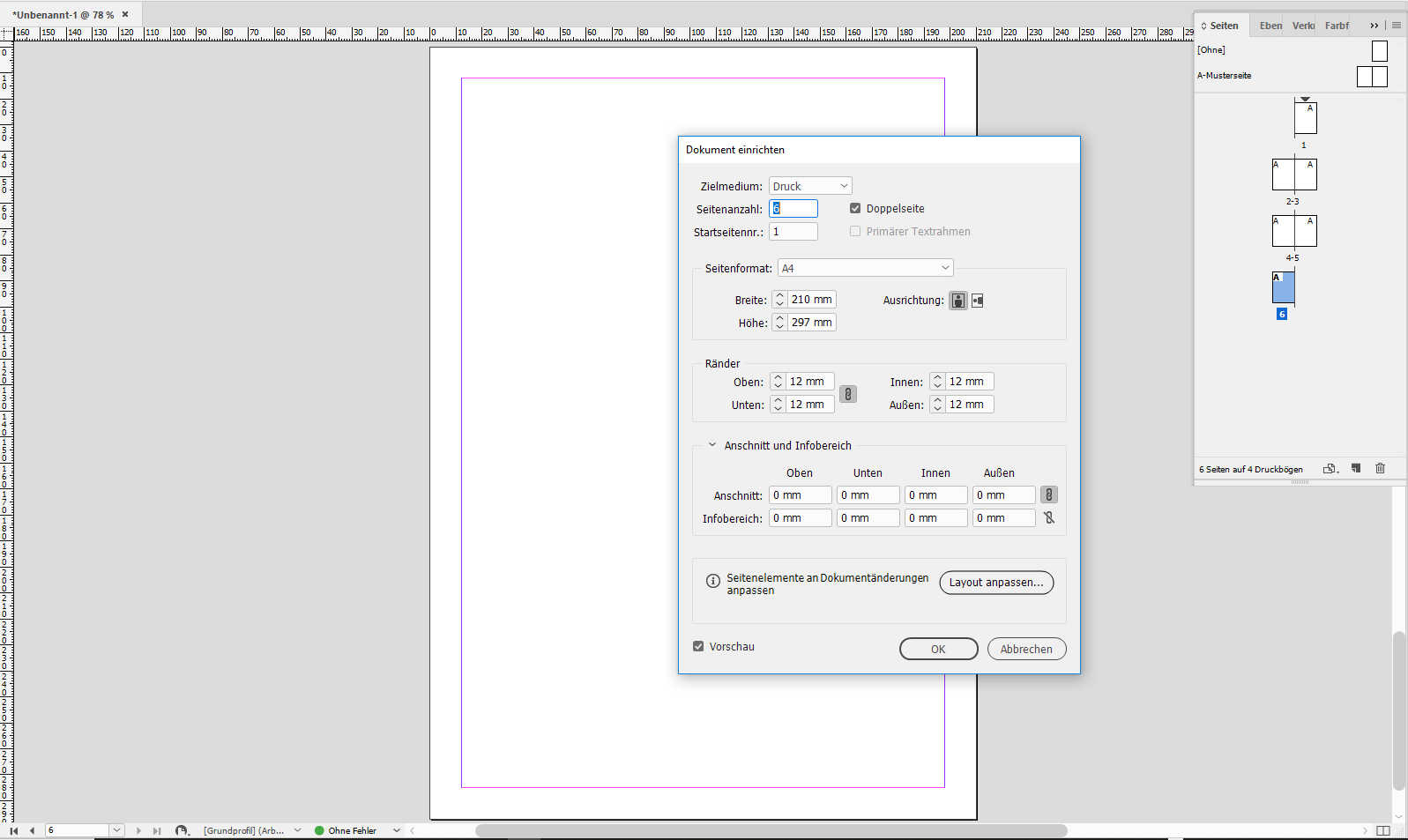
Regards,
Uwe
Copy link to clipboard
Copied
Okay, I’ve got it now:
This is a new feature in 2019 that Margins and Columns are now in File > Page Setup. What I wrote before was from memory and applies to 2018 and earlier. I just found the movie in Ann-Marie’s title on lynda.com.
When you change this setting, it only changes the pages that are using that setting.
I’ve been at MAX and this was not mentioned as one of the new features in that session.
Copy link to clipboard
Copied
jane-e wrote
…When you change this setting, it only changes the pages that are using that setting.
I guess Henrik experiences the issue immediately after setting up a new document.
Regards,
Uwe

Copy link to clipboard
Copied
This is new in CC2019 and I'm guessing is part of the Adjust Layout feature which is why you can now adjust the margins within the Document Setup dialog box. Not sure about the inconsistencies that the OP was experiencing though.
Copy link to clipboard
Copied
Short answer: it’s not a bug; you can only change this for an existing document in Margins and Columns.
Long answer:
I am not in my office and am on my iPad, but that does not look like the dialog box you get from File > Document Setup. How did you get it? Is it the one from changing a Document Preset? When you go to File > Document Setup, Margins and Columns is not an option.
You can select Margins and Columns when you create the document in File > New. To change them, they need to be changed on each Master in Margins and Columns.
Best practice is to change them on the Master. If you have one Master, it might be Master A. They can also be changed on individual pages, but I don’t do that.
Think of what would happen if you had a document with multiple settings for Margins and Columns and destroyed them by changing a global setting.

Copy link to clipboard
Copied
Thanks, this worked!

Copy link to clipboard
Copied
Hi,
with High Sierra it doesn't work and I couldn't find a solution. You can post the issue on:

Copy link to clipboard
Copied
This doesn't seem to work on Windows either. Definitely looks like a bug.
Copy link to clipboard
Copied
Hi gerdavd,
what's your exact version of InDesign on your Windows machine?
Could you show some screenshots with the issue?
Thanks,
Uwe Laubender
( ACP )

Copy link to clipboard
Copied
Fixed- for me, the margins setting was set in the first master page. I could not adjust margins on the other pages unless I changed the fist mater page setting.


Get ready! An upgraded Adobe Community experience is coming in January.
Learn more
 AdChoices