Inspiring
September 3, 2024
Answered

How to Change the Red Comma in Index to Black?

  • September 3, 2024
  • 3 replies
  • 1242 views

Hello,


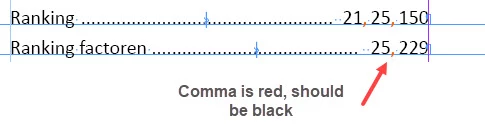
I am using the index. The comma between the pagenumbers is red, instead of black. I cannot find anything in the styling of the index that explains it. I use the same style of index in other books, without this problem. I can I get black comma's?


René


<Title renamed by MOD>
This topic has been closed for replies.
Correct answer Robert at ID-Tasker

@Rene tbd 


I know what the problem is - my friend had a similar problem recently with something else.


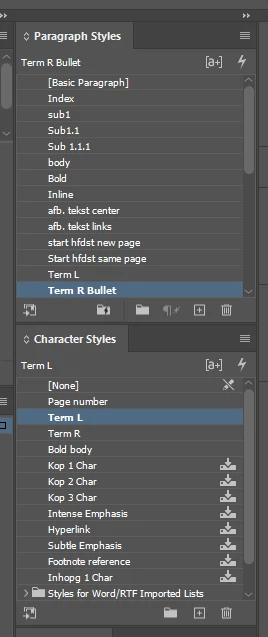
In your document - when nothing is selected - those are your default Styles - Char and Para:


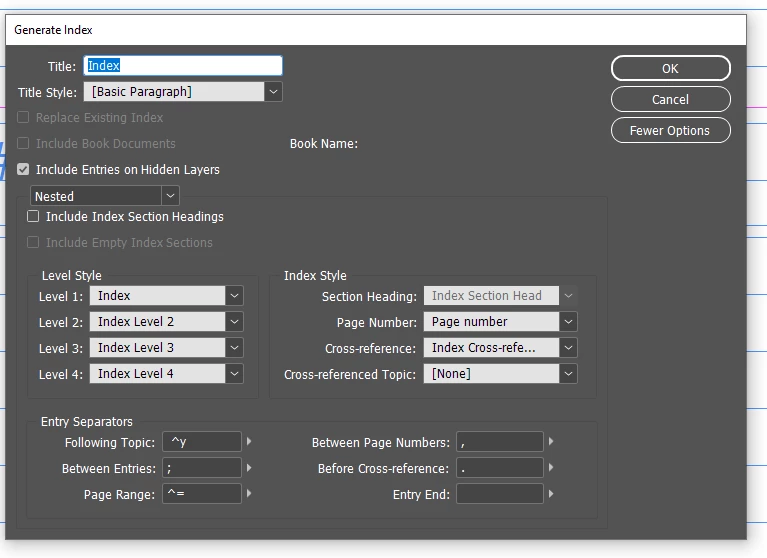
When generating Index - InDesign is using styles defined in the dialog:


BUT then uses DEFAULT CharStyle "to fill the blanks"...


When I try to re-create new index - the same happens - commas get this orange CharStyle.


So the solution to your problem - click anywhere, so nothing is selected, then select "[None]" as an active CharStyle - generate Index again.


3 replies

Robert at ID-Tasker
Robert at ID-TaskerCorrect answer
Legend
September 3, 2024

@Rene tbd 


I know what the problem is - my friend had a similar problem recently with something else.


In your document - when nothing is selected - those are your default Styles - Char and Para:


When generating Index - InDesign is using styles defined in the dialog:


BUT then uses DEFAULT CharStyle "to fill the blanks"...


When I try to re-create new index - the same happens - commas get this orange CharStyle.


So the solution to your problem - click anywhere, so nothing is selected, then select "[None]" as an active CharStyle - generate Index again.


Rene tbdAuthor
Inspiring
September 4, 2024

Robert,


Thanks for this, it worked! Odd problem though but fortulately you had a solution. Thanks again!


René

Robert at ID-Tasker
Legend
September 4, 2024

@Rene tbd


You're welcome. 


Robert at ID-Tasker
Legend
September 3, 2024

@Rene tbd


Do you have any GREP style(s) in the definition of the applied ParaStyle?


Rene tbdAuthor
Inspiring
September 3, 2024

Hello Robert,


I haved looked at it, but there are no Grep styles. Comma's in paragraphes are ok.

René

Abhishek Rao
Community Manager
Community Manager
September 3, 2024

Hi @Rene tbd,


Thank you for reaching out! I understand how frustrating it can be when something as specific as the comma color in your index isn't behaving as expected.

To help you further, could you please let me know the version of InDesign you’re using and the operating system? 


In the meantime, one thing you might want to check is whether there is an override or a character style applied specifically to the commas. Even though it’s not evident in the index style, it's possible that a manual override or a different character style is being applied.


Let me know if this helps or if you need further assistance!


Thank you, 
Abhishek Rao

Rene tbdAuthor
Inspiring
September 3, 2024

Hello Abhishek,


I use IIndd 19.5, and Windows 10. I have looked at all styles, including the styles the index is derived from. Comma's in paragraph text are ok. I am not using Grep styles and other files with the same index settings are ok.


René

Robert at ID-Tasker
Legend
September 3, 2024

As @Robert at ID-Tasker suspected, there is a chaeacter style applied to the comma.


quote

As @Robert at ID-Tasker suspected, there is a chaeacter style applied to the comma.


By @jmlevy


It was @Abhishek Rao who suggested "you might want to check is whether there is an override or a character style applied specifically to the commas".