Known Participant
May 12, 2020
Answered

How to clear a color in a character style?

  • May 12, 2020
  • 6 replies
  • 3751 views

Is there a way to "clear" character color instead of reset all other character style settings?


I know it looks to be a silly question.

Thanks!

Correct answer Bozenka

InDesign v15.0.1

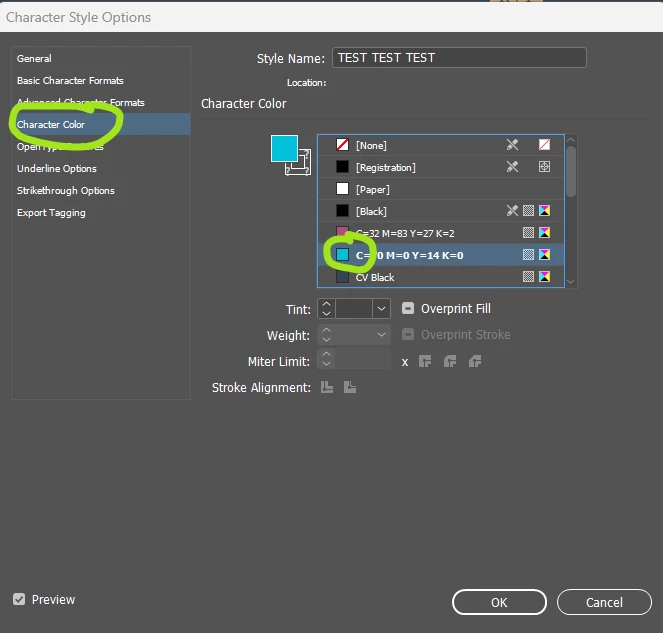
  1. Open the character style from the Character Styles palette.
  2. Click Character Color from the list on the left.
  3. Control/click (PC) Command/click (Mac) on the little swatch square in the character colour list:

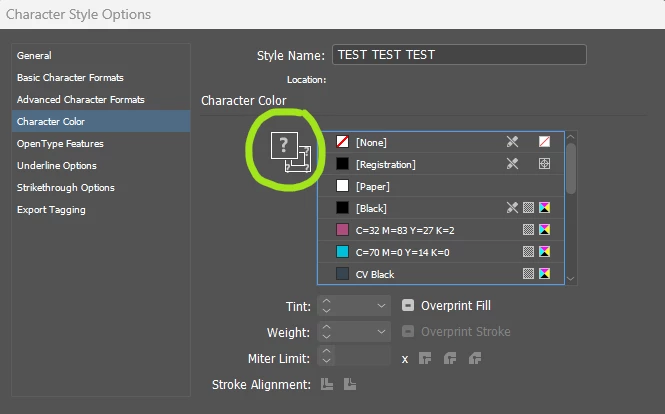
Afterwards, it will look like this:


6 replies

Philip Byrne
Known Participant
October 29, 2025

This didn't appear to be working in InDesign 20.5 – the edit wouldn't save – but I think it may have been a corrupt style. Restarting my Mac Pro and recreating the style eventually worked but command-clicking the swatch still had unreliable results so I had to keep editing until it eventually stuck.

Willi Adelberger
Community Expert
Community Expert
October 29, 2025

If. the cmd-click-way does not work do that:

  1. Create a new character styles with the needed settings.
  2. Delete the old style and choose to replace it with the new style.
  3. Rename the new style with the final name.
BozenkaCorrect answer
Participant
October 26, 2024

InDesign v15.0.1

  1. Open the character style from the Character Styles palette.
  2. Click Character Color from the list on the left.
  3. Control/click (PC) Command/click (Mac) on the little swatch square in the character colour list:

Afterwards, it will look like this:


Participant
October 26, 2024

Everyone is giving the cmd + click solution, but its not working for me. I've tried every key combination I can think of, it only selects the color.

Dave Creamer of IDEAS
Community Expert
Community Expert
October 26, 2024

You need to Cmd-click (Mac) or Cntl-click (Win) on the swatch, not the "big T" symbol.


David Creamer: Community Expert (ACI and ACE 1995-2023)
Willi Adelberger
Community Expert
Community Expert
July 5, 2022

Click any color, hold down cmd/ctrl and click the same color again.

Diane Burns
Inspiring
May 12, 2020

Adding to David's reply, hold down Command/Ctrl and click on the color that is assigned to the text. Does basically the same thing, but one click. 🙂

Known Participant
May 14, 2020

Thanks, @diane_Burns but it's not the slution in this case. I have some paragraphs in different colors. These specific style can be applied in some of them. It shouldn't have a color. 🙂

David Popham
Participating Frequently
May 12, 2020

In Character Style Options > Character Color, Cmd/Ctrl + click on the [None] swatch until the fill color icon shows question marks in the corners.

Known Participant
May 14, 2020

Thanks, @David_Popham !