Inspiring
April 23, 2020
Answered

How to create a list of images in Indesign to edit and print, for example?

  • April 23, 2020
  • 2 replies
  • 3184 views

Preflight menu do that but only shows problems (low resolution, links, etc).


How to obtain a real list of those graphic pieces placed in the file?

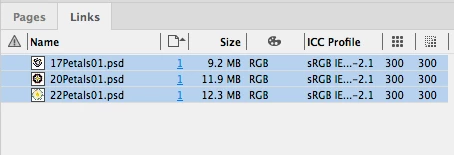
It is possible? The link panel shows the objects, of course.


InDesign Secrets mentions a very valuable script by Martin Fischer («Links export list») but this script only lists some items (PDF, for example) and uses only a page number  (all objects in pages 34-45 are refered as belonging to page 34)


This topic has been closed for replies.
Correct answer rob day

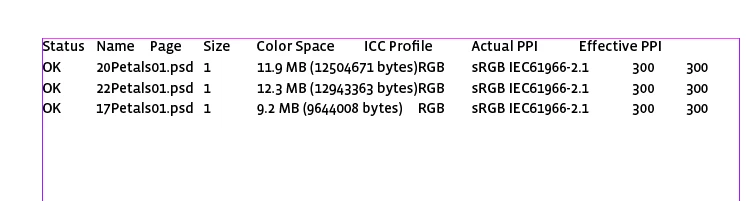
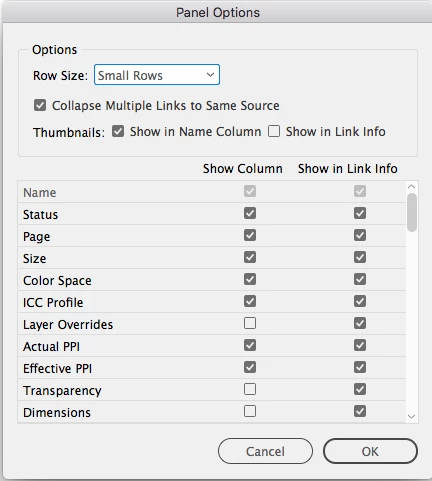
There is also the Copy Info option from the Links panel. From Panel Options check the items you want to include under Show Column


Then select all of your links, and Copy Info


Pasted text:

2 replies

Inspiring
April 24, 2020

(above, the real information thst is required in form of text)


Hi, the package menu seems not entirely working...


For example, my document has 150 PDF and 156 figures:

LINKS AND IMAGES

(Show Problems Only)
Links and Images: 306 Links Found; 0 Modified, 0 Missing, 0 Inaccessible
Images: 0 Embedded, 27 use RGB color space


But this report does not list entirely the pieces.

Only mentions some figures (15)...

- Name: Figura 5.1. Forma gráfica del método de transformada inversa; Type: JPEG RGB; Status: Linked
Filename: Figura 5.1. Forma gráfica del método de transformada inversa
Link Updated: Saturday, 11 April 2020 6:56 AM
File Last Modified:
Actual ppi: 165x165 Effective ppi: 196x196
Layer Overrides: N/A
Complete Name: /Users/camilo/Dropbox/ALfaCamilo/Simulación/1 docs originales/Figuras renombradas/Figura 5.1. Forma gráfica del método de transformada inversa
Link Profile: Embedded
On Page 94


We need all the pieces inside.


rob day
Community Expert
rob dayCommunity ExpertCorrect answer
Community Expert
April 24, 2020

There is also the Copy Info option from the Links panel. From Panel Options check the items you want to include under Show Column


Then select all of your links, and Copy Info


Pasted text:

Inspiring
April 29, 2020

Rob,


Thanks. It worked.

Legend
April 24, 2020

Click the Report button in the Package window.