


Known Participant
August 31, 2024
Answered

how to create a separate number next to page number on master page?

  • August 31, 2024
  • 3 replies
  • 642 views


Hello there,

So on my master page, I was able to do the page numbers on my footer, Page A of 1 so it increases based on the page. But on the right side, I'm needing to increase the number by 1 in the box. So D100, D101, D102, etc.

I'm having a really hard time figuring out how to increase this properly so that it doesn't impact the page count on the left side. Any help would be appreciated.
This topic has been closed for replies.
Correct answer jmlevy

Use a list: https://helpx.adobe.com/indesign/using/bullets-numbering.html?x-product=Helpx%2F1.0.0&x-product-location=Search%3AForums%3Alink%2F3.4.0#:~:text=then%20click%C2%A0OK.-,Define%20lists,-A%20defined%20list

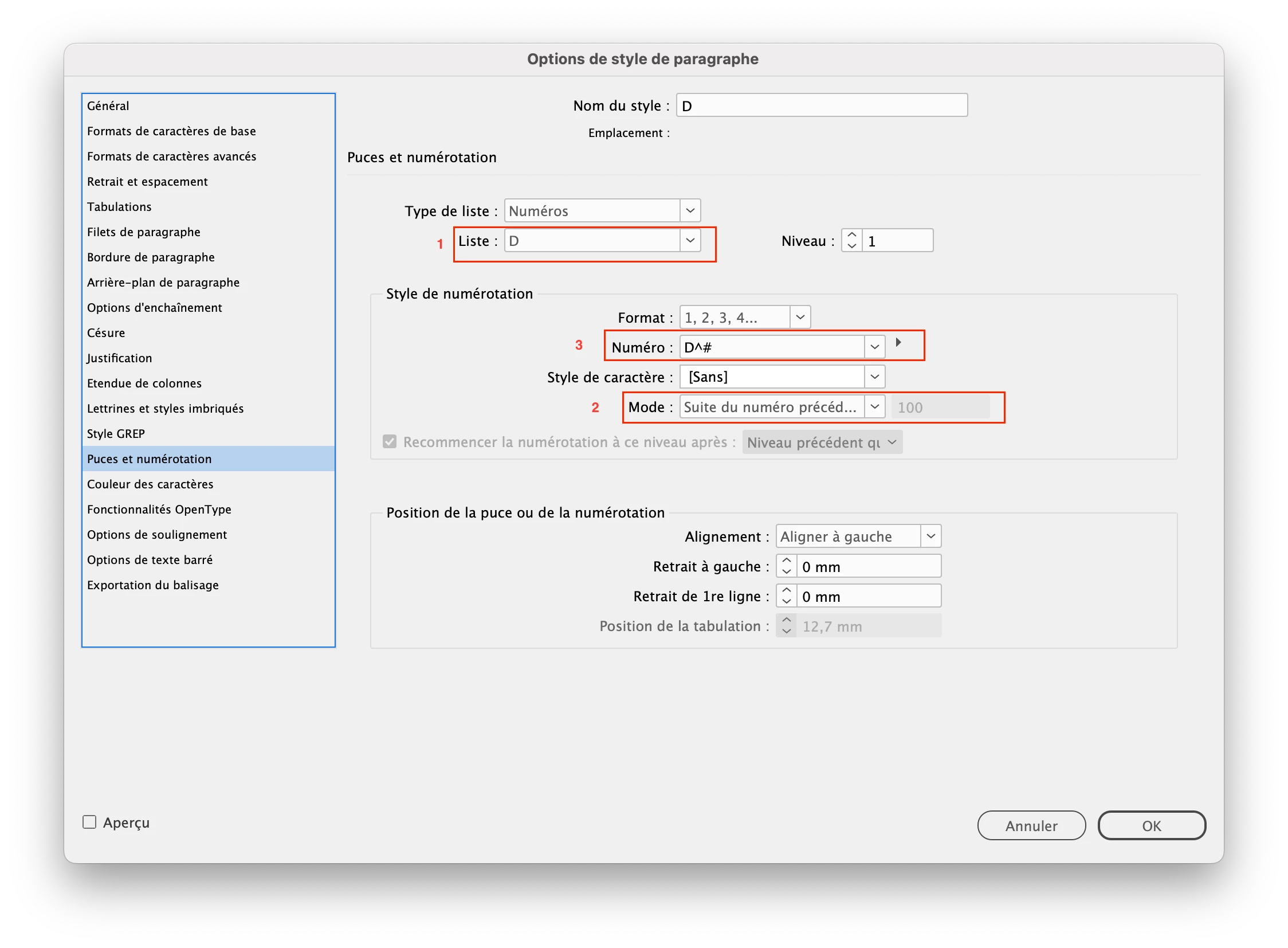
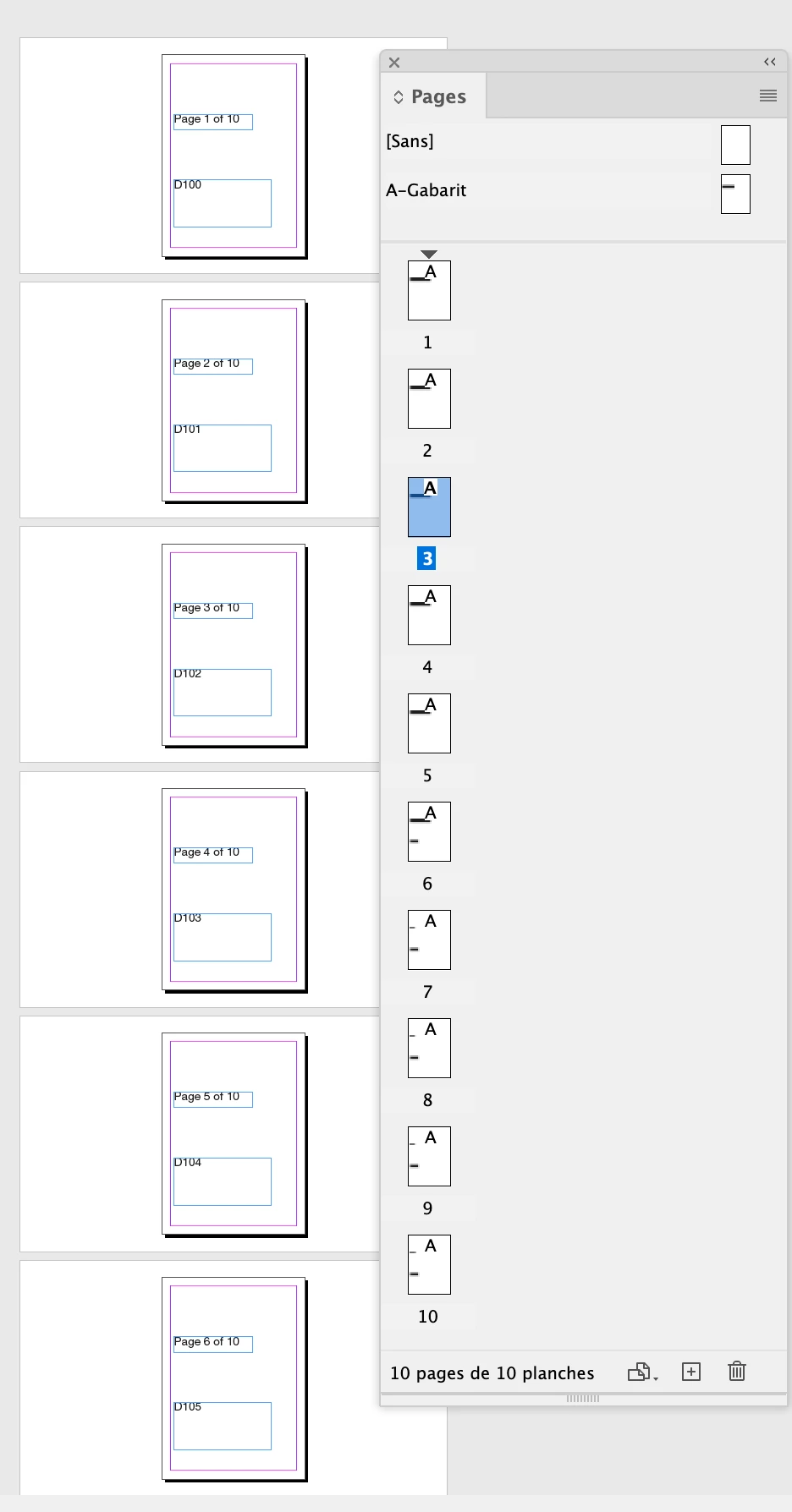
In my example, I created a list that I named “D” (1) and I made it start at 100 (2). I added the letter D before the automatic numbering (3). Then I created a text frame on the parent page and typed a space in it to trigger the auto numbering. The last step is to override the parent page elements on each page to get the actual numbering.

3 replies

jmlevy
Community Expert
jmlevyCommunity ExpertCorrect answer
Community Expert
August 31, 2024

Use a list: https://helpx.adobe.com/indesign/using/bullets-numbering.html?x-product=Helpx%2F1.0.0&x-product-location=Search%3AForums%3Alink%2F3.4.0#:~:text=then%20click%C2%A0OK.-,Define%20lists,-A%20defined%20list

In my example, I created a list that I named “D” (1) and I made it start at 100 (2). I added the letter D before the automatic numbering (3). Then I created a text frame on the parent page and typed a space in it to trigger the auto numbering. The last step is to override the parent page elements on each page to get the actual numbering.

Dave Creamer of IDEAS
Community Expert
Community Expert
August 31, 2024

Just a couple of tips on overriding parent page items...

Option 1: If you want to PREVENT overrides on certain frames, select the frame, right-click, and deselect "Allow Parent Item Overrides". 

Option 2: Put the parent items you do NOT want to override on a separate layer and lock it. (I would put the other parent items--the ones you want to unlock--on their own separate layer too.)


David Creamer: Community Expert (ACI and ACE 1995-2023)
Participant
August 31, 2024

You may try Data Merge. This should be a simple fix, given the page-background remains unchanged.

Robert at ID-Tasker
Legend
August 31, 2024
quote

You may try Data Merge. This should be a simple fix, given the page-background remains unchanged.


By @Upendra Bhati


DataMerge won't work in this case at all.


Willi Adelberger
Community Expert
Community Expert
August 31, 2024

Write this number or use a text variable and isert the page marker. I don't see a problem here.

bekreiderAuthor
Known Participant
August 31, 2024

The number on the right is different from the page number, so it might be page 3, but it's D103 on the right