


Answered
How to curve text within a paragraph
Hello,
How can I curve a text within a paragraph as in the example?
thanks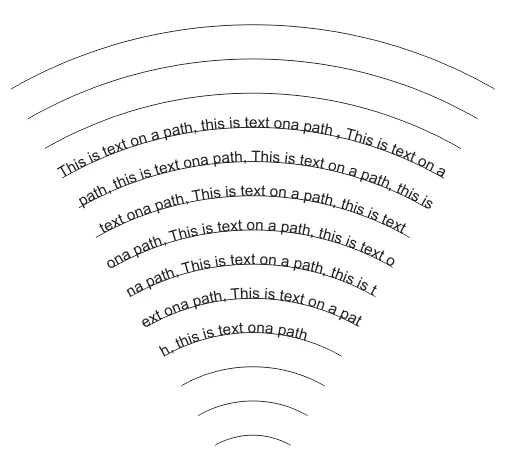

Hello,
How can I curve a text within a paragraph as in the example?
thanks
kol28429812 wrote
… though I hoped there's a more elegant way.
Hi kol28429812 ,
hm. At least a bit of that task is scriptable easily: Activating the text on path and thread to one story.
I wrote an ad-hoc ExtendScript (JavaScript) snippet that is working on selected objects.
Important: Select the path segements in the order you like to see them threaded!
Then run the script. If you are not satisfied with the result just undo it and start with a new selection.
/**
* @@@BUILDINFO@@@ AddTextPathsAndThreadToStory-SELECTION.jsx !Version! Tue Jun 05 2018 10:33:14 GMT+0200
*/

( function()
{


	/*
		Script by Uwe Laubender

		Posted at Adobe InDesign Forum:

		How to curve text within a paragraph
		kol28429812 Jun 5, 2018 7:54 AM
		https://forums.adobe.com/message/10425153#10425153

		Script adds text path to selected item if no text path is there.
		Script threads text path 1 of every selected item in order of selection if possible.

	*/

	app.scriptPreferences.userInteractionLevel = UserInteractionLevels.INTERACT_WITH_ALL;

	app.doScript
	(

		addTextPathsAndThreadThem,
		ScriptLanguage.JAVASCRIPT,
		[],
		UndoModes.ENTIRE_SCRIPT,
		"Add Text Paths to Selection and Thread them | SCRIPT"

	);

	function addTextPathsAndThreadThem()
	{

		// Do nothing, if:
		if( app.documents.length == 0 ){ return };
		if( app.selection.length == 0 ){ return };

		if( app.selection.length == 1 && app.selection[0].hasOwnProperty("baselineShift") ){ return };
		if( app.selection.length == 1 && app.selection[0].constructor.name == "Cell" ){ return };
		if( app.selection.length == 1 && app.selection[0].constructor.name == "Table" ){ return };

		if( app.selection.length == 1 && app.selection[0].textPaths.length > 0 ){ return };
		if( app.selection.length == 1 && app.selection[0].textPaths.length == 0 )
		{
			app.selection[0].textPaths.add();
			return
		};

		var sel = app.selection;
		var selLength = sel.length;
		var textPathsArray = [];
		var e;

		for( var n=0; n<selLength; n++)
		{
			if(sel[n].textPaths.length == 0){ sel[n].textPaths.add() };
		};

		for( var n=0; n<selLength-1; n++)
		{
			var thisTextPath = sel[n].textPaths[0];
			var nextTextPath =  sel[n+1].textPaths[0];

			try
			{
			thisTextPath.nextTextFrame = nextTextPath;
			}catch(e){ continue };
		};

	};
}() )
Regards,
Uwe
// EDIT: Repaired the damaged script code.
What happened:
The code in my answer was damaged last year by moving this thread from the old InDesign forum to this new one.
NOTE: How to save the code to a script file, how to install the script file and how to use it from the Scripts panel in InDesign see: https://www.indiscripts.com/pages/help#hd0sb2
Regards,
Uwe Laubender
( ACP )
Already have an account? Login
Enter your E-mail address. We'll send you an e-mail with instructions to reset your password.
 AdChoices