


Inspiring
March 19, 2023
Answered

How to Define a default stroke in InDesign

  • March 19, 2023
  • 3 replies
  • 7515 views

For years I had a default stroke of 0.25 point (black) set and it worked fine. Now, whenever I go to create a new line (I use these for callouts), the settings are correct, however the line path is created but without a color or width assigned to it. Just the "placeholder" is present, which I have to go in and fix Every. Single. Time.


I need to do hundreds of these and I don't know what I messed up (or when), but it's driving me crazy. Any thoughts?


In this top image the supposed-default setting of black/0.25pt is selected.

As soon as I attempt to draw a line with these settings this is what results:
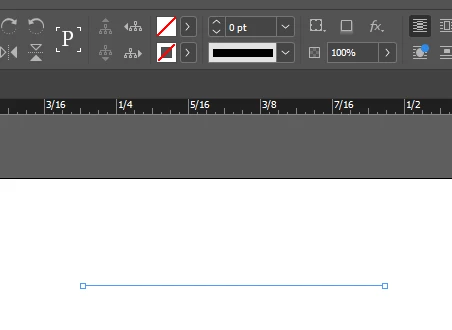
Result: 0 pt line, no stroke color.


{Renamed By MOD}


This topic has been closed for replies.
Correct answer rob day

I have applied the script and it does appear to have solved the problem—thanks—however I wish I could have done this without needing to use this step. It definitely appears to be related to the "none" object style; beats me how this affects things or why I can't change it. SO frustrating....


I have applied the script and it does appear to have solved the problem


You can perform the same steps as the script manually. With a document open, make sure there is nothing selected, double click the [Basic Graphics Frame] Object Style, set the dialog’s Fill to [None], the Stroke to [Black], and the Stroke Weight to .25. Click OK and leave the default Object Style as [Basic Graphics Frame]. If necessary clear overrides by Option-clicking the style.


The script does the above with one click. As I mentioned a startup script could force a desired default behavior for every document you open. I don’t think resetting your prefs is necessary.


3 replies

Robert at ID-Tasker
Brainiac
March 19, 2023
Barb Binder
Community Expert
March 19, 2023

Hi @PeterD-NJ:


If resetting defaults doesn't do it, check your Object Styles panel. What is selected before and after you draw your line?


~Barb


~Barb at Rocky Mountain Training
Peter Spier
Community Expert
March 19, 2023

Define it with no files open to make it a default for all new files. With nothing selected to redefine the default in existing files.

PeterD-NJAuthor
Inspiring
March 19, 2023

Dumb question, but how can I do this with no files open?

PeterD-NJAuthor
Inspiring
March 19, 2023

If I create a NEW document it works correctly, but on existing documents it does not work.


Hi @PeterD-NJ , I don’t think there is a corruption—as James noted, the page item default preference is both an application and document level preference—most InDesign preferences work that way.


So you set the application’s behavior by setting the stroke with no documents open, but all existing documents can have their own default behavior, which is why your existing documents are not responding to the application default you set with no docs open.


The page item defaults are scriptable. This script would change the application default and the defaults for any open documents:


var p = {strokeWeight: .25, strokeColor:"Black", fillColor:"None"}
app.pageItemDefaults.properties = p
var d = app.documents;
if (d.length > 0) {
    for (var i = 0; i < d.length; i++){
        d[i].pageItemDefaults.properties = p;
    };   
} 


If you really want it to be the same for every document you open, a startup script could listen for an open event and change the defaults for every document you open. I can post that code if you are interested.


Thanks for the script and I'll consider that as the last resort. But since I've never heard of scripts before, I'd rather fix what broke rather than apply a work-around if at all possible, and to maybe understand why it happened in the first place. This document is a pig--over 500 Mb, opened, edited and closed a lot, and since it's on a PC, it crashes at least once every few days with the document open. I have no doubt that whatever happened, happened in such a crash.

Resetting preferences is an absolute non-starter; I have SO many custom keyboard commands remapped that took me months to find. I did this once last year before I went to press and it took me another 9 or 10 weeks to make it all work again. To say I'm computer illiterate is an understatement. Having to re-learn how to work with ID after having things function in a way I've understood for over 10 years is terrifying, quite frankly.