



Sayed Ali Mousawi
Known Participant
January 4, 2022
Question

How to delete all instance of a linked object

  • January 4, 2022
  • 7 replies
  • 1644 views

Hi, guys.

How can i delete all instance of a linked object.

We have these options when we select a linked object in link panel. but what if i need to delete all instance of a linked object?
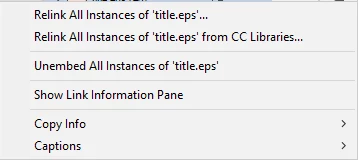
thank you.

This topic has been closed for replies.

7 replies

Mike Witherell
Community Expert
December 19, 2024

Hi Kasyan,

Thanks for this script. It is a completely satisfying addition to the Links panel!

Also, it works fine when installed in the User versus the Application. 

It undoes in one step--always a nice touch. I give it two thumbs way up!

This will definitely go in my "Anytime Upgrades" startup scripts recommendations.

Mike Witherell
Mike Witherell
Community Expert
December 11, 2024

Super interesting and thanks for your replies.

Kasyan, the first script worked for me but the second one did not.

I like the basic idea, though!

Mike Witherell
Kasyan Servetsky
Brainiac
December 19, 2024

Here I updated my script. Now, it's a single script that should be installed in the start-up folder.

It should work in non-English versions (locales) of InDesign. I tested it in version 2024/5 on Mac & Windows and it works for me.

Mike Witherell
Community Expert
December 10, 2024

Hi Kasyan,

I was just looking at that script! I wish it could become a Links panel menu choice, perhaps by way of a startup script. I was trying to get ChatGPT to rewrite the script to function that way in the Links panel, but ChatGPT is pretty lame when it comes to writing ExtendScripts.

Mike Witherell
Kasyan Servetsky
Brainiac
December 10, 2024

Hi Mike,
It's possible to do — make a script acting as a menu item — but I'm too busy with my daily work to get down to this at the moment.
— Kasyan

Kasyan Servetsky
Brainiac
December 10, 2024

You can do this by the 'Remove all instances of the same link' script.

Mike Witherell
Community Expert
December 10, 2024

This is actually a useful idea for the Links panel! I like it.

Mike Witherell
Anshul_Saini
Community Manager
Community Manager
January 4, 2022

Hi there,


Thanks for reaching out. As @Eugene Tyson said, it is not possible in InDesign as of now. I would suggest you post it here (https://indesign.uservoice.com/). This way, you will keep getting all the updates related to this feature, and other users can also upvote, which would help us prioritize. Also, this is the best way of communicating with the Engineering and Product teams regarding issues and suggestions so they can be implemented in future releases.

Regards,
Anshul Saini

Community Expert
January 4, 2022

You cannot - you'd need to go to each image placed and delete it manually.


It might be possible with a script or another method that I'm not aware of .