

Inspiring
September 19, 2022
Answered

How to delete Custom Page Sizes / Document Preset sizes

  • September 19, 2022
  • 2 replies
  • 2149 views

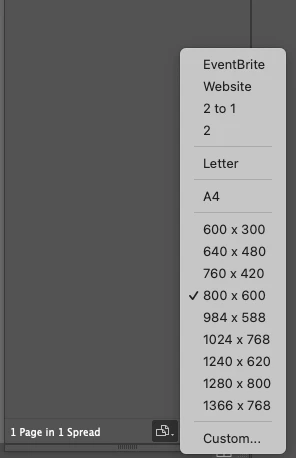
In the Pages panel I've edited the Page Sizes. These custom page sizes have been saved. And also appear in the New Document Preset sizes.


How do I delete these?
 

This topic has been closed for replies.
Correct answer markeeeee

Hold, I've just worked it out...

In the Page Panel > Edit Page Size > Custom > Select the size and delete it.

2 replies

Community Expert
September 19, 2022

Probably deleting the InDesign cache might remove it. See the following discussion

https://community.adobe.com/t5/indesign-discussions/how-can-i-delete-custom-page-sizes/td-p/12227860

-Manan

Willi Adelberger
Community Expert
Community Expert
September 19, 2022

Delete InDesign’s preferences.


But: If you want a document with another size, use File > Document Set Up …

Using page diensions changes only for exceptions in a file, like for the shorter page of a trifold or the spine of a book cover, but not for all pages as it causes further problems lile a bigger file size or more crashes in bigger files.

markeeeeeAuthorCorrect answer
Inspiring
September 19, 2022

Hold, I've just worked it out...

In the Page Panel > Edit Page Size > Custom > Select the size and delete it.

Rishabh_Tiwari
Community Manager
Community Manager
September 19, 2022

Glad to hear that! Feel free to reach out if you have any other questions or issues.
