yehudan37348595
Inspiring
March 7, 2018
Answered

How to disable a textBox or dropdown in a dialog

  • March 7, 2018
  • 1 reply
  • 1564 views

Hi!

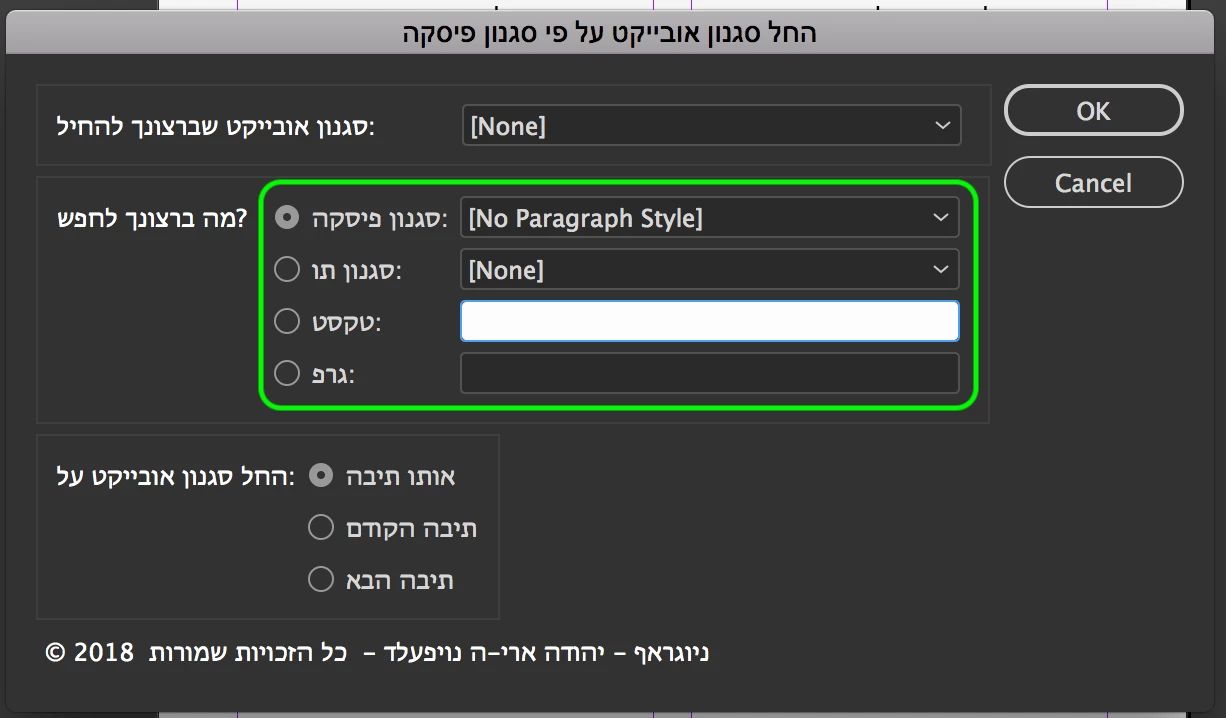
I have a dialog with a group of 4 radio buttons, & each radio button option has a textBox or dropdown, see screenshot:

How do I enable only the dropdown or textBox of the selected radioButton?!

Thanks a lot in advance!!!

This topic has been closed for replies.
Correct answer Loic.Aigon

Here is a possible approach:

var w = new Window('dialog'),

g = w.add('group')

g1 = g.add('group'),

g2 = g.add('group'),

btn = w.add('button', undefined, "Cancel"),

cb, dd;

for ( i = 0; i < 5; i++ ) {

cb  = g1.add('checkbox',undefined,(i+1));

cb.index = i;

cb.alignment = "fill";

dd  = g2.add('dropdownlist',undefined,(i+1));

dd.enabled = false;

dd.alignment = "fill";

}

g1.addEventListener ('mousedown', function(evt){

var cb  = evt.target, index, n = g1.children.length, cb, dd, value;

if(cb.constructor.name != "Checkbox") return;

index = cb.index;

value = !cb.value;

while ( n-- ) {

dd = g2.children;

cb = g1.children;

dd.enabled = !value? false : ( n == index );

value && n != index && cb.value = false;

}

});

g1.children[0].value = true;

g2.children[0].enabled = true;

g1.orientation = g2.orientation = "column";

g.orientation = "row";

w.show();

Although I would process differently myself using constructors and somme event programming:

Event-Driven Programming with ExtendScript | Ozalto

HTH

1 reply

Loic.Aigon
Loic.AigonCorrect answer
Brainiac
March 7, 2018

Here is a possible approach:

var w = new Window('dialog'),

g = w.add('group')

g1 = g.add('group'),

g2 = g.add('group'),

btn = w.add('button', undefined, "Cancel"),

cb, dd;

for ( i = 0; i < 5; i++ ) {

cb  = g1.add('checkbox',undefined,(i+1));

cb.index = i;

cb.alignment = "fill";

dd  = g2.add('dropdownlist',undefined,(i+1));

dd.enabled = false;

dd.alignment = "fill";

}

g1.addEventListener ('mousedown', function(evt){

var cb  = evt.target, index, n = g1.children.length, cb, dd, value;

if(cb.constructor.name != "Checkbox") return;

index = cb.index;

value = !cb.value;

while ( n-- ) {

dd = g2.children;

cb = g1.children;

dd.enabled = !value? false : ( n == index );

value && n != index && cb.value = false;

}

});

g1.children[0].value = true;

g2.children[0].enabled = true;

g1.orientation = g2.orientation = "column";

g.orientation = "row";

w.show();

Although I would process differently myself using constructors and somme event programming:

Event-Driven Programming with ExtendScript | Ozalto

HTH

yehudan37348595
Inspiring
March 7, 2018

Is this JavaScript?!

It doesn't look familiar...

Loic.Aigon
Brainiac
March 8, 2018

I think that what confuses you is that you may have used the InDesign own Dialog Class for building your UI while I am offering an UI based on ScriptUI (see ScriptUI for Dummies for more details).

But yes, it's Javascript, well ExtendScript.