


Participating Frequently
March 15, 2025
Question

How to export InDesign Book (indb) to PDF/A

  • March 15, 2025
  • 2 replies
  • 1007 views

Hello! So I am printing a book that I made in InDesign and the printers requested I send them the book in the PDF/A-1 (ISO 19005-1) standard. However when I try to go to Export Book to PDF, the only standards are the X standards. So I export to PDF/X-1a and open the exported file in Adobe Acrobat. I go to Use Print Production > Preflight > Standards > PDF/A. However I get two errors in my report 
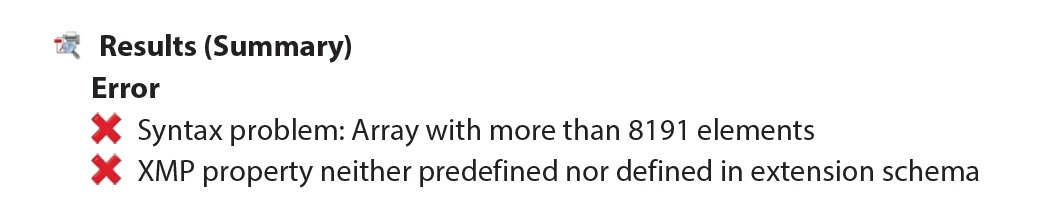


I don't know what either of these errors mean and I could not find more information online. I would like to know either if there is a way to export directly to PDF/A in InDesign or if not what these two errors mean and how I can fix them. Thanks!

2 replies

Community Expert
March 16, 2025

I have to agree with Dave that you probably don't need a PDF/A format file to create your press-ready PDF.


But if you'd like to create one, you can do so by first saving your PDF/X-1a file from InDesign. Then you can open it in Adobe Acrobat Pro and selecting the Menu button at the upper left of the Application bar and selecting the Save as other>Archivable PDF (PDF/A) menu command, as shown at right.


Follow the steps and you will have both a PDF/X and a PDF/A file you can provide your vendor and that should cover all your bases.


Hope this helps,


Randy

Community Expert
March 16, 2025

In the case of RGB colorspace, we could update to creating a PDF/x4 standard, which would allow RGB color and transparency in the file. And as I said earlier, the /x-1a or /x4 standard would match up with "press ready" work. I'm down with chasing your /a pdf output request as a curiosity more than anything else. 

I can't assure you will output a PDF/A file from Acrobat right now, but it would only take you a bit to see if that works on your end. But if it doesn't, I would get with your print vendor and see if a PDF/X4 formatted file will meet your needs.


Randy

Participating Frequently
March 16, 2025

Is your InDesign document set up for proper tagging for accessibility? That is a must for PDF/A. 


Again, I ask if you are just printing this file? Is the document going to be valid for the next 10-20 years or just for a few reprints?

Did you question the printer about their requirement? Don't assume every printer knows what they are talking about. The fact that they are asking for a PDF/A and not a PDF/X raises a red flag. They COULD ask for a PDF/X file that meets the PDF/A standards--but they didn't. 


The document is currently tagged for accessibility. I sent the email to the printers but I won't get a response til at least Monday. Honestly at this point I'm just going to send them the X pdf because of how much of a headache this is. My desire to convert to A is purely a curiosity at this point. I wish these errors were more descriptive so if any of y'all have any clue on how to get more information that would be great. 

Dave Creamer of IDEAS
Community Expert
March 15, 2025

PDF/A is an archival format. Either it was misread on your end, a typo on the printers end, or the printer has some very strange requirements (causing concern).  I suspect it is supposed to be PDF/X-1a, but even that is outdated. Most modern printers would want a PDF/X-4.

https://www.loc.gov/preservation/digital/formats/fdd/fdd000125.shtml


David Creamer: Community Expert (ACI and ACE 1995-2023)
Participating Frequently
March 15, 2025

This is the exact wording according to the formatting guide I was sent and what is currently on the printing website. It says to use ISO 19005-1 format. I can always send an email asking if they would accept the X format instead but I would still like to know if it possible to save in the A format. Thanks!


Dave Creamer of IDEAS
Community Expert
March 15, 2025

The screen captures are from Microsoft Word. If you are strictly printing it, there is absolutely no need for an archival PDF.


David Creamer: Community Expert (ACI and ACE 1995-2023)