Inspiring
May 10, 2019
Answered

how to export selected cells to txt file

  • May 10, 2019
  • 3 replies
  • 863 views

Hi experts,

How to export  my selection[0] to text file?

my script like this:

var expFile = new File("~/Desktop/file2clip.txt");

var myContents = app.selection[0];

expFile.encoding = "UTF-8";  

myContents.exportFile(ExportFormat.textType, expFile);

my aim to export my selection contents to txt file and encoding = "UTF-8";

how can I make it working.

thanks

regard

John

This topic has been closed for replies.
Correct answer Laubender

Okay, seems I misremembered the behavior of 'contents' when having a table selected. Fortunately, it was a fun exercise to work it out.

The following approach works: first, get the contents of *all* selected cells. This is going to be a flat array of [Object Cell], of which we get the contents only, so it will be a flat array of text strings. Then separate this long array into original-cell-selection widths, and finally join the row parts back with tabs, and the rows themselves with newlines.

Code:

cellSpan = app.selection[0].columns.length;

text = app.selection[0].cells.everyItem().contents;

result = []

while (text.length)

    result.push(text.splice(0, cellSpan).join('\t'));

result = result.join('\n');

and then 'result' will hold newline separated rows, with tabs between the cell contents.


Hi Jongware,

however, merged cells could be a challenge.

But for that we have a menu command we could execute in case:

"Unmerge Cell".

EDITED:

var columnSeparatorString = '\t' ;

var rowSeparatorString = '\n' ;

var doUndo = false ;

var unmergeCell = app.menuActions.itemByName("$ID/Unmerge Cell");

if( unmergeCell.enabled ){ unmergeCell.invoke(), doUndo = true };

var cellSpan = app.selection[0].columns.length; 

var text = app.selection[0].cells.everyItem().contents; 

var result = [] ;

while (text.length)

{

    result.push(text.splice(0, cellSpan).join( columnSeparatorString ));

};


result = result.join( rowSeparatorString );

if( doUndo ){ app.documents[0].undo() };

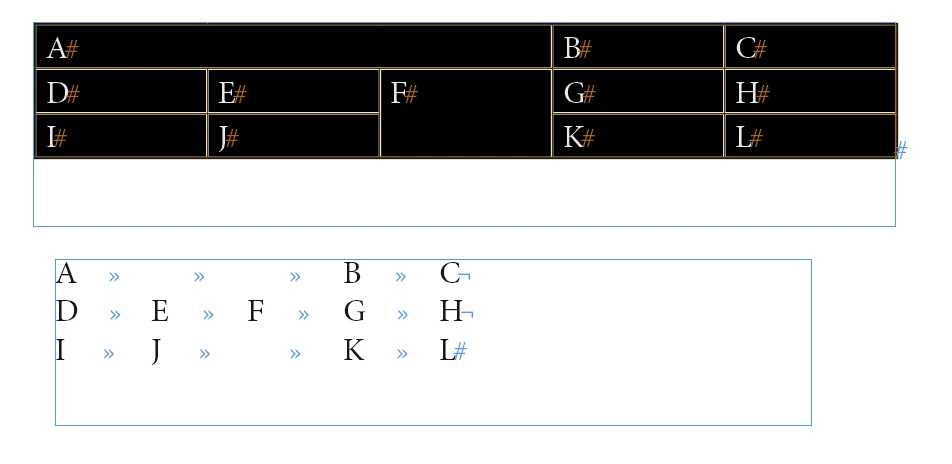
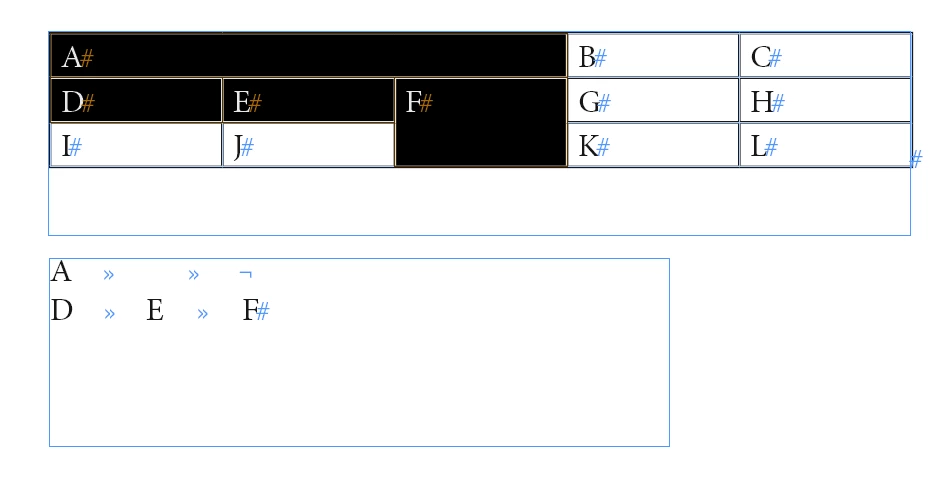
Some selection samples and the result string as contents of text frame below:

Sample selection 1 ( whole table with merged cells )
Sample 2 ( some cells of row 2 and row 3 selected )
Sample 3 ( all cells of column 1 to 4 selected )
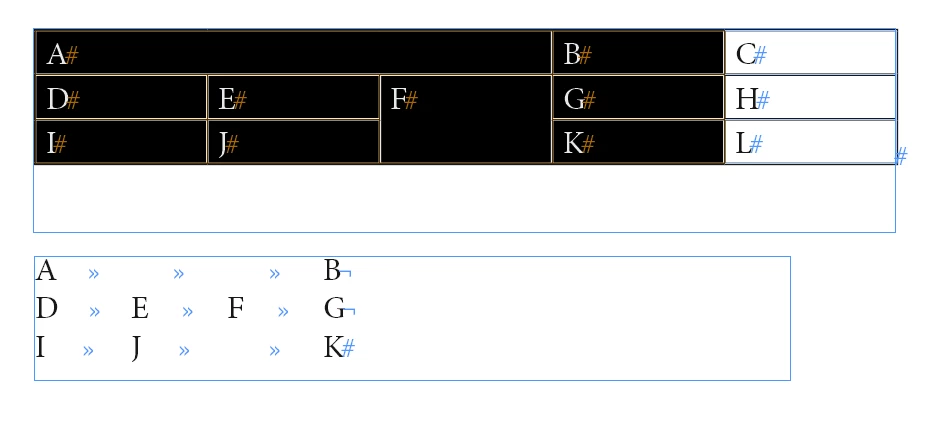
Regards,
Uwe


3 replies

JohnwhiteAuthor
Inspiring
May 11, 2019

thank you guys

thank so much.

both idea are great.

John

JohnwhiteAuthor
Inspiring
May 11, 2019

thank you Uwe,

to so much.

but my selection is 2 columns, and my table is 5 clommns.

the come out is 5 columns of contents.

my expectation is 2 columns of contents write to file.

how can I fix it?

thanks

regard

John

Jongware
Community Expert
Community Expert
May 10, 2019

Check the type of your selection: it will be Cells (or possibly Columns -- InDesign tries to accumulate a selection into Columns, Rows, or an entire Table when possible). You did not add what the current code does, but I bet your problem is that Cells do not have an exportFile method.

Only Text objects (and derived classes such as Story, Paragraph, and Line) have a text export method. But you selected more than a single text object, so either loop over each cell's contents, or, since you only want the plain text anyway, use

  1. var myContents = app.selection[0].contents; 

Note: untested! But I think it should return all text in your selection, neatly separated by tabs and returns, as a Javascript string. That means you (still!) cannot use the exportFile method. So you can use regular file I/O to create and write the text file.

JohnwhiteAuthor
Inspiring
May 10, 2019

Thank you Jongware,

thanks so much.

but as you say write the text to file

i made a script like this:

var file = new File("~/Desktop/selection2txt.txt");

for(var i = 0; i < app.selection.length; i++)  {

    if (app.selection.hasOwnProperty ( "baseline" )) {

    myContents = app.selection.contents;

    WriteToFile(file, myContents);

    }

    else if (app.selection.constructor.name == "Cell") {

    myCellCeontents = app.selection.cells.everyItem().texts.everyItem().contents;

    WriteToFile(file, myCellCeontents.join("\n"));

    }

else exit ();

}


function WriteToFile(file, text)

{

    file.encoding = "UTF-8";

    file.open("w");

    file.write(text);

    file.close();

    file.execute();

}

if my selection is two columns of cells

the come out will like this:

but waht I want just like this:

how can I fix it?

thanks

regard

John

Community Expert
May 11, 2019

Hi John,

do it row by row.

Something like the code below will work for the whole table if the table has more than one column:

// If table has more than one column!!

var contentsString = "";

var contentsArray = [];

var rowsOfSelectedTable = app.selection[0].rows.everyItem().getElements();

for( var n=0; n<rowsOfSelectedTable.length; n++ )

{

contentsArray = contentsArray.concat( [ rowsOfSelectedTable.contents.join("\t") ] );

};

contentsString = contentsArray.join("\r");

For a selection of cells out of a bigger table you'll need a different strategy.

Regards,
Uwe