

Known Participant
July 13, 2017
Answered

How to export workspace settings

  • July 13, 2017
  • 3 replies
  • 49037 views

How do I export Workspace settings in Mac InDesign 2017.1 so I can make them the same on laptop/desktop?

    Correct answer MatejKriz

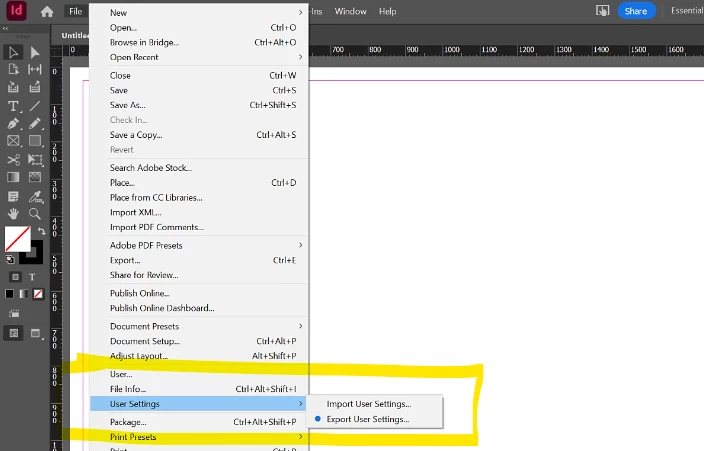
    In 2024/04: Go to FileUser Settings > Export User Settings.

    "Export and Import User Settings" a new InDesign feature (already in version 19.4) that was introduced a few days ago.

    You can now export or import these user settings: Preferences, Workspaces, Menu Sets, Keyboard Shortcuts, Glyph Sets


    More info (source): https://helpx.adobe.com/in/indesign/using/export-import-user-settings-indesign.html


    3 replies

    MatejKrizCorrect answer
    Inspiring
    April 29, 2024

    In 2024/04: Go to FileUser Settings > Export User Settings.

    "Export and Import User Settings" a new InDesign feature (already in version 19.4) that was introduced a few days ago.

    You can now export or import these user settings: Preferences, Workspaces, Menu Sets, Keyboard Shortcuts, Glyph Sets


    More info (source): https://helpx.adobe.com/in/indesign/using/export-import-user-settings-indesign.html


    New Participant
    June 25, 2025

    Great! Thank you 🙂

    Known Participant
    July 13, 2017

    Excellent! Thank you.  I was looking in the right place almost...

    amaarora
    Community Manager
    Community Manager
    July 13, 2017

    Hi,

    You need to migrate your preferences.

    1. Go to: ~/Library/Preferences/Adobe/Adobe InDesign

    2. Navigate to Version X.0/en_us/Workspaces and you'll find your workspace files

    Copy and place the workspace files in the exact same location on the new Macintosh and launch InDesign -- you should see them in the menu.

    Let us know if the issue was resolved.

    -Aman

    New Participant
    November 22, 2022

    My computer (Mac, updated to the latest OS) does not have a folder within ~/Library/Preferences/ called Adobe or Adobe Indesign so these steps were not helpful. Why isn't there a way to export your settings and save them where you want? It is so much simpler than running around looking for a folder especially when apparently it's not always organized the same way. Not to mention each app works a little differently to access these setting so it is an absolute nightmare every time I realize I have to share my setttings from device to device because I know it will not be straight-forward. In this case for InDesign, I'm absolutely stuck because that folder you mentioned isn't there.

    danpinho
    Known Participant
    November 23, 2022

     I assume you haven't turned your Library Folder visible. So go to your User Folder, hit "Command J" and make the Library folder visible. And yes, all Mac OS Folders are organized and distributed the same way, there is no point distributing random OS just for fun.


    Hope it helps.