



Anantha Prabu G
Legend
November 7, 2024
Question

How to Find 13-Digit Numbers in tables and Create Hyperlinks in Grouped Items in Adobe InDesign?

  • November 7, 2024
  • 2 replies
  • 785 views

Dear All,

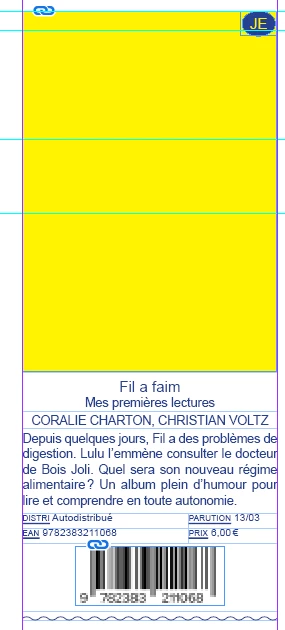
I need help with a task in Adobe InDesign. I have a document with 13-digit numbers inside tables, and these numbers are part of grouped items. I want to:

  1. Find all the 13-digit numbers in the document.
  2. Create hyperlinks for these numbers automatically.
  3. Ensure that the hyperlinks are applied correctly, even if the 13-digit numbers are part of grouped items (i.e., text frames or objects grouped together).

Could someone guide me on how to achieve this, possibly with a script or using GREP expressions? Any help would be greatly appreciated!
i tried Indesign javascript:

// InDesign JavaScript
var myDoc = app.activeDocument;
var myStory = myDoc.stories;
var urlPrefix = "https://www.librairesdelest.fr/livre/";

// Find 13-digit numbers
app.findGrepPreferences = null;
app.changeGrepPreferences = null;
app.findGrepPreferences.findWhat = "\\b\\d{13}\\b";

var foundItems = myDoc.findGrep();

for (var i = 0; i < foundItems.length; i++) {
    var match = foundItems[i];
    var thirteenDigitNumber = match.contents;
    var fullURL = urlPrefix + thirteenDigitNumber;

    // Create the hyperlink
    var source = myDoc.hyperlinkTextSources.add(match);
    myDoc.hyperlinkURLDestinations.add(fullURL);
    myDoc.hyperlinks.add(source, myDoc.hyperlinkURLDestinations.item(-1));
}

// Clear GREP preferences
app.findGrepPreferences = null;
app.changeGrepPreferences = null;

alert("Hyperlinks added to all 13-digit numbers!");


This topic has been closed for replies.

2 replies

brian_p_dts
Community Expert
Community Expert
November 7, 2024

Something like this perhaps would get either the containing group of the match, or the match's parent textframe if no group is found. 


var getGorTF = function(match) { 
var par = match.parent;
var ftf = false;
var tf = undefined;
while(par.constructor.name !== "Application") { 
  if (par.constructor.name == "Group") {
      return par;
  }
  if (par.constructor.name == "TextFrame" && !ftf) {
      tf = par;
      ftf = true;
  } 
  par = par.parent;
}
return tf;
}


Robert at ID-Tasker
Legend
November 7, 2024

@brian_p_dts 


I think OP has a problem with texts in Cells not being part of the search result of the document?


Robert at ID-Tasker
Legend
November 7, 2024

I think he's saying that the pageitemsource is not working. That's because he is adding it to the same SelectedItem, whereas in the second code, 

sourcePageItem : selectedItem

should be 

sourcePageItem : getGorTF(match)


Of course, we would want to check if the func returns undefined 


@brian_p_dts 


First version of the code was working on:

    var source = myDoc.hyperlinkTextSources.add(match);

the latest on:

		source : doc.hyperlinkPageItemSources.add


but as per the earlier post:


So I think something is wrong with the text in the Cells?


Robert at ID-Tasker
Legend
November 7, 2024

I'm on my phone - what's the problem with your code? 


Anantha Prabu G
Legend
November 7, 2024

Hi Robert,
This code find 13 digit number and make hyperlink, but not pick the numbers in table.

Thanks,PrabuDesign smarter, faster, and bolder with InDesign scripting.
Robert at ID-Tasker
Legend
November 7, 2024

You should get results from tables as well - can you post your screenshot again - but with Hidden Characters visible?