


New Participant
June 11, 2020
Answered

How to find lost Indesign File on computer

  • June 11, 2020
  • 3 replies
  • 5058 views

Hello, 

The files saved on my laptop are a little messy, so I am not sure where this file is stored. When I type in the name it will not pop up. I do not know where my indesign files are saved because I am new to the app. How can I view all my indesign files to search for the one I need? I have a pdf of the file but not the actual indesign file. Any info is appreciated- thanks!


{Renamed by MOD}
This topic has been closed for replies.
Correct answer Ashutosh_Mishra

Hi Merari,


Thanks for reaching out. You may use Adobe Bridge in order to find a specific extension(in your case .INDD or .IDML for InDesign files). Please download Adobe Bridge from Creative Cloud or here.

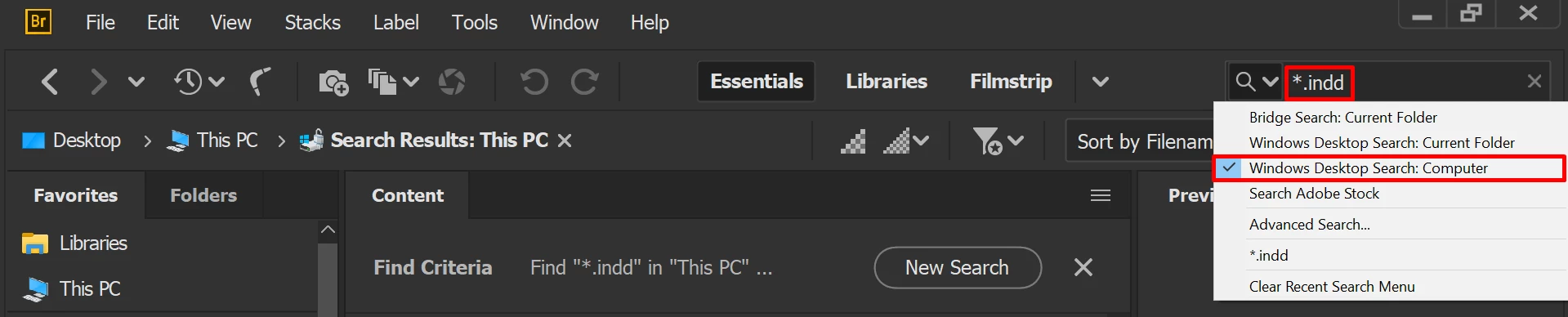
Once installed, launch it and you will find a search box on the top right hand. You need to select the specific folder you want to look for or select the whole Computer/HDD.

Type *.indd or *.idml(or any extension you want it to search for) and press Enter. You will get all the files found with similar extension listed. I am also attaching screenshots for reference:


Hope it helps.


Regards,

Ashutosh


3 replies

Dave Creamer of IDEAS
Adobe Expert
January 9, 2022

You are probably not typing the name correctly. This happens if you forgot exactly how you typed the name or made a typo when entering the name. 


First, did you check your Recent Files in InDesign? It is possibly listed there if you didn't open too many other ID files.


Also, you can do a wildcard search at the desktop in a folder. 

For example, on Windows, if I thought the name was Feb Newsleter.indd, but wasn't sure how I spelt it, I could search for:

*news*.indd

Here is some info on wildcard file searching on Mac and Windows:

https://discussions.apple.com/thread/5433422

https://www.howtogeek.com/school/learning-windows-search/lesson4/


David Creamer: Community Expert (ACI and ACE 1995-2023)
Sheena Kaul
Community Manager
Community Manager
June 20, 2020

Hi there, 


I hope your issue has been resolved till now. If not, please let us know so that we can assist you further. 

Else please confirm if any of the suggestions above helped. 


Regards,

Sheena

Pandarus
New Participant
January 9, 2022

The Adobe Bridge interface looks nothing like your shared capture. Please describe how to do this in Adobe Bridge.

Abambo
Adobe Expert
January 9, 2022

As Bridge's view is configurable, maybe you should share what your bridge looks like?

Mine looks quite as the screenshot (Bridge 2021/2022):

And you should also tell us about your version?


ABAMBO | Hard- and Software Engineer | Photographer
Ashutosh_Mishra
Ashutosh_MishraCorrect answer
Inspiring
June 11, 2020

Hi Merari,


Thanks for reaching out. You may use Adobe Bridge in order to find a specific extension(in your case .INDD or .IDML for InDesign files). Please download Adobe Bridge from Creative Cloud or here.

Once installed, launch it and you will find a search box on the top right hand. You need to select the specific folder you want to look for or select the whole Computer/HDD.

Type *.indd or *.idml(or any extension you want it to search for) and press Enter. You will get all the files found with similar extension listed. I am also attaching screenshots for reference:


Hope it helps.


Regards,

Ashutosh