dublove
Brainiac
June 24, 2025
Answered

How to get the image path without switching the selection tool?

  • June 24, 2025
  • 5 replies
  • 1602 views

Sometimes, it is necessary to switch to the direct selection tool (white arrow) in order to recognize it.
Sometimes, it is again necessary to use the selection tool (black arrow) to recognize it.

For example:
// open the paths in photoshop
openPathsInPhotoshop(paths);
This requires the selection tool.
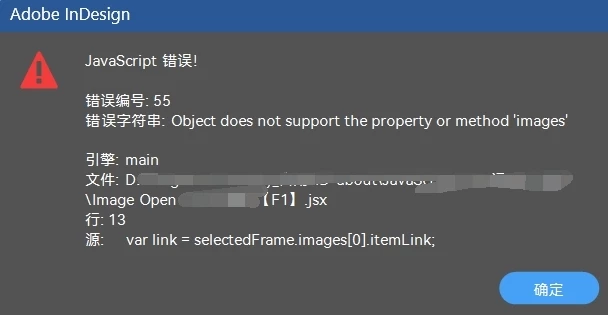
If it is a direct selection tool, it will report an error.


Is it possible to pass through?
Because sometimes we don't need to distinguish between them.


Thank you very much.

Correct answer m1b

@m1b 

    var link = selectedFrame.images[0].itemLink;

 You have to keep that one.
Otherwise it won't update the modified link.
You can't open the current image without updating the modified link.


Try this for your main function:

(function () {

    if (0 === app.documents.length)
        return alert('Please open a document and try again');

    var doc = app.activeDocument,
        items = doc.selection;

    if (0 === items.length)
        return alert('Please select a picture frame');

    // collect paths for each selected item
    var paths = [],
        links = [];

    for (var i = 0; i < items.length; i++) {

        var item = items[i];

        // maybe user selected the image, not the frame
        if ('Image' === item.constructor.name)
            item = item.parent;

        if (
            !item.hasOwnProperty('graphics')
            || 0 === item.graphics.length
            || !item.graphics[0].itemLink
            || LinkStatus.LINK_MISSING === item.graphics[0].itemLink.status
        )
            // ignore anything we can't use
            continue;

        var link = item.graphics[0].itemLink;

        // update the image
        if (LinkStatus.LINK_OUT_OF_DATE === link.status)
            link.update();

        // first linked image is all we need right now
        paths.push(link.filePath);
        links.push(link);
        
    }

    if (0 === paths.length)
        return alert('Please select a linked graphic frame and try again.');

    // open the paths in photoshop
    openPathsInPhotoshop(paths);

    if (!confirm('Are you ready to update the selected graphics?'))
        return;

    var counter = 0;

    for (var i = links.length - 1; i >= 0; i--) {

        if (LinkStatus.LINK_OUT_OF_DATE !== links[i].status)
            continue;

        links[i].update();
        counter++;

    }

    alert('Updated ' + counter + ' graphics.');

})();


I have put the update link code in the right place. See if it works.

- Mark


P.S. you may find this function useful to collect links from the selection (or page items):

/** demonstration of GetLinks usage. */
(function () {

    var doc = app.activeDocument,
        links = getLinks(doc.selection);

    alert('links.length = ' + links.length);

    for (var i = 0; i < links.length; i++)
        $.writeln(links[i].name);

})();

/**
 * Get Links from the given `items`.
 * @7111211 m1b
 * @version 2025-06-25
 * @9397041 {Array<PageItem>|collection|PageItem|Image} items - the items to search.
 * @Returns {Array<Link>?}
 */
function getLinks(items) {

    var links = [];

    if ('function' === typeof items.everyItem)
        items = items.everyItem().getElements();

    if ('Array' !== items.constructor.name)
        items = [items];

    for (var i = 0, item; i < items.length; i++) {

        item = items[i];

        if (
            item.hasOwnProperty('graphics')
            && 1 === item.graphics.length
            && item.graphics[0].itemLink.isValid
        ) {
            links.push(item.graphics[0].itemLink);
            continue;
        }

        else if (
            item.hasOwnProperty('itemLink')
            && item.itemLink.isValid
        ) {
            links.push(item.itemLink);
            continue;
        }

        else if (
            item.hasOwnProperty('pageItems')
            && item.pageItems.length > 0
        )
            links = links.concat(getLinks(item.pageItems) || []);

    }

    if (links.length)
        return links;

};


5 replies

Participating Frequently
September 13, 2025

To get the image path without switching tools: Layers Panel: Open the Layers panel and hover over the image to see its details. Info Panel: Open the Info panel (Window > Info) for position and path details. Right-click: Right-click the image and select "Properties" or "Reveal in Finder/Explorer". These methods allow you to access the path easily!

Community Expert
June 24, 2025

Hi @dublove ,

thank you for your sample InDesign document test.indd in zip test-6-24.zip.

I ran the following code on the selected upper rectangle without any issue:

var itemLink = app.selection[0].images[0].itemLink;
alert( File( itemLink.filePath).fsName );

Also successfully when I selected the bottom frame:


Regards,
Uwe Laubender
( Adobe Community Expert )

dublove
dubloveAuthor
Brainiac
June 24, 2025

@Laubender 

Do you try it with the direct selection tool (white arrow) and does it pop up an error?
It might be somewhat useful for you to have this pop up a hint, for the missing diagram, copy the original path to the clipboard:
Path copied to clipboard

Community Expert
June 24, 2025

@dublove asked: "… Do you try it with the direct selection tool (white arrow) and does it pop up an error?"


Not yet. What you see from my screenshots are selections with the Selection tool and not with the Direct Selection tool. Using the Direct Selection tool makes no sense to me. And it makes no difference if you do it right:


Note the selected path and the path points showing up when using the Direct Selection tool.


So you need to select the edge of the frame to select the frame itself with the Direct Selection tool. If you click inside the frame you select the image inside the frame. And that, of course, leads to an error with my little code snippet:


So yes, it makes a difference how you select something.


Regards,
Uwe Laubender
( Adobe Community Expert )


Community Expert
June 24, 2025

Hi @dublove ,

that's more than unusual, that you need the Direct Selection tool.

Please attach a sample InDesign document where this is the case.


Thanks,
Uwe Laubender
( Adobe Community Expert )

m1b
Community Expert
June 24, 2025

I cannot reproduce your issue using the direct selection tool. It works as normal.


Maybe you could try running this script when you have the selection, and it might reveal something...

alert(app.activeDocument.selection[0].constructor.name);
dublove
dubloveAuthor
Brainiac
June 24, 2025

@m1b @Manan Joshi 

Except that you can't use the direct selection tool.
This one is probably the one that can determine the most exceptions (missing images, links not updated, no images selected)


Can you add the indistinguishable selection tool?
Also, countdown to 20 seconds to update the link.

simple example here


/**
 * @original author m1b
 * @version 2025-06-16
 * @original discussion:
https://community.adobe.com/t5/indesign-discussions/how-to-solve-images-don-t-update-automatically-after-opening-and-modifying-them-in-ps-with-a-script/m-p/15370844
Current address:
https://community.adobe.com/t5/indesign-discussions/how-to-get-the-image-path-without-switching-the-selection-tool/m-p/15385688#M629189
**/

(function () {
    if (0 === app.documents.length)
        return alert('Please open a document and try again');
    var doc = app.activeDocument,
        items = doc.selection;
    if (0 === items.length)
        return alert('Please select a picture frame');

    var selectedFrame = app.selection[0];
    var imageFile = new File(selectedFrame.images[0].itemLink.filePath);
    if (!imageFile.exists)
        alert("Current file does not exist", 600);

    //update
    var selectedFrame = app.selection[0];
    var link = selectedFrame.images[0].itemLink;
    if (LinkStatus.LINK_OUT_OF_DATE === link.status)
        link.update();

    // collect paths for each selected item
    var paths = [],
        links = [];

    for (var i = 0; i < items.length; i++) {

        var item = items[i];

        // maybe user selected the image, not the frame
        if ('Image' === item.constructor.name)
            item = item.parent;

        if (
            !item.hasOwnProperty('graphics')
            || 0 === item.graphics.length
            || !item.graphics[0].itemLink
            || LinkStatus.NORMAL !== item.graphics[0].itemLink.status
        )
            // ignore anything we can't use
            continue;
        // first linked image is all we need right now
        paths.push(item.graphics[0].itemLink.filePath);
        links.push(item.graphics[0].itemLink);
    }

    if (0 === paths.length)
        return alert('Please select a linked graphic frame and try again.');
    // open the paths in photoshop
    openPathsInPhotoshop(paths);

    if (!confirm('Are you ready to update the selected graphics?'))
        return;

    var counter = 0;

    for (var i = links.length - 1; i >= 0; i--) {

        if (LinkStatus.LINK_OUT_OF_DATE !== links[i].status)
            continue;

        links[i].update();
        counter++;

    }

    alert('Updated ' + counter + ' graphics.');

})();

/**
 * Opens the given `paths` in Photoshop.
 * @author m1b
 * @version 2025-03-08
 * @param {Array<String>} paths - the paths to open.
 */
function openPathsInPhotoshop(paths) {

    const DELIMITER = '###';

    var photoshop = BridgeTalk.getSpecifier("photoshop");

    if (!photoshop)
        return alert("BridgeTalk couldn\'t find Photoshop.");

    // send script via BridgeTalk
    var bt = new BridgeTalk();
    bt.target = photoshop;

    // arrange the function inside an IIFE string,
    // and perform string replacements to insert
    // our variables
    bt.body = '(#FN#)("#P#","#D#");'
        .replace('#D#', DELIMITER)
        .replace('#P#', paths.join(DELIMITER))
        .replace('#FN#', openPaths);

    bt.onResult = undefined;
    bt.send(1000);

};

/**
 * Photoshop function to open the given `paths`.
 * Note: cannot use // style comments here because
 * of the way I stringify it.
 * @param {String} paths - the paths, delimited.
 * @param {String} delimiter - the string used to delimit `paths`.
 */
function openPaths(paths, delimiter) {

    app.bringToFront();

    /* make aray by splitting paths */
    paths = paths.split(delimiter);

    for (var i = 0; i < paths.length; i++)
        if (File(paths[i]).exists)
            app.open(File(paths[i]));

};


m1b
m1bCorrect answer
Community Expert
June 25, 2025

@m1b 

    var link = selectedFrame.images[0].itemLink;

 You have to keep that one.
Otherwise it won't update the modified link.
You can't open the current image without updating the modified link.


Try this for your main function:

(function () {

    if (0 === app.documents.length)
        return alert('Please open a document and try again');

    var doc = app.activeDocument,
        items = doc.selection;

    if (0 === items.length)
        return alert('Please select a picture frame');

    // collect paths for each selected item
    var paths = [],
        links = [];

    for (var i = 0; i < items.length; i++) {

        var item = items[i];

        // maybe user selected the image, not the frame
        if ('Image' === item.constructor.name)
            item = item.parent;

        if (
            !item.hasOwnProperty('graphics')
            || 0 === item.graphics.length
            || !item.graphics[0].itemLink
            || LinkStatus.LINK_MISSING === item.graphics[0].itemLink.status
        )
            // ignore anything we can't use
            continue;

        var link = item.graphics[0].itemLink;

        // update the image
        if (LinkStatus.LINK_OUT_OF_DATE === link.status)
            link.update();

        // first linked image is all we need right now
        paths.push(link.filePath);
        links.push(link);
        
    }

    if (0 === paths.length)
        return alert('Please select a linked graphic frame and try again.');

    // open the paths in photoshop
    openPathsInPhotoshop(paths);

    if (!confirm('Are you ready to update the selected graphics?'))
        return;

    var counter = 0;

    for (var i = links.length - 1; i >= 0; i--) {

        if (LinkStatus.LINK_OUT_OF_DATE !== links[i].status)
            continue;

        links[i].update();
        counter++;

    }

    alert('Updated ' + counter + ' graphics.');

})();


I have put the update link code in the right place. See if it works.

- Mark


P.S. you may find this function useful to collect links from the selection (or page items):

/** demonstration of GetLinks usage. */
(function () {

    var doc = app.activeDocument,
        links = getLinks(doc.selection);

    alert('links.length = ' + links.length);

    for (var i = 0; i < links.length; i++)
        $.writeln(links[i].name);

})();

/**
 * Get Links from the given `items`.
 * @7111211 m1b
 * @version 2025-06-25
 * @9397041 {Array<PageItem>|collection|PageItem|Image} items - the items to search.
 * @Returns {Array<Link>?}
 */
function getLinks(items) {

    var links = [];

    if ('function' === typeof items.everyItem)
        items = items.everyItem().getElements();

    if ('Array' !== items.constructor.name)
        items = [items];

    for (var i = 0, item; i < items.length; i++) {

        item = items[i];

        if (
            item.hasOwnProperty('graphics')
            && 1 === item.graphics.length
            && item.graphics[0].itemLink.isValid
        ) {
            links.push(item.graphics[0].itemLink);
            continue;
        }

        else if (
            item.hasOwnProperty('itemLink')
            && item.itemLink.isValid
        ) {
            links.push(item.itemLink);
            continue;
        }

        else if (
            item.hasOwnProperty('pageItems')
            && item.pageItems.length > 0
        )
            links = links.concat(getLinks(item.pageItems) || []);

    }

    if (links.length)
        return links;

};

Community Expert
June 24, 2025

Something like the following would work. Make a selection with either the direct selection tool or selection tool and execute the following code

var sel = app.selection[0]
if (sel.hasOwnProperty("itemLink")) {
    alert(sel.itemLink.filePath)
}
else if (sel.hasOwnProperty("graphics")) {
    if(sel.graphics.length)
    alert(sel.graphics[0].itemLink.filePath)
}

-Manan

dublove
dubloveAuthor
Brainiac
June 24, 2025

Hi  Manan Joshi 

Not sure how to use this piece of your code, the error reported above may be caused by the one below.

    //update links
    var selectedFrame = app.selection[0];
    var link = selectedFrame.images[0].itemLink;
    if (LinkStatus.LINK_OUT_OF_DATE === link.status)
        link.update();


It was originally at the top. 

I was just happy for a moment, and then the same problem happened again.
Putting it on the back still causes problems.


    if (0 === app.documents.length)
        return alert('Please open a document and try again.');

    var doc = app.activeDocument,
        items = doc.selection;

    if (0 === items.length)
        return alert('Please select a linked graphic frame and try again.');

    //update links
    var selectedFrame = app.selection[0];
    var link = selectedFrame.images[0].itemLink;
    if (LinkStatus.LINK_OUT_OF_DATE === link.status)
        link.update();