



saxtonstudio
Inspiring
August 4, 2022
Answered

how to import only a section of Word doc

  • August 4, 2022
  • 4 replies
  • 1137 views

How to import just one part of a Word doc into InDesign? For example, let's say a client makes changes to Chapter 6 – if I copy and paste the changes, the formatting is lost, and if I use "place" (allowing formatting to remain), it places the whole document. I've divied the InDesign doc into sections, so am hoping I can make changes to individual sections as needed. Your help is appreciated!
This topic has been closed for replies.
Correct answer Barb Binder

Hi @saxtonstudio:


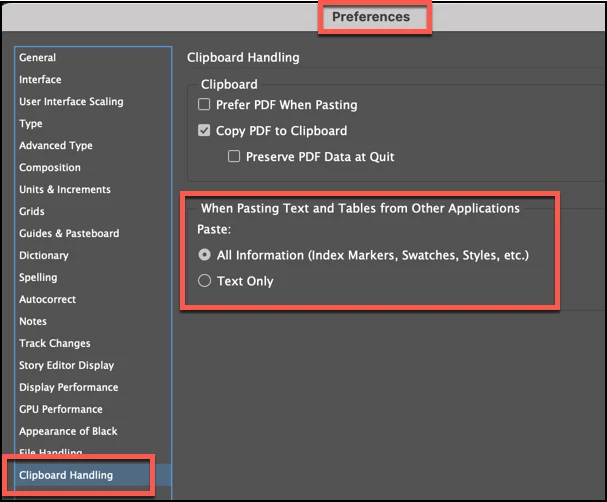
You can change the paste defaults to see if that works for you:


~Barb

4 replies

James Gifford—NitroPress
Legend
August 4, 2022

I can't really think of a way to make this work except to cut out the part of the Word doc you want to replace.


  1. Extract the new Chapter 6 text.
  2. Save it as a file of its own.
  3. Place it in the ID document, perhaps in a text frame of its own.
  4. Edit and format as needed.
  5. Cut/paste over the prior Chapter 6.


saxtonstudio
Inspiring
August 5, 2022

Similar to David Creamer's answer and makes good sense - thank you!

Dave Creamer of IDEAS
Community Expert
Community Expert
August 4, 2022

A couple of suggestions (possibly for the future...):

  • Import each chapter separately. This might mean breaking the Word file down into separate chapters, but it is worth it in the long run. Then you only have to deal with one chapter's changes.
  • Word has a Compare Document feature so you can see where the changes have been made from the previous Word file. Then you can just copy-paste the changed sections.
  • Look into Em Software WordsFlow--it can link the Word file to InDesign so the author/editor can edit in Word and the changes will appear in InDesign.


David Creamer: Community Expert (ACI and ACE 1995-2023)
saxtonstudio
Inspiring
August 5, 2022

Great ideas! Thank you!

John Mensinger
Community Expert
Community Expert
August 4, 2022
quote

if I copy and paste the changes, the formatting is lost


That doesn't have to be the case. Go to Preferences > Clipboard Handling and tick "Text Only".


And...you're using paragraph styles, right?

saxtonstudio
Inspiring
August 5, 2022

Thanks, and yes, am using paragraph styles. 🙂 I think Barb's suggestion of checking the the "all information" makes sense though, because I want the styling to come in, not just the text. But I'll try this as well.


Barb Binder
Community Expert
Barb BinderCommunity ExpertCorrect answer
Community Expert
August 4, 2022

Hi @saxtonstudio:


You can change the paste defaults to see if that works for you:


~Barb

~Barb at Rocky Mountain Training
saxtonstudio
Inspiring
August 5, 2022

This seems to work well – at least with regular bodies of text and their styles.

But for the Endnotes section, none of the footnote numbers came through (they do show in the body of the text, just not when I import the Endnotes separately...  this may be a whole different situation! 

Barb Binder
Community Expert
Community Expert
August 5, 2022

Footnotes or endnotes? These are two separate features in InDesign, and in Word. Can you share a screen shot?


~Barb

~Barb at Rocky Mountain Training