



Question
How to jump to a specific position in the same document?
Urgently need help for the following issue:
Type of computer:
PC - Windows Pro 10
Version of InDesign:
InDesign CC 2015.4 Release
I have created a button (Click Here) in the 1st page and also created a Bookmark4 in page 2. Somehow, this can not link to the specific position at the bottom of page 2 (with a short article) after export to pdf format. It only able to navigate the top of the page 2 upon button is clicked. Screenshot below illustrate the current setup for the button.
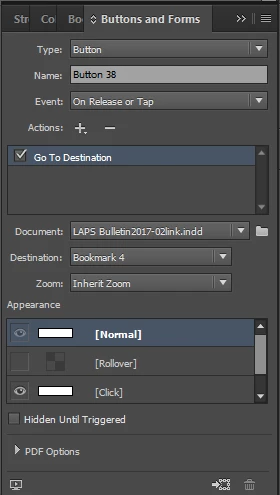
Anyone can step by step guide on how to create a button to navigate to the specific position? Appreciate and thanks in advance.
 AdChoices