


Inspiring
September 24, 2022
Answered

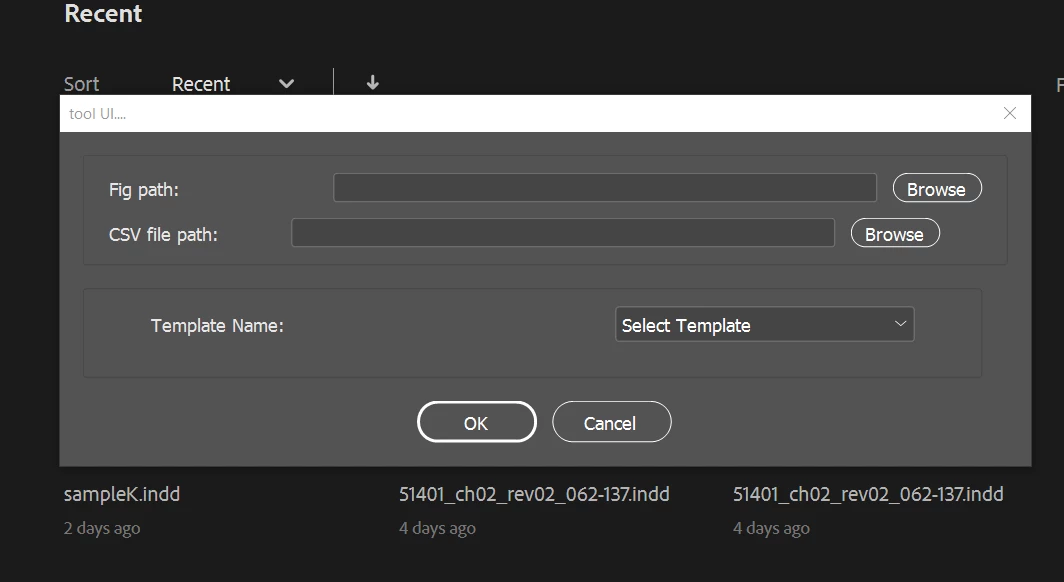
How to load csv data into dropdown in UI Dialog window in indesign javascript

  • September 24, 2022
  • 1 reply
  • 835 views
//UI starts here:
app.scriptPreferences.userInteractionLevel = UserInteractionLevels.NEVER_INTERACT;
var files =[];
var cA=['Select Template'];
var csvCells =[];
var AOBC_myfile;
var COBC_myfile;
//
var Bfilesr = [];
var myFiles ;

//
var myDia = new Window ("dialog", "tool UI...."); 
myDia.canCancel=true;
    // GROUP1
// ======  
    var myPanel = myDia.add ("panel");
    
    var myGrp2=myPanel.add("group",undefined,"Group3",{orientation:"column"});
    var OBC=myGrp2.add("staticText",[0,0,140,20],"Fig path: ");
    var edt3=myGrp2.add("edittext",[0,0,363,20],"");
    var btn1=myGrp2.add("button",[0,0,60,20],"Browse");
    btn1.onClick=function(){
        AOBC_myfile=Folder.selectDialog();
        if(AOBC_myfile != null)
             {
            edt3.text=AOBC_myfile.relativeURI;
            filesB = GetFilesB(AOBC_myfile); 
            }
        else  {
            alert ("Please Select Indesign Folder");
            }
 }
    
    myGrp2.alignment="left";
    
    var myGrp4=myPanel.add("group",undefined,"Group4",{orientation:"column"});
    var OBC5=myGrp4.add("staticText",[0,0,112,20],"CSV file path:");
    var edt5=myGrp4.add("edittext",[0,0,363,20],"");
    var btn2=myGrp4.add("button",[0,0,60,20],"Browse");
    myGrp4.alignment="left";
    btn2.onClick=function(){
        //???
      myDia.close();
         myfile=File.openDialog();
    if(myfile==null || myfile.name.match("\\.csv$","i")==null){
        alert("Please select csv file and to proceed!!!");
        edt1.text="";
        pgst1.visible=false;
        }
    else{
    //&&&&&&&&&&&&&&&&&&&&&&&&&&&&&&&&&&&&&& csv starts:
        if(myfile.length>0){
                        var my_csv_File = myfile;
                        my_csv_File.open("r"); // read the file
                        var content = my_csv_File.read(); // get the text in it
                        my_csv_File.close(); // close it again
                        var lines = content.split('\n');// split the lines (windows should be '\r')
                        var keys = lines[0].split(','); // get the heads
                        // loop the data
                        for(var i = 1; i < lines.length;i++){
                            var obj = {}; // temp object
                            if(lines[i].match(/\w/)!=null)  {//validate whether the entry contains any words(aphabets and numbers) or not)
                               var cells = lines[i].split(',');// get the cells
                               csvCells.push(cells);
                            }
                       }
         }
    }
    for(var c=0; c<csvCells.length; c++){
        var cellA = csvCells[c];
         cA.push(cellA[0]);             
        }
      //???
        }
    
    //%%%%%
    // PANEL1
// ======
var panel1 = myDia.add("panel", undefined, undefined, {name: "panel1"}); 
    panel1.orientation = "column"; 
    panel1.alignment = "left"; 
    panel1.preferredSize.width = 600;
 
// GROUP4
// ======
var group4 = panel1.add("group", undefined, {name: "group4"}); 
    group4.orientation = "row"; 
    group4.alignChildren = ["left","center"]; 

var statictextq = group4.add("statictext",[0,0,300,20], undefined, {name: "statictextq"}); 
    statictextq.text = "Template Name:"; 
//var dropdown1_array = ["Item 1","-","Item 2"]; 
var dropdown1 = group4.add("dropdownlist", undefined, undefined, {name: "dropdown1", items: cA}); 
    dropdown1.selection = 0; 
    dropdown1.preferredSize.width = 200; 

// GROUP5
// ======
var group7 = panel1.add("group", undefined, {name: "group8"}); 
    group7.orientation = "row"; 
    group7.alignChildren = ["left","center"]; 
 
    //%%%%%
    
var myGrp=myDia.add("group",undefined,"Group9",{orientation:"row"});
var ok = myGrp.add("button",undefined,"OK");
var cancelA = myGrp.add("button",undefined,"Cancel");

if(myDia.show()==1){ 
okraman();
    }
else{
    alert("user cancelled this action");
     exit();
    }

//<<<<<<<<<
//????
function GetFilesB(theBFolder) { 
    var fileListB = theBFolder.getFiles(), 
    i, fileB;  
    for (i = 0; i < fileListB.length; i++) { 
        fileB = fileListB[i]; 
        if (fileB instanceof Folder) { 
            Bfilesr = files.concat(GetFilesB(fileB)); 
        } 
        else if (fileB instanceof File && fileB.name.match(/.*\.tif$/i)) {  
            Bfilesr.push(fileB);
        }
        else if (fileB instanceof File && fileB.name.match(new RegExp(".*\\.tif$", "i"))) { 
            Bfilesr.push(fileB);
        }    
     else if (fileB instanceof File && fileB.name.match(new RegExp(".*\\.eps$", "i"))) { 
            Bfilesr.push(fileB);
        }    
    else if (fileB instanceof File && fileB.name.match(new RegExp(".*\\.png$", "i"))) { 
            Bfilesr.push(fileB);
        }  
    }
return Bfilesr;
}
//???
function okraman(){
var myDocument = app.documents.add();
            with (myDocument.documentPreferences) {
            pagesPerDocument =2;
            facingPages=false;
            }
    }

I am trying to load data recieved from the input csv and load it in dropdown to show user to select it. I tried to load but its not working for dropdown alone but it is working for editText alone. Please help me with this.


I also attached the sample csv for loading data with this post!
 

This topic has been closed for replies.
Correct answer Manan Joshi

Try the following, you were closing the parent dialog on click of browse button then how is the user going to see the dropdown if the window itself is closed. Secondly you were updating the array not the dropdown. There seems to be other issues as well, as I got some errors but you will figure that out when you test.

app.scriptPreferences.userInteractionLevel = UserInteractionLevels.NEVER_INTERACT;
var files = [];
var cA = ['Select Template'];
var csvCells = [];
var AOBC_myfile;
var COBC_myfile;
//
var Bfilesr = [];
var myFiles;

//
var myDia = new Window("dialog", "tool UI....");
myDia.canCancel = true;
// GROUP1
// ======  
var myPanel = myDia.add("panel");

var myGrp2 = myPanel.add("group", undefined, "Group3", { orientation: "column" });
var OBC = myGrp2.add("staticText", [0, 0, 140, 20], "Fig path: ");
var edt3 = myGrp2.add("edittext", [0, 0, 363, 20], "");
var btn1 = myGrp2.add("button", [0, 0, 60, 20], "Browse");
btn1.onClick = function () {
    AOBC_myfile = Folder.selectDialog();
    if (AOBC_myfile != null) {
        edt3.text = AOBC_myfile.relativeURI;
        filesB = GetFilesB(AOBC_myfile);
    }
    else {
        alert("Please Select Indesign Folder");
    }
}

myGrp2.alignment = "left";

var myGrp4 = myPanel.add("group", undefined, "Group4", { orientation: "column" });
var OBC5 = myGrp4.add("staticText", [0, 0, 112, 20], "CSV file path:");
var edt5 = myGrp4.add("edittext", [0, 0, 363, 20], "");
var btn2 = myGrp4.add("button", [0, 0, 60, 20], "Browse");
myGrp4.alignment = "left";
btn2.onClick = function () {
    //???
    //myDia.close();
    myfile = File.openDialog();
    if (myfile == null || myfile.name.match("\\.csv$", "i") == null) {
        alert("Please select csv file and to proceed!!!");
        edt1.text = "";
        pgst1.visible = false;
    }
    else {
        //&&&&&&&&&&&&&&&&&&&&&&&&&&&&&&&&&&&&&& csv starts:
        if (myfile.length > 0) {
            var my_csv_File = myfile;
            my_csv_File.open("r"); // read the file
            var content = my_csv_File.read(); // get the text in it
            my_csv_File.close(); // close it again
            var lines = content.split('\n');// split the lines (windows should be '\r')
            var keys = lines[0].split(','); // get the heads
            // loop the data
            for (var i = 1; i < lines.length; i++) {
                var obj = {}; // temp object
                if (lines[i].match(/\w/) != null) {//validate whether the entry contains any words(aphabets and numbers) or not)
                    var cells = lines[i].split(',');// get the cells
                    csvCells.push(cells);
                }
            }
        }
    }
    for (var c = 0; c < csvCells.length; c++) {
        var cellA = csvCells[c];
		dropdown1.add("item", cellA[0])
    }
    //???
}

//%%%%%
// PANEL1
// ======
var panel1 = myDia.add("panel", undefined, undefined, { name: "panel1" });
panel1.orientation = "column";
panel1.alignment = "left";
panel1.preferredSize.width = 600;

// GROUP4
// ======
var group4 = panel1.add("group", undefined, { name: "group4" });
group4.orientation = "row";
group4.alignChildren = ["left", "center"];

var statictextq = group4.add("statictext", [0, 0, 300, 20], undefined, { name: "statictextq" });
statictextq.text = "Template Name:";
//var dropdown1_array = ["Item 1","-","Item 2"]; 
var dropdown1 = group4.add("dropdownlist", undefined, undefined, { name: "dropdown1" , items:cA});
dropdown1.selection = 0;
dropdown1.preferredSize.width = 200;

// GROUP5
// ======
var group7 = panel1.add("group", undefined, { name: "group8" });
group7.orientation = "row";
group7.alignChildren = ["left", "center"];

//%%%%%

var myGrp = myDia.add("group", undefined, "Group9", { orientation: "row" });
var ok = myGrp.add("button", undefined, "OK");
var cancelA = myGrp.add("button", undefined, "Cancel");

if (myDia.show() == 1) {
    okraman();
}
else {
    alert("user cancelled this action");
    //exit();
}

//<<<<<<<<<
//????
function GetFilesB(theBFolder) {
    var fileListB = theBFolder.getFiles(),
        i, fileB;
    for (i = 0; i < fileListB.length; i++) {
        fileB = fileListB[i];
        if (fileB instanceof Folder) {
            Bfilesr = files.concat(GetFilesB(fileB));
        }
        else if (fileB instanceof File && fileB.name.match(/.*\.tif$/i)) {
            Bfilesr.push(fileB);
        }
        else if (fileB instanceof File && fileB.name.match(new RegExp(".*\\.tif$", "i"))) {
            Bfilesr.push(fileB);
        }
        else if (fileB instanceof File && fileB.name.match(new RegExp(".*\\.eps$", "i"))) {
            Bfilesr.push(fileB);
        }
        else if (fileB instanceof File && fileB.name.match(new RegExp(".*\\.png$", "i"))) {
            Bfilesr.push(fileB);
        }
    }
    return Bfilesr;
}
//???
function okraman() {
    var myDocument = app.documents.add();
    with (myDocument.documentPreferences) {
        pagesPerDocument = 2;
        facingPages = false;
    }
}

-Manan

1 reply

Manan JoshiCorrect answer
Community Expert
September 24, 2022

Try the following, you were closing the parent dialog on click of browse button then how is the user going to see the dropdown if the window itself is closed. Secondly you were updating the array not the dropdown. There seems to be other issues as well, as I got some errors but you will figure that out when you test.

app.scriptPreferences.userInteractionLevel = UserInteractionLevels.NEVER_INTERACT;
var files = [];
var cA = ['Select Template'];
var csvCells = [];
var AOBC_myfile;
var COBC_myfile;
//
var Bfilesr = [];
var myFiles;

//
var myDia = new Window("dialog", "tool UI....");
myDia.canCancel = true;
// GROUP1
// ======  
var myPanel = myDia.add("panel");

var myGrp2 = myPanel.add("group", undefined, "Group3", { orientation: "column" });
var OBC = myGrp2.add("staticText", [0, 0, 140, 20], "Fig path: ");
var edt3 = myGrp2.add("edittext", [0, 0, 363, 20], "");
var btn1 = myGrp2.add("button", [0, 0, 60, 20], "Browse");
btn1.onClick = function () {
    AOBC_myfile = Folder.selectDialog();
    if (AOBC_myfile != null) {
        edt3.text = AOBC_myfile.relativeURI;
        filesB = GetFilesB(AOBC_myfile);
    }
    else {
        alert("Please Select Indesign Folder");
    }
}

myGrp2.alignment = "left";

var myGrp4 = myPanel.add("group", undefined, "Group4", { orientation: "column" });
var OBC5 = myGrp4.add("staticText", [0, 0, 112, 20], "CSV file path:");
var edt5 = myGrp4.add("edittext", [0, 0, 363, 20], "");
var btn2 = myGrp4.add("button", [0, 0, 60, 20], "Browse");
myGrp4.alignment = "left";
btn2.onClick = function () {
    //???
    //myDia.close();
    myfile = File.openDialog();
    if (myfile == null || myfile.name.match("\\.csv$", "i") == null) {
        alert("Please select csv file and to proceed!!!");
        edt1.text = "";
        pgst1.visible = false;
    }
    else {
        //&&&&&&&&&&&&&&&&&&&&&&&&&&&&&&&&&&&&&& csv starts:
        if (myfile.length > 0) {
            var my_csv_File = myfile;
            my_csv_File.open("r"); // read the file
            var content = my_csv_File.read(); // get the text in it
            my_csv_File.close(); // close it again
            var lines = content.split('\n');// split the lines (windows should be '\r')
            var keys = lines[0].split(','); // get the heads
            // loop the data
            for (var i = 1; i < lines.length; i++) {
                var obj = {}; // temp object
                if (lines[i].match(/\w/) != null) {//validate whether the entry contains any words(aphabets and numbers) or not)
                    var cells = lines[i].split(',');// get the cells
                    csvCells.push(cells);
                }
            }
        }
    }
    for (var c = 0; c < csvCells.length; c++) {
        var cellA = csvCells[c];
		dropdown1.add("item", cellA[0])
    }
    //???
}

//%%%%%
// PANEL1
// ======
var panel1 = myDia.add("panel", undefined, undefined, { name: "panel1" });
panel1.orientation = "column";
panel1.alignment = "left";
panel1.preferredSize.width = 600;

// GROUP4
// ======
var group4 = panel1.add("group", undefined, { name: "group4" });
group4.orientation = "row";
group4.alignChildren = ["left", "center"];

var statictextq = group4.add("statictext", [0, 0, 300, 20], undefined, { name: "statictextq" });
statictextq.text = "Template Name:";
//var dropdown1_array = ["Item 1","-","Item 2"]; 
var dropdown1 = group4.add("dropdownlist", undefined, undefined, { name: "dropdown1" , items:cA});
dropdown1.selection = 0;
dropdown1.preferredSize.width = 200;

// GROUP5
// ======
var group7 = panel1.add("group", undefined, { name: "group8" });
group7.orientation = "row";
group7.alignChildren = ["left", "center"];

//%%%%%

var myGrp = myDia.add("group", undefined, "Group9", { orientation: "row" });
var ok = myGrp.add("button", undefined, "OK");
var cancelA = myGrp.add("button", undefined, "Cancel");

if (myDia.show() == 1) {
    okraman();
}
else {
    alert("user cancelled this action");
    //exit();
}

//<<<<<<<<<
//????
function GetFilesB(theBFolder) {
    var fileListB = theBFolder.getFiles(),
        i, fileB;
    for (i = 0; i < fileListB.length; i++) {
        fileB = fileListB[i];
        if (fileB instanceof Folder) {
            Bfilesr = files.concat(GetFilesB(fileB));
        }
        else if (fileB instanceof File && fileB.name.match(/.*\.tif$/i)) {
            Bfilesr.push(fileB);
        }
        else if (fileB instanceof File && fileB.name.match(new RegExp(".*\\.tif$", "i"))) {
            Bfilesr.push(fileB);
        }
        else if (fileB instanceof File && fileB.name.match(new RegExp(".*\\.eps$", "i"))) {
            Bfilesr.push(fileB);
        }
        else if (fileB instanceof File && fileB.name.match(new RegExp(".*\\.png$", "i"))) {
            Bfilesr.push(fileB);
        }
    }
    return Bfilesr;
}
//???
function okraman() {
    var myDocument = app.documents.add();
    with (myDocument.documentPreferences) {
        pagesPerDocument = 2;
        facingPages = false;
    }
}

-Manan

Inspiring
September 24, 2022

Thank You @Manan Joshi , actually I tried to create another dialog by closing this dialog but when I try to do like that onClick function is not working properly for Ok and cancel button.

Thank you so much Manan!

rob day
Community Expert
September 24, 2022

Hi @Karthik SG , Not sure if this helps, but you might find this JS UI builder useful:


https://scriptui.joonas.me/


It’s a drag and drop interface with a code exporter. Took me a few minutes to replicate your dialog: