



dublove
Legend
October 17, 2025
Question

How to make this script select all cells in the currently selected column at once?

  • October 17, 2025
  • 2 replies
  • 241 views

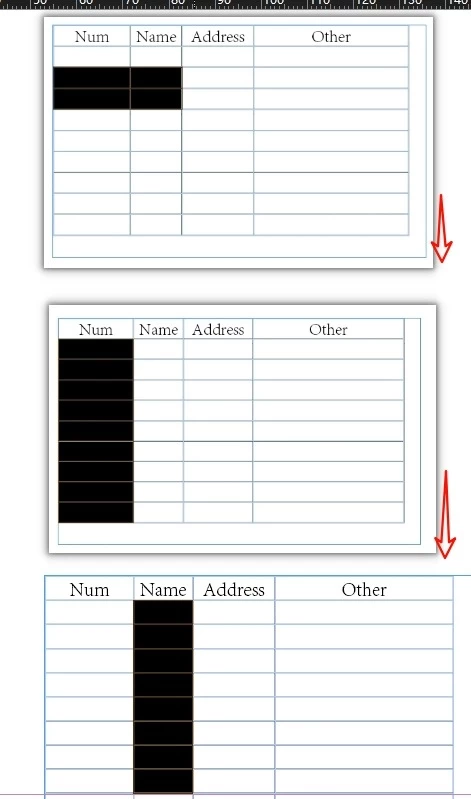
I've observed that the script below selects the column in two separate steps.

selectCellForCurrentFrame();
function selectCellForCurrentFrame() {
    var item = app.selection[0];
    var col = item.columns

    //Cyclic column
    for (var c = 0; c < col.length; c++) {
        var cel = col[c].cells;
        //var textFrame = app.selection[0].parent.parent;
        var rangeOfCells =
            cel.everyItem().getElements();

        //Look here carefully—each column has been selected.
        alert(rangeOfCells);
        
        var cellsToSelect = [];
        for (var n = 0; n < rangeOfCells.length; n++) {
            if (rangeOfCells[n].rowType == RowTypes.BODY_ROW
            ) {
                cellsToSelect[cellsToSelect.length++] = rangeOfCells[n];
            }
        };

        app.select(cellsToSelect[0]);
        for (var n = 1; n < cellsToSelect.length; n++) {
            app.select(cellsToSelect[n], SelectionOptions.ADD_TO)
        };
    }
};
2 replies

m1b
Community Expert
Community Expert
October 28, 2025

Hi @dublove this is some of the basics. Note I am accessing the cells by name, in this example "0:1" and "1:3", but you can use any valid cell reference. It won't always work smoothly if you try to get a range across partial merged cells, but for simple cases it seems to work fine.

- Mark


var doc = app.activeDocument;
var table = doc.stories[0].tables[0];

if (!table.isValid)
    return alert('This example needs a table.');

// get a reference to a range of cells
// note: this is an "everyItem" type object (constructor is "Cell", but that is misleading)
var cellRange = table.cells.itemByRange(table.cells.itemByName('0:1'), table.cells.itemByName('1:3'));

// select the cells (we can do it in one request because of the "everyItem" nature of the object)
cellRange.select();

// if you want the the *actual* individual cells
// var cells = cellRange.cells.everyItem().getElements();


dublove
dubloveAuthor
Legend
October 30, 2025

This is quite interesting.

Perhaps this could use a variableitemByName(‘n:m’)

m1b
Community Expert
Community Expert
October 30, 2025

@dublove yes you could. Here is an example:

(function () {

    var doc = app.activeDocument;
    var table = doc.stories[0].tables[0];

    if (!table.isValid)
        return alert('This example needs a table.');

    var cell1 = getCell(table, [0, 1]);
    var cell2 = getCell(table, [1, 3]);

    if (!cell1 || !cell2)
        throw new Error('Bad coordinates for cell range.');

    // get a reference to a range of cells
    // note: this is an "everyItem" type object (constructor is "Cell", but that is misleading)
    var cellRange = table.cells.itemByRange(cell1, cell2);

    if (!cellRange.isValid)
        throw new Error('Could not get range from ' + cell1 + ' and ' + cell2 + '.');

    // select the cells (we can do it in one request because of the "everyItem" nature of the object)
    cellRange.select();

    // if you want the the *actual* individual cells
    // var cells = cellRange.cells.everyItem().getElements();

})();

/**
 * Returns a Cell at `pos`.
 * @param {Table} table
 * @param {Array<Number>} pos - the [column, row] position of the cell.
 * @returns {Cell?}
 */
function getCell(table, pos) {

    if (
        !table || !table.isValid
        || table.columns.length < pos[0]
        || table.rows.length < pos[1]
    )
        return;

    var cell = table.cells.itemByName(pos[0] + ':' + pos[1]);

    if (cell.isValid)
        return cell;

};
Community Expert
October 19, 2025

The code does two things that would require iteration in my opinion. It is probably checking for any merged cells and it also needs to select just the body cells of the column.

-Manan

Community Expert
October 19, 2025

Another thing I found is somehow the selection code for cells is not able to select when passed in an array of cell. So something like the following works for textframes

app.select(app.documents[0].pages[0].textFrames.everyItem())

However, the same errors for cells

app.select(app.documents[0].pages[0].textFrames[1].tables[0].columns[0].cells.everyItem())

I think this is the reason the author of the script you shared used a loop to add cells the the selection. 

-Manan

dublove
dubloveAuthor
Legend
October 19, 2025

@Manan Joshi 

The original code was provided by @Laubender, and this is my modified version.
Perhaps a different approach:
Treat two parallel cells as a single unit and loop downward?