


Participating Frequently
November 8, 2018
Answered

How to match text in tables and apply paragraph style via external CSV?

  • November 8, 2018
  • 3 replies
  • 1220 views

Hi good peoples,

I wish to know is there a way/script to search and match a big list of item numbers in an indesign table from a external CSV file and apply a new paragraph style over it?

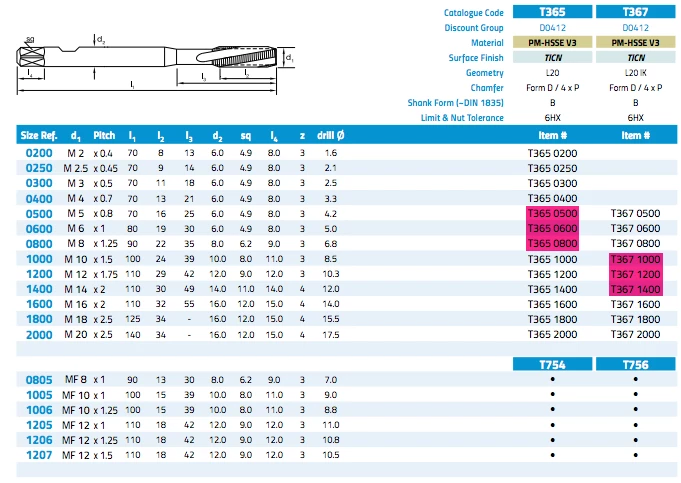
Below is my example:

  1. We have a catalogue with part numbers on the right most columns applied with "item#" paragraph style.
  2. Client wish to highlight the only certain part numbers in the catalogue they have in stock and supplied a corresponding Excel/CSV list they carry (in this case it's T365 0500,T365 0600,T365 0800,T367 1000,T367 1200,T367 1400.
  3. We have to create a new document with the items from the CSV highlighted (in this case we wish to just bold and change colour by applying a "item#2" paragraph style) 
  4. So my question is if there any way of scripting this process of matching item numbers to a CSV or text file and applying "item#2" over it?

I
I hope my question makes sense and thanks for any suggestions in advance

This topic has been closed for replies.
Correct answer FRIdNGE

Try this:

// by FRIdNGE, November 2018

var myDoc = app.activeDocument,

mySKUsListFile = File(myDoc.filePath + "/ProductsRefToBeCatched.txt"); 

mySKUsListFile.open(); 

var mySKUsList = mySKUsListFile.read(),

mySKUs = mySKUsList.split("\n"); 

mySKUsListFile.close(); 

var S = mySKUs.length,  s;

for ( s = 0; s < S; s++ ) {

    app.findGrepPreferences = app.changeGrepPreferences = null;

    app.findGrepPreferences.findWhat = "\\b" + mySKUs + "\\b";

    app.findGrepPreferences.appliedParagraphStyle = "item#";

    app.changeGrepPreferences.appliedParagraphStyle = "item#2";

    myDoc.changeGrep();

}

app.findGrepPreferences = app.changeGrepPreferences = null;

I've used a .txt file here saved at the same place as the .indd file.

Best,

Michel

3 replies

raliottaAuthor
Participating Frequently
November 9, 2018

Hi Michel,

This works amazingly!   Just that I have to move the paragraph styles out of its folder. Is there a command to tell the script to search inside paragraph folders also?

FRIdNGE
Inspiring
November 9, 2018

// by FRIdNGE, November 2018

var myDoc = app.activeDocument,

//------------------------------------------------------------------------------------------

myGroup1 = myDoc.paragraphStyleGroups.itemByName("item#_Group"),

myParaStyle1 = myGroup1.paragraphStyles.itemByName("item#"),

myGroup2 = myDoc.paragraphStyleGroups.itemByName("item#2_Group"),

myParaStyle2 = myGroup2.paragraphStyles.itemByName("item#2"),

//------------------------------------------------------------------------------------------

mySKUsListFile = File(myDoc.filePath + "/ProductsRefToBeCatched.txt"); 

mySKUsListFile.open(); 

var mySKUsList = mySKUsListFile.read(),

mySKUs = mySKUsList.split("\n"); 

mySKUsListFile.close(); 

var S = mySKUs.length,  s;

for ( s = 0; s < S; s++ ) {

    app.findGrepPreferences = app.changeGrepPreferences = null;

    app.findGrepPreferences.findWhat = "\\b" + mySKUs + "\\b";

    app.findGrepPreferences.appliedParagraphStyle = myParaStyle1;

    app.changeGrepPreferences.appliedParagraphStyle = myParaStyle2;

    myDoc.changeGrep();

}

app.findGrepPreferences = app.changeGrepPreferences = null;

raliottaAuthor
Participating Frequently
November 10, 2018

This works really great Michel! Can't thank you enough

raliottaAuthor
Participating Frequently
November 8, 2018

I have found something that sort of works, although its not from a external csv, and i will have to create a list of items that need to change to paste into the search queries...

Would someone shed some more light on this?

var myDoc = app.activeDocument,      

myCodes = ["T820 0300","T820 0500","T820 0800", etc...etc...],    

C = myCodes.length,  c;      

app.findTextPreferences = null;    

for ( c = 0; c < C; c++) {        

    app.findTextPreferences.findWhat = myCodes;        

    myFound = myDoc.findText();      

    var F = myFound.length,  f; 


    var ItemNumber = myDoc.paragraphStyles.itemByName("ItemNumber");

    var CoreRange = myDoc.paragraphStyles.itemByName("CoreRange");


    for ( f = 0; f < F; f++) {    

        myFound.appliedCharacterStyle = myDoc.characterStyles[0]; 


        if ((myFound.appliedParagraphStyle == ItemNumber)) {    


                myFound.appliedParagraphStyle = CoreRange; 

        } else{} 

    }    

}

FRIdNGE
FRIdNGECorrect answer
Inspiring
November 8, 2018

Try this:

// by FRIdNGE, November 2018

var myDoc = app.activeDocument,

mySKUsListFile = File(myDoc.filePath + "/ProductsRefToBeCatched.txt"); 

mySKUsListFile.open(); 

var mySKUsList = mySKUsListFile.read(),

mySKUs = mySKUsList.split("\n"); 

mySKUsListFile.close(); 

var S = mySKUs.length,  s;

for ( s = 0; s < S; s++ ) {

    app.findGrepPreferences = app.changeGrepPreferences = null;

    app.findGrepPreferences.findWhat = "\\b" + mySKUs + "\\b";

    app.findGrepPreferences.appliedParagraphStyle = "item#";

    app.changeGrepPreferences.appliedParagraphStyle = "item#2";

    myDoc.changeGrep();

}

app.findGrepPreferences = app.changeGrepPreferences = null;

I've used a .txt file here saved at the same place as the .indd file.

Best,

Michel

Legend
November 8, 2018

I think I would use a GREP style within your Paragraph style to attach a Character style with underline and bold to the list of numbers.

Apply text Underline to :

T365 0500|T365 0600|T365 0800|T367 1000|T367 1200|T367 1400

The | character in GREP functions as OR, so any of those values listed get the character style, and the rest are left alone.

This was, you don't need a separate paragraph style for those numbers, and if the highlighted numbers changed, you just have to edit the GREP list.

pixxxelschubser
Community Expert
Community Expert
November 8, 2018

a bit more flexibel:

Grep:

T36(5\h[5-8]|7\h1[0-4])00

raliottaAuthor
Participating Frequently
November 8, 2018

Thanks for the suggestion but we dealing with a big list of unique items number and they tend to jump around. So I'm not sure the range method will work