Hi @dublove here is a quick attempt to combine all book documents into one. It can be a complex task depending on the specifics and complications involved, but this script takes a simple approach. Use with care.
- Mark
/**
 * @file Quick Combine Book Documents.js
 *
 * Combines a book into one document by simply (naively!)
 * duplicating the pages to the end of the first document.
 *
 * See "PARTIAL LIST OF ISSUES" under documentation for
 * `duplicateSpreads` function below.
 *
 * @author m1b
 * @version 2025-04-27
 * @discussion https://community.adobe.com/t5/indesign-discussions/how-to-merge-documents-in-a-book-into-one/m-p/15290043
 */
function main() {

    if (0 === app.books.length)
        return alert('Please open a book and try again.');

    var settings = {
        closeBookAfterCombining: false,
        closeBookDocumentsAfterCombining: true,
        combineSpreadsAtJoins: true,
        removeSections: true,
        revealCombinedDocument: false,
        saveCombinedDocument: false,
        showUI: true,
        target: app.books[0],
    };

    if (
        settings.showUI
        // show ui
        && 2 === ui(settings)
    )
        // user cancelled ui
        return;

    if (!settings.target.hasOwnProperty('bookContents'))
        return alert('Target must be an Indesign Book.');

    // the docs to combine
    var docs = [],
        book = settings.target,
        bookContents = book.bookContents.everyItem().getElements();

    // open all the book's documents
    for (var i = 0; i < bookContents.length; i++)
        docs[i] = app.open(bookContents[i].fullName);

    // open the combining document as a copy
    var combinedDoc = app.open(bookContents[0].fullName, true, OpenOptions.OPEN_COPY);

    if (!settings.combinedName)
        combinedDoc.name = book.name.replace(/\.[^\.]+$/, ' combined');

    // duplicate the spreads into the combined document
    for (var i = 1; i < docs.length; i++)
        duplicateSpreads(docs[i], combinedDoc);

    if (settings.removeSections)
        // remove all sections except first
        while (combinedDoc.sections.length > 1)
            combinedDoc.sections.lastItem().remove();

    // join adjacent single-page facing-pages spreads
    if (
        settings.combineSpreadsAtJoins
        && combinedDoc.documentPreferences.facingPages
    )
        combineAdjacentSinglePageSpreads(combinedDoc, false);

    if (settings.closeBookDocumentsAfterCombining) {
        // close all except the combined document
        for (var i = docs.length - 1; i >= 0; i--)
            docs[i].close(SaveOptions.NO);
    }

    if (settings.saveCombinedDocument) {

        // save the combined document
        var path = String(book.fullName).replace(/\.[^\.]+$/, ' combined'),
            n = 0;

        // add a number to avoid overwriting
        while (File(path + (n ? ' ' + n : '') + '.indd').exists) n++;

        var f = File(path + (n ? ' ' + n : '') + '.indd');

        // save it
        combinedDoc.save(f);

        if (settings.revealCombinedDocument)
            f.parent.execute();

    }

    if (settings.closeBookAfterCombining)
        // close the book
        book.close(SaveOptions.NO);

};
app.doScript(main, ScriptLanguage.JAVASCRIPT, undefined, UndoModes.ENTIRE_SCRIPT, 'Combine Book Documents');

/**
 * Returns an item from `things` that has a label stored under `key`.
 * @author m1b
 * @version 2025-04-26
 * @param {Array<*>} things - the things to search.
 * @param {String} key - the label key.
 * @param {String} value - the value to match.
 */
function getThingWithLabel(things, key, value) {

    for (var i = 0, label; i < things.length; i++) {

        if ('function' !== typeof things[i].extractLabel)
            continue;

        label = things[i].extractLabel(key);

        if (label && label == value)
            return things[i];

    }

};

/**
 * Naive attempt to duplicate all spreads of `fromDoc` to the end of `toDoc`.
 *
 * PARTIAL LIST OF ISSUES:
 *   - will duplicate *spreads*, not pages, so further work will need
 *     to be done if you want to combine, for example, two consecutive
 *     single-page facing-pages spreads.
 *   - duplicating spreads causes text threads between spreads to be broken and
 *     this function attempts to re-thread them (using labels planted in the source
 *     doc) but I have no idea how this interacts with complex pages.
 *   - makes no attempt at rationalizing section numbering.
 *   - makes no attempt at synchronizing styles or parent pages.
 *
 * @author m1b
 * @version 2025-04-26
 * @param {Document} fromDoc - the document to duplicate spreads from.
 * @param {Document} toDoc - the document to duplicate spreads to.
 * @returns {Array<Spreads>}
 */
function duplicateSpreads(fromDoc, toDoc) {

    var id,
        frame,
        spread,
        dupSpread,
        dupSpreads,
        nextTextFrame,
        nextTextFrameID;

    // mark the threading that crosses spreads so we can fix broken threading later
    for (var j = 0; j < fromDoc.spreads.length; j++) {

        spread = fromDoc.spreads[j];

        for (var k = 0; k < spread.textFrames.length; k++) {

            frame = spread.textFrames[k];
            id = String(frame.id);
            frame.insertLabel('id', id);

            if (
                frame.previousTextFrame
                && frame.previousTextFrame.parentPage !== frame.parentPage
                && frame.previousTextFrame.parentPage.parent !== frame.parentPage.parent
            )
                frame.previousTextFrame.insertLabel('nextTextFrame', id)

        }

    }

    // duplicate to the end of the first document
    fromDoc.spreads.everyItem().duplicate(LocationOptions.AT_END, toDoc);

    // explicitly get new references for the duplicated spreads
    // because of a bug(?) in the returned value of the duplicate method
    dupSpreads = toDoc.spreads.itemByRange(toDoc.spreads.item(toDoc.spreads.length - fromDoc.spreads.length), toDoc.spreads.lastItem()).getElements();

    // re-instate the threading that was broken by the duplicating
    for (var j = 0; j < dupSpreads.length; j++) {

        dupSpread = dupSpreads[j];

        for (var k = 0; k < dupSpread.textFrames.length; k++) {

            frame = dupSpread.textFrames[k];
            id = frame.extractLabel('id');
            nextTextFrameID = frame.extractLabel('nextTextFrame');

            // find the next text frame
            for (var i = dupSpreads.length - 1; i >= 0; i--) {

                nextTextFrame = getThingWithLabel(dupSpreads[i].textFrames, 'id', nextTextFrameID);

                if (nextTextFrame)
                    frame.nextTextFrame = nextTextFrame;

            }

        }

    }

    return dupSpreads;

};


/**
 * UI for Quick Combine Book Documents.
 * @author m1b
 * @version 2025-03-27
 * @param {Object} settings
 * @param {Array<String>} settings.before - the before array of strings.
 * @param {Array<String>} [settings.description] - a short description of what's going to happen (default: none).
 * @returns {1|2} - ScriptUI result code (1 = good, 2 = user cancelled).
 */
function ui(settings) {

    var w = new Window("dialog", 'Combine Book Documents'),
        group = w.add("group {orientation:'column', alignment:['fill','top'], margins:[20,20,20,20] }"),
        label = group.add('statictext {text:"Combine documents from", preferredSize:[300,-1], alignment:["left","top"], justify:["left","top"]}'),
        booksMenu = group.add("Dropdownlist {preferredSize:[300,-1], alignment:['left','center']}"),

        checkboxes1 = w.add("panel {orientation:'column', margins:[20,10,20,10], alignment:['fill','fill'], alignChildren:['left', 'top'] }"),
        removeSectionsCheckbox = checkboxes1.add("CheckBox { text:'Remove Sections' }"),
        combineSpreadsAtJoinsCheckbox = checkboxes1.add("CheckBox { text:'Combine Spreads At Joins' }"),

        checkboxes2 = w.add("panel {orientation:'column', margins:[20,10,20,10], alignment:['fill','fill'], alignChildren:['left', 'top'] }"),
        closeBookAfterCombiningCheckbox = checkboxes2.add("CheckBox { text:'Close Book After Combining' }"),
        closeBookDocumentsAfterCombiningCheckbox = checkboxes2.add("CheckBox { text:'Close Book Documents After Combining' }"),

        checkboxes3 = w.add("panel {orientation:'column', margins:[20,10,20,10], alignment:['fill','fill'], alignChildren:['left', 'top'] }"),
        saveCombinedDocumentCheckbox = checkboxes3.add("CheckBox { text:'Save Combined Document' }"),
        revealCombinedDocumentCheckbox = checkboxes3.add("CheckBox { text:'Reveal Saved Document' }"),

        bottomUI = w.add("group {orientation:'row', alignment:['fill','top'], margins:[0,20,0,0] }"),
        buttons = bottomUI.add("group {orientation:'row', alignment:['right','top'], alignChildren:'right' }"),
        cancelButton = buttons.add('button', undefined, 'Cancel', { name: 'cancel' }),
        okButton = buttons.add('button', undefined, 'Combine', { name: 'ok' });

    // populate books menu
    for (var i = 0; i < app.books.length; i++)
        booksMenu.add('item', app.books[i].name);

    // update UI
    removeSectionsCheckbox.value = settings.removeSections;
    combineSpreadsAtJoinsCheckbox.value = settings.combineSpreadsAtJoins;
    combineSpreadsAtJoinsCheckbox.enabled = !settings.removeSections;
    closeBookAfterCombiningCheckbox.value = settings.closeBookAfterCombining;
    closeBookDocumentsAfterCombiningCheckbox.value = settings.closeBookDocumentsAfterCombining;
    saveCombinedDocumentCheckbox.value = settings.saveCombinedDocument;
    revealCombinedDocumentCheckbox.value = settings.revealCombinedDocument;
    revealCombinedDocumentCheckbox.enabled = settings.saveCombinedDocument;
    booksMenu.selection = 0;
    updateLabel();

    // event handling
    booksMenu.onChange = updateLabel;

    // enforces a hierarchy between save and reveal
    saveCombinedDocumentCheckbox.onClick = function () {
        revealCombinedDocumentCheckbox.enabled = this.value;
    };

    // enforces a hierarchy between remove sections and combine spreads at joins
    removeSectionsCheckbox.onClick = function () {
        combineSpreadsAtJoinsCheckbox.enabled = !this.value;
        if (!this.value)
            combineSpreadsAtJoinsCheckbox.value = true;
    };

    okButton.onClick = function () {

        // update settings
        settings.combineSpreadsAtJoins = combineSpreadsAtJoinsCheckbox.value;
        settings.removeSections = removeSectionsCheckbox.value;
        settings.closeBookAfterCombining = closeBookAfterCombiningCheckbox.value;
        settings.closeBookDocumentsAfterCombining = closeBookDocumentsAfterCombiningCheckbox.value;
        settings.saveCombinedDocument = saveCombinedDocumentCheckbox.value;
        settings.revealCombinedDocument = revealCombinedDocumentCheckbox.value;
        settings.target = app.books[booksMenu.selection.index];

        w.close(1);

    };

    w.center();
    return w.show();

    /** update the number of documents shown in the UI */
    function updateLabel() {
        label.text = 'Combine # documents from'
            .replace('#', app.books[booksMenu.selection.index].bookContents.length);
    };

};

/**
 * Combined adjacent single-page spreads into two-page spreads.
 * @param {Document} doc - an Indesign Document.
 * @param {Boolean} force - whether to force the spreads together.
 */
function combineAdjacentSinglePageSpreads(doc, force) {

    var spreads = doc.spreads;

    for (var i = spreads.length - 1; i > 0; i--) {

        if (
            1 !== spreads[i - 1].pages.length
            || 1 !== spreads[i].pages.length
        )
            continue;

        var spread1 = spreads[i - 1],
            spread2 = spreads[i],
            section1 = undefined,
            section2 = undefined;

        if (spread1.pages[0].documentOffset === spread1.pages[0].appliedSection.pageStart.documentOffset)
            section1 = spread1.pages[0].appliedSection;

        if (spread2.pages[0].documentOffset === spread2.pages[0].appliedSection.pageStart.documentOffset)
            section2 = spread2.pages[0].appliedSection;

        if (
            force
            || (section1 && section1.pageStart.documentOffset > 0) // ignore the first section!
            || section2
        )
            // we need this to combine a spread where a section starts
            spread1.allowPageShuffle = false;

        // combine the two single page spreads by moving the second's page into the first
        spreads[i].pages[0].move(LocationOptions.AT_END, spreads[i - 1]);

    }

};
Edit 2025-04-27: bypassed a bug where the returned value from Spread.duplicate() would return an invalid object. Added a UI with some basic options.
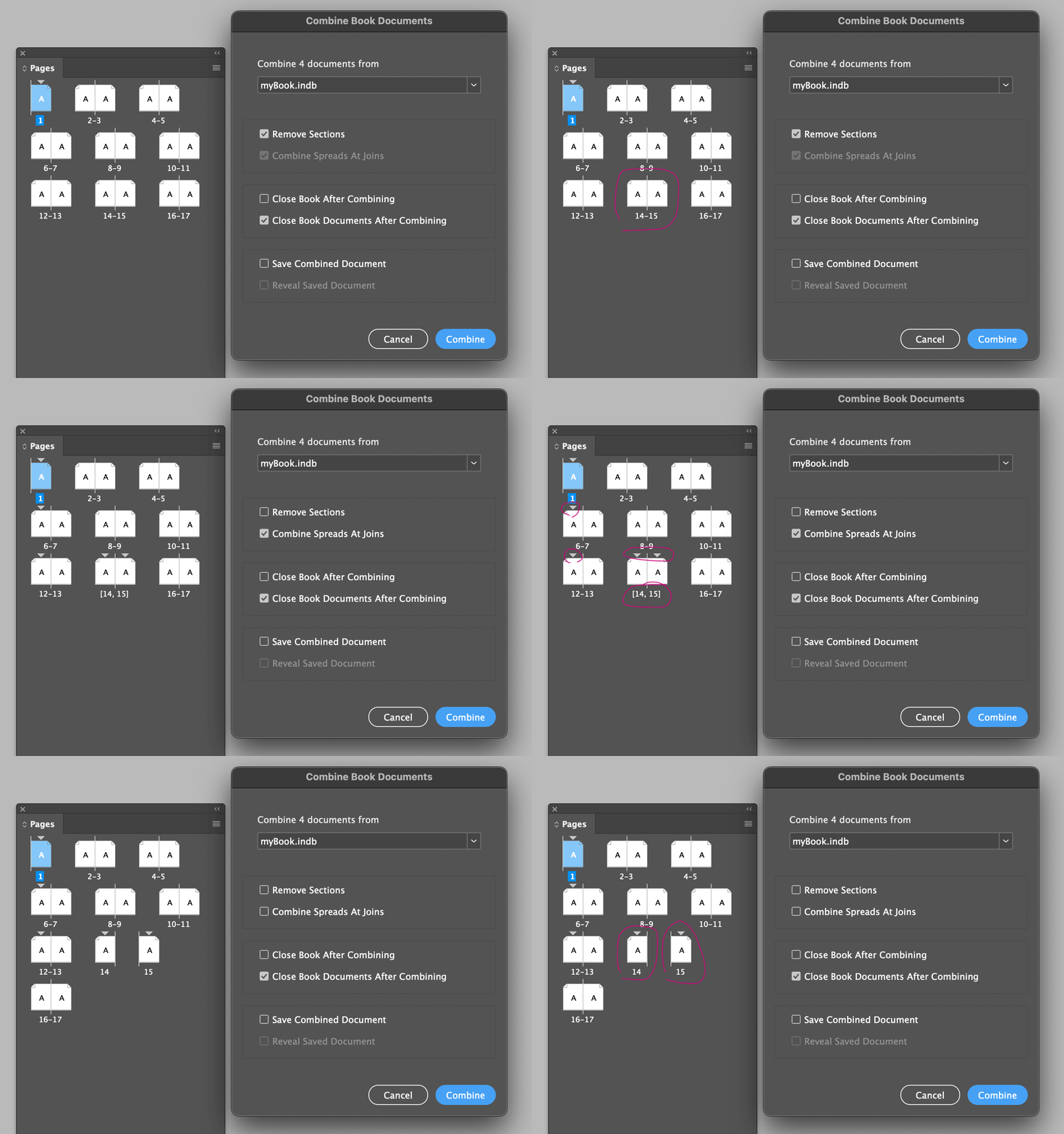
Edit 2025-04-27: improved script by combining adjacent single-page facing-page spreads at the document joins. Added more UI options. Added number of pages display. Set hierarchy so that "Combine Spreads At Joins" relates better to "Remove Sections" See the following diagram:




 AdChoices