

Known Participant
July 16, 2019
Answered

How to merge the cells which are highlighted on the table?

  • July 16, 2019
  • 2 replies
  • 774 views

How to merge the highlighted cells on the table? Does anyone know??

    This topic has been closed for replies.
    Correct answer Barb Binder

    Hi Bijoyb:

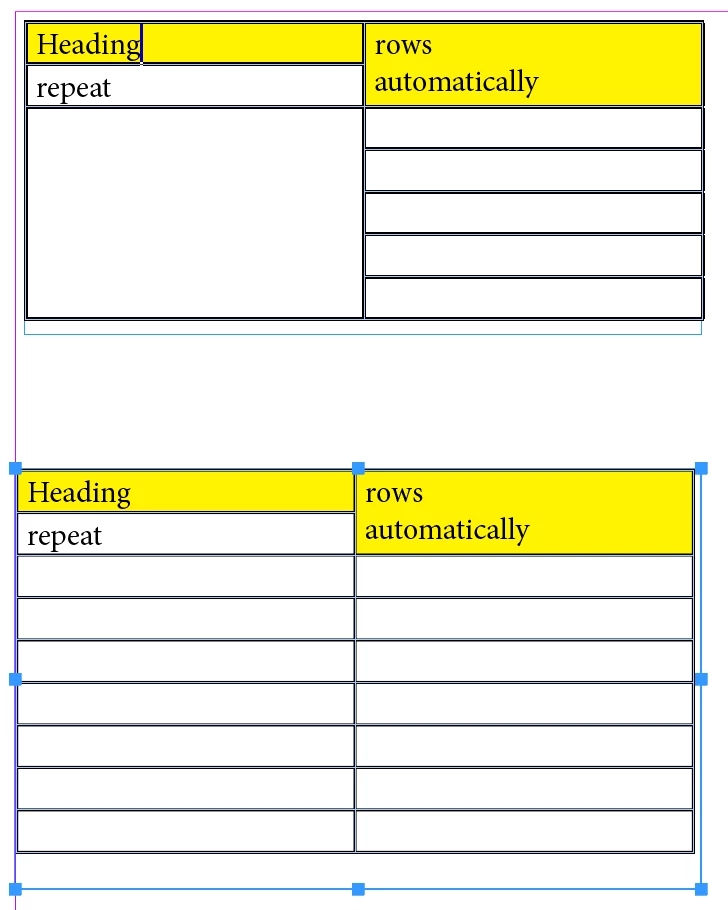
    It will work within the body rows and within the heading rows. It will not work for a selection that contains both.

    ~Barb
    2 replies

    Frans v.d. Geest
    Community Expert
    Community Expert
    July 16, 2019

    Right click, choose Merge cells.

    bijoybAuthor
    Known Participant
    July 16, 2019

    I don't see the option of Merge cells.

    Jongware
    Community Expert
    Community Expert
    July 16, 2019

    bijoyb  wrote

    I don't see the option of Merge cells.

    One or more rows are designated as Header Rows; that's why (1) you cannot merge them, as you cannot merge mixed header and table body cells, and (2) you have the option "Convert To Body Rows" in this dropdown menu.

    Do note that option (2) may not do what you want - the header might be in use somewhere else. If you don't want to lose your current table header, start your selection beneath it.

    vladan saveljic
    Inspiring
    July 16, 2019

    bijoybAuthor
    Known Participant
    July 16, 2019

    Doesn't work

    Barb Binder
    Community Expert
    Community Expert
    July 16, 2019

    Thank you Barb. That worked now.


    Great! We are always happy to help.

    ~Barb

    ~Barb at Rocky Mountain Training