dublove
Brainiac
April 20, 2025
Answered

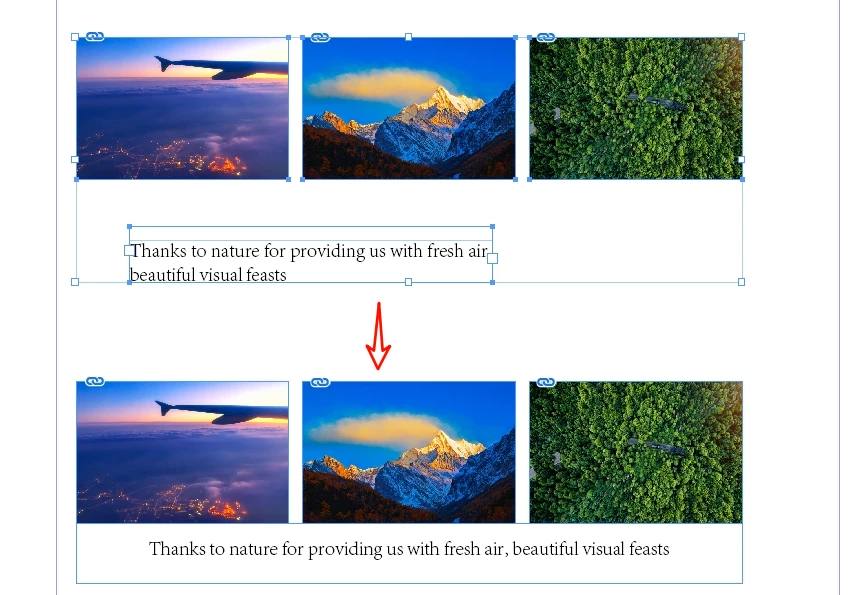
How to modify this script to select multiple images and a text box?

  • April 20, 2025
  • 3 replies
  • 1761 views

Thanks to FRIdNGE, the great original script provider! 

There's also Robert at ID-Tasker who has been quite helpful.
It is now suitable for the case of one caption for one picture, allowing the caption to be quickly pasted close to the picture.

The original post seems to have sunk.
I'm trying to modify it to a situation where multiple images share a caption, but I don't know how to traverse out the textframe and image with a loop.

/*
    _FRIdNGE-0766_ImageCaptionAlignment.jsx
    Script written by FRIdNGE, Michel Allio [02/11/2024]
*/
//https://community.adobe.com/t5/indesign-discussions/script-to-match-object-sizes-and-align-captions-in-indesign/m-p/14941759
app.doScript(main, ScriptLanguage.JAVASCRIPT, undefined, UndoModes.FAST_ENTIRE_SCRIPT, 'Image And Caption Alignment');

function main() {

    var myDoc = app.activeDocument;
    var myRulerOrigin = myDoc.viewPreferences.rulerOrigin;

    if ( app.selection.length != 2 ) {

        alert( "Select 2 items!")
        exit();
        
    } else {

        if ( app.selection[0] instanceof Rectangle && app.selection[1] instanceof TextFrame ) {
            var myGraphicFrame = app.selection[0];
            var myTextFrame = app.selection[1];        
        } else if ( app.selection[1] instanceof Rectangle && app.selection[0] instanceof TextFrame ) {
            var myGraphicFrame = app.selection[1];
            var myTextFrame = app.selection[0];        
        } else {
            alert( "Bad Selection!")
            exit();
        }

        myDoc.viewPreferences.rulerOrigin = RulerOrigin.SPREAD_ORIGIN;

        myTextFrame.geometricBounds = [ myGraphicFrame.geometricBounds[2], myGraphicFrame.geometricBounds[1], myGraphicFrame.geometricBounds[2] + myTextFrame.geometricBounds[2] - myTextFrame.geometricBounds[0], myGraphicFrame.geometricBounds[3] ];
        
        myDoc.viewPreferences.rulerOrigin = myRulerOrigin;

    }

}


Correct answer m1b

Hi @dublove, here is one approach...

- Mark


/**
 * @file Align Caption Frame To Graphic Frames.js
 *
 * Usage:
 *   1. Select the caption, a text frame
 *   2. Also select one or more graphic frames
 *   3. Run script
 *
 * Script will align the left and right edges of the caption frame
 * to the left and right extremes of the graphic frame(s), and
 * also align the caption frame above or below the graphic frame(s).
 *
 * @author m1b
 * @version 2025-04-23
 * @discussion https://community.adobe.com/t5/indesign-discussions/how-to-modify-this-script-to-select-multiple-images-and-a-text-box/m-p/15282394
 */
function main() {

    var settings = {

        // distance between the graphic frame(s) and caption frame, in points
        gap: 0,

        // whether to adjust the final positioning to account for text frame insets [T, L, B, R].
        adjustForTextFrameInsets: [false, true, false, true],

    };

    var doc = app.activeDocument,
        items = doc.selection,
        graphicFrames = getThingsWithFilter(items, function (item) { return item.hasOwnProperty('graphics') && item.graphics.length > 0 }, false),
        captionFrame = getThingsWithFilter(items, function (item) { return item.hasOwnProperty('texts') && item.texts.length > 0 }, true);

    if (0 === graphicFrames.length)
        return alert('Please include one or more graphic frames in your selection.');

    if (!captionFrame)
        return alert('Please include one caption text frame in your selection.')

    app.scriptPreferences.measurementUnit = MeasurementUnits.POINTS;

    // insets to adjust for text frame insets
    var insets = [
        settings.adjustForTextFrameInsets[0] ? captionFrame.textFramePreferences.insetSpacing[0] : 0,
        settings.adjustForTextFrameInsets[1] ? captionFrame.textFramePreferences.insetSpacing[1] : 0,
        settings.adjustForTextFrameInsets[2] ? captionFrame.textFramePreferences.insetSpacing[2] : 0,
        settings.adjustForTextFrameInsets[3] ? captionFrame.textFramePreferences.insetSpacing[3] : 0,
    ];

    var minimumHeight = captionFrame.texts[0].characters[0].pointSize
        + (captionFrame.textFramePreferences.insetSpacing[2] + captionFrame.textFramePreferences.insetSpacing[0]);

    var left = Infinity,
        right = -Infinity,
        top = Infinity,
        bottom = -Infinity,
        anchor;

    for (var i = 0; i < graphicFrames.length; i++) {
        left = Math.min(graphicFrames[i].geometricBounds[1], left);
        right = Math.max(graphicFrames[i].geometricBounds[3], right);
        top = Math.min(graphicFrames[i].geometricBounds[0], top);
        bottom = Math.max(graphicFrames[i].geometricBounds[2], bottom);
    }

    if (top < captionFrame.geometricBounds[0]) {
        // align caption below graphic frames
        top = bottom + settings.gap;
        bottom = top + minimumHeight;
        anchor = AnchorPoint.TOP_LEFT_ANCHOR;
    }

    else {
        // align caption above graphic frames
        bottom = top - settings.gap;
        top = bottom - minimumHeight;
        anchor = AnchorPoint.BOTTOM_LEFT_ANCHOR;
    }

    // new bounds, adjusting for insets
    captionFrame.geometricBounds = [
        top - insets[0],
        left - insets[1],
        bottom + insets[2],
        right + insets[3],
    ];

    // now expand to fit the caption text
    while (captionFrame.overflows)
        captionFrame.resize(CoordinateSpaces.PARENT_COORDINATES, anchor, ResizeMethods.ADDING_CURRENT_DIMENSIONS_TO, [0, 2]);

};
app.doScript(main, ScriptLanguage.JAVASCRIPT, undefined, UndoModes.ENTIRE_SCRIPT, 'Align Caption To Graphic Frames');

/**
 * Returns any things which pass the `filter` function.
 * @author m1b
 * @version 2025-04-23
 * @param {Array<*>} things - the things to search.
 * @param {Function} filter - a function that, given a thing, returns true when it matches.
 * @param {Boolean} [returnFirstThing] - whether to return the first thing only (default: false).
 * @returns {Array<*>}
 */
function getThingsWithFilter(things, filter, returnFirstThing) {

    var found = [];

    for (var i = 0; i < things.length; i++) {

        if (
            'Group' === things[i].constructor.name
            && things[i].pageItems.length > 0
        ) {
            var moreThings = getThingsWithFilter(things[i].pageItems.everyItem().getElements(), filter, returnFirstThing);

            if (
                returnFirstThing
                && undefined != moreThings
                && 'Array' !== moreThings.constructor.name
            )
                return moreThings;

            if (moreThings.length > 0)
                found = found.concat(moreThings);

            continue;
        }

        if (!filter(things[i]))
            continue;

        if (returnFirstThing)
            return things[i];

        found.push(things[i]);

    }

    if (
        returnFirstThing
        && 0 === found.length
    )
        return;

    return found;

};

Edit 2025-04-22: added support for grouped items.

Edit 2025-04-23: fixed bug relating to minimum height of caption frame, added support for adjusting for text frame insets.

Edit 2025-04-23: added finer control over each text frame inset and fixed another bug relating to minimum height.


3 replies

m1b
m1bCorrect answer
Community Expert
April 22, 2025

Hi @dublove, here is one approach...

- Mark


/**
 * @file Align Caption Frame To Graphic Frames.js
 *
 * Usage:
 *   1. Select the caption, a text frame
 *   2. Also select one or more graphic frames
 *   3. Run script
 *
 * Script will align the left and right edges of the caption frame
 * to the left and right extremes of the graphic frame(s), and
 * also align the caption frame above or below the graphic frame(s).
 *
 * @author m1b
 * @version 2025-04-23
 * @discussion https://community.adobe.com/t5/indesign-discussions/how-to-modify-this-script-to-select-multiple-images-and-a-text-box/m-p/15282394
 */
function main() {

    var settings = {

        // distance between the graphic frame(s) and caption frame, in points
        gap: 0,

        // whether to adjust the final positioning to account for text frame insets [T, L, B, R].
        adjustForTextFrameInsets: [false, true, false, true],

    };

    var doc = app.activeDocument,
        items = doc.selection,
        graphicFrames = getThingsWithFilter(items, function (item) { return item.hasOwnProperty('graphics') && item.graphics.length > 0 }, false),
        captionFrame = getThingsWithFilter(items, function (item) { return item.hasOwnProperty('texts') && item.texts.length > 0 }, true);

    if (0 === graphicFrames.length)
        return alert('Please include one or more graphic frames in your selection.');

    if (!captionFrame)
        return alert('Please include one caption text frame in your selection.')

    app.scriptPreferences.measurementUnit = MeasurementUnits.POINTS;

    // insets to adjust for text frame insets
    var insets = [
        settings.adjustForTextFrameInsets[0] ? captionFrame.textFramePreferences.insetSpacing[0] : 0,
        settings.adjustForTextFrameInsets[1] ? captionFrame.textFramePreferences.insetSpacing[1] : 0,
        settings.adjustForTextFrameInsets[2] ? captionFrame.textFramePreferences.insetSpacing[2] : 0,
        settings.adjustForTextFrameInsets[3] ? captionFrame.textFramePreferences.insetSpacing[3] : 0,
    ];

    var minimumHeight = captionFrame.texts[0].characters[0].pointSize
        + (captionFrame.textFramePreferences.insetSpacing[2] + captionFrame.textFramePreferences.insetSpacing[0]);

    var left = Infinity,
        right = -Infinity,
        top = Infinity,
        bottom = -Infinity,
        anchor;

    for (var i = 0; i < graphicFrames.length; i++) {
        left = Math.min(graphicFrames[i].geometricBounds[1], left);
        right = Math.max(graphicFrames[i].geometricBounds[3], right);
        top = Math.min(graphicFrames[i].geometricBounds[0], top);
        bottom = Math.max(graphicFrames[i].geometricBounds[2], bottom);
    }

    if (top < captionFrame.geometricBounds[0]) {
        // align caption below graphic frames
        top = bottom + settings.gap;
        bottom = top + minimumHeight;
        anchor = AnchorPoint.TOP_LEFT_ANCHOR;
    }

    else {
        // align caption above graphic frames
        bottom = top - settings.gap;
        top = bottom - minimumHeight;
        anchor = AnchorPoint.BOTTOM_LEFT_ANCHOR;
    }

    // new bounds, adjusting for insets
    captionFrame.geometricBounds = [
        top - insets[0],
        left - insets[1],
        bottom + insets[2],
        right + insets[3],
    ];

    // now expand to fit the caption text
    while (captionFrame.overflows)
        captionFrame.resize(CoordinateSpaces.PARENT_COORDINATES, anchor, ResizeMethods.ADDING_CURRENT_DIMENSIONS_TO, [0, 2]);

};
app.doScript(main, ScriptLanguage.JAVASCRIPT, undefined, UndoModes.ENTIRE_SCRIPT, 'Align Caption To Graphic Frames');

/**
 * Returns any things which pass the `filter` function.
 * @author m1b
 * @version 2025-04-23
 * @param {Array<*>} things - the things to search.
 * @param {Function} filter - a function that, given a thing, returns true when it matches.
 * @param {Boolean} [returnFirstThing] - whether to return the first thing only (default: false).
 * @returns {Array<*>}
 */
function getThingsWithFilter(things, filter, returnFirstThing) {

    var found = [];

    for (var i = 0; i < things.length; i++) {

        if (
            'Group' === things[i].constructor.name
            && things[i].pageItems.length > 0
        ) {
            var moreThings = getThingsWithFilter(things[i].pageItems.everyItem().getElements(), filter, returnFirstThing);

            if (
                returnFirstThing
                && undefined != moreThings
                && 'Array' !== moreThings.constructor.name
            )
                return moreThings;

            if (moreThings.length > 0)
                found = found.concat(moreThings);

            continue;
        }

        if (!filter(things[i]))
            continue;

        if (returnFirstThing)
            return things[i];

        found.push(things[i]);

    }

    if (
        returnFirstThing
        && 0 === found.length
    )
        return;

    return found;

};

Edit 2025-04-22: added support for grouped items.

Edit 2025-04-23: fixed bug relating to minimum height of caption frame, added support for adjusting for text frame insets.

Edit 2025-04-23: added finer control over each text frame inset and fixed another bug relating to minimum height.

dublove
dubloveAuthor
Brainiac
April 22, 2025

Hi  m1b.

Thank you.
You're so strong and always invincible going forward.


It seems like the text box position can't be higher than the top of the image. This doesn't matter, it can be overcome.


The header note annotations aren't right
**/
There seems to be something wrong with the algorithm. The right side of the text box isn't aligned and the top isn't close.

Also, is it possible to recognize the three images if they are already grouped?

m1b
Community Expert
April 22, 2025

Hi @dublove I have updated the script to handle grouped items. However the other problems you show work fine on my computer. Can you post an .indd (not .idml) of those exact files and I will test.

- Mark

Robert at ID-Tasker
Brainiac
April 20, 2025

@dublove 


It would be much easier - if you make a requirement - that "images" are selected FIRST - then TextFrame LAST - or vice versa.


Then, script can just check if first / last is a TextFrame and treat the rest as "images".


And also, that "images" are selected from left to right.


dublove
dubloveAuthor
Brainiac
April 20, 2025

In case of multiple images, the images must have been arranged side by side from left to right.
You need to detect the first picture and the last picture.
Sometimes the text box is not always at the bottom, sometimes it may be above the picture.

That is, the text box is not necessarily at the end.


Single image and multiple images should share 1 script, making 2 scripts would be too inconvenient.

dublove
dubloveAuthor
Brainiac
April 20, 2025

@dublove


Just realised, that I've already made something like that - and is available in the free version of my tool: 


Of course, it would require a few modifications - but the mechanism, overall, would be pretty much the same. 


The plugin doesn't work well.
Scripts are more flexible.

m1b
Community Expert
April 20, 2025

For a start, let's ask Michel.

@FRIdNGE ?

dublove
dubloveAuthor
Brainiac
April 20, 2025

Looking forward to FRIdNGE reproducing.
But sadly, he seems to have been too busy to be interested in it. Because I asked twice a long time ago under the original post.