


New Participant
August 25, 2020
Question

How to preserve vertical text in 'Fixed-Format' ePubs?

  • August 25, 2020
  • 4 replies
  • 787 views

I'm exporting a textbook as a Fixed-Format ePub via InDesign 2020 but noticed vertical text get exported horizontally instead! Here is an example of what I mean:
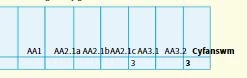


Here's how it should look like:
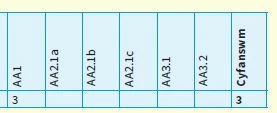
 

Does anyone know how I can preserve the text rotation? There are hundreds of examples of this issue in the book. Would there be a 'global' setting/CSS to resolve this?

This topic has been closed for replies.

4 replies

Community Expert
August 26, 2020

I would suggest you are looking for a bug report in InDesign UserVoice or doing your own report there:

https://indesign.uservoice.com/forums/601180-adobe-indesign-bugs?category_id=209104&filter=top&page=1


FWIW: With Publish Online there is no bug with text rotation in table cells:

https://indd.adobe.com/view/6daea8fb-84ba-4ae5-94bb-f7c30843eb9a


Regards,
Uwe Laubender

( ACP )

rayek.elfin
Brainiac
August 27, 2020

Publish online converts the entire thing to a SVG. Basically cheating, because the text and table is converted to pure vectors. Its solution is identical to my previous advise: convert the table to a graphic. No text is retained.


At least the epub export attempts to retain the text as text.

rayek.elfin
Brainiac
August 27, 2020

PS In my opinion this is not a bug, but merely an unsupported feature in epubs. Beyond simple formatting, the epub format is as fragile as a house of crystal cards. Not the fault of InDesign or the developers.

Community Expert
August 26, 2020

Hi Gareth,

hi rayek_elfin,

tested rotated text in table cells with InDesign 15.1.1.103 on Windows 10.

InDesign's EPUB Interactivity Preview panel is already showing the bug:


Consequently the Windows EPUB viewer and also Thorium are showing the same:


Regards,
Uwe Laubender

( ACP )

Community Expert
August 25, 2020

Hi Gareth,

I fear this is a bug with InDesign's export to Fixed Layout EPUB.

A workaround would be to use a separate table in a separate text frame that is rotated.

Think, we recently had a case like that in the forum.


FWIW: Did not test this.


Regards,
Uwe Laubender

( ACP )

BobLevine
Community Expert
August 25, 2020

How are you reading the EPUB? Anything but the Books app on iOS or Mac is a crapshoot.


New Participant
August 25, 2020

Thanks for your comment 🙂 I'm using Kindle Previewer and Calibre to preview the ePubs.... the text orientation shows up incorrectly on both.

BobLevine
Community Expert
August 25, 2020

Check it out using the Books app.