


New Participant
August 25, 2020
Question

How to preserve vertical text in 'Fixed-Format' ePubs?

  • August 25, 2020
  • 4 replies
  • 787 views

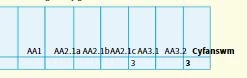
I'm exporting a textbook as a Fixed-Format ePub via InDesign 2020 but noticed vertical text get exported horizontally instead! Here is an example of what I mean:


Here's how it should look like:
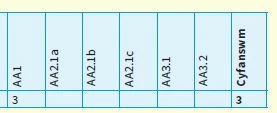
 

Does anyone know how I can preserve the text rotation? There are hundreds of examples of this issue in the book. Would there be a 'global' setting/CSS to resolve this?

This topic has been closed for replies.

4 replies

Community Expert
August 26, 2020

I would suggest you are looking for a bug report in InDesign UserVoice or doing your own report there:

https://indesign.uservoice.com/forums/601180-adobe-indesign-bugs?category_id=209104&filter=top&page=1


FWIW: With Publish Online there is no bug with text rotation in table cells:

https://indd.adobe.com/view/6daea8fb-84ba-4ae5-94bb-f7c30843eb9a


Regards,
Uwe Laubender

( ACP )

rayek.elfin
Legend
August 27, 2020

Publish online converts the entire thing to a SVG. Basically cheating, because the text and table is converted to pure vectors. Its solution is identical to my previous advise: convert the table to a graphic. No text is retained.


At least the epub export attempts to retain the text as text.

rayek.elfin
Legend
August 27, 2020

PS In my opinion this is not a bug, but merely an unsupported feature in epubs. Beyond simple formatting, the epub format is as fragile as a house of crystal cards. Not the fault of InDesign or the developers.

Community Expert
August 26, 2020

Hi Gareth,

hi rayek_elfin,

tested rotated text in table cells with InDesign 15.1.1.103 on Windows 10.

InDesign's EPUB Interactivity Preview panel is already showing the bug:


Consequently the Windows EPUB viewer and also Thorium are showing the same:


Regards,
Uwe Laubender

( ACP )

Community Expert
August 25, 2020

Hi Gareth,

I fear this is a bug with InDesign's export to Fixed Layout EPUB.

A workaround would be to use a separate table in a separate text frame that is rotated.

Think, we recently had a case like that in the forum.


FWIW: Did not test this.


Regards,
Uwe Laubender

( ACP )

BobLevine
Community Expert
Community Expert
August 25, 2020

How are you reading the EPUB? Anything but the Books app on iOS or Mac is a crapshoot.


New Participant
August 25, 2020

Thanks for your comment 🙂 I'm using Kindle Previewer and Calibre to preview the ePubs.... the text orientation shows up incorrectly on both.

New Participant
August 25, 2020

Check it out using the Books app. 


Have you got a download link for that?