


K-E
New Participant
July 8, 2019
Answered

How to remove background in InDesign?

  • July 8, 2019
  • 7 replies
  • 186925 views

Hello,

I am quite new to this indesign program and have previously used Corel Draw.

I am wanting to know how i can remove the white background of a JPEG that I have exported from Corel Draw in to InDesign.

Thanks


***** Title renamed by Moderator "VS" *****
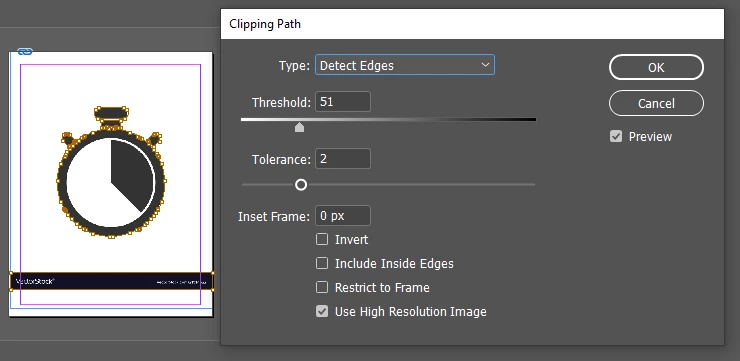
Correct answer roses91211073

They way, I've found It is Clipping Path. You just select your object. Now go to the Object>Clipping Path>Option Now from this window change your Type Click drop down menu select Detect Edges.

But it is a simple clipping path to remove a background from an image in InDesign. However, the ever-increasing success of Photoshop all over the world, you never earn a perfect result without it, Such as when you like to remove the background from images like glass, hair, etc.

7 replies

BobLevine
Community Expert
October 6, 2025

I did not look at the attachment, but the person IM'd me asking another basic question about video. Did the attachment contain something that was obvious spam? (I'm wondering if the person is just a really naive user...)


I've seen a hundred like it. A worthless image and view words of text on old posts. 

Dave Creamer of IDEAS
Community Expert
October 5, 2025

It was spam and I removed it.


I did not look at the attachment, but the person IM'd me asking another basic question about video. Did the attachment contain something that was obvious spam? (I'm wondering if the person is just a really naive user...)

David Creamer: Community Expert (ACI and ACE 1995-2023)
BobLevine
Community Expert
October 5, 2025

You replied to a 6 year old thread. Best to start a new thread, but you need to clarify what you are asking. It doesn't make any sense. 


If you are asking how to remove the background from the photo, Photoshop's new Select People features would be a good place to start.


It was spam and I removed it.

Dave Creamer of IDEAS
Community Expert
October 4, 2025

You replied to a 6 year old thread. Best to start a new thread, but you need to clarify what you are asking. It doesn't make any sense. 


If you are asking how to remove the background from the photo, Photoshop's new Select People features would be a good place to start.


David Creamer: Community Expert (ACI and ACE 1995-2023)
BobLevine
Community Expert
July 8, 2019

Why are you using JPG from CorelDRAW? PDF is a far better choice.

I believe CorelDRAW is capable of producing a PDF/X-4 file. Place that in InDesign and make sure to show options when doing so to allow you to choose a transparent background.

K-E
K-EAuthor
New Participant
July 8, 2019

Hello and thanks for your help

Re: Bob, I used JPG for individual images and pdf format for the whole document, I did find it easier that way than cropping down the pdf.

Everything is still new to me so I will keep all this in mind!

BobLevine
Community Expert
July 8, 2019

PDF is far superior and will maintain the vector quality.

roses91211073
roses91211073Correct answer
New Participant
July 8, 2019

They way, I've found It is Clipping Path. You just select your object. Now go to the Object>Clipping Path>Option Now from this window change your Type Click drop down menu select Detect Edges.

But it is a simple clipping path to remove a background from an image in InDesign. However, the ever-increasing success of Photoshop all over the world, you never earn a perfect result without it, Such as when you like to remove the background from images like glass, hair, etc.

New Participant
May 23, 2021

Photoshop doesn't help at all. I already tried using photoshop to get rid of the white background and imported it into indesign. If you do have another way to get rid of the background using photoshop, please do share. 


Thank you 🙂

Barb Binder
Community Expert
May 24, 2021

This would be best asked on the Photoshop forum: https://forums.adobe.com/community/photoshop.


In Photoshop, Select and Mask is the recommeded approach for a non-destructive removal of any background, white or otherwise. If you are a brand new Photoshop user and don't want to invest the time to learn how to do it correctly, at least give the Magic Eraser a shot. 


~Barb 


~Barb at Rocky Mountain Training
Steve Werner
Community Expert
July 8, 2019

InDesign is not an image editing program. It would be far better to open an image editor like Photoshop or Affinity Photo to remove a white background.

K-E
K-EAuthor
New Participant
July 8, 2019

Thanks for your reply Steve,

We have only registered to get the InDesign app and intended to still use the Corel Draw suite for image editing. Is there a different save as file that will keep the background format?

Thanks

Steve Werner
Community Expert
July 8, 2019

I'm assuming that you want white areas to become transparent. This is often called "silhouetting"—dropping out a background behind your subject.

I'm unfamiliar with what CorelDraw can do (I think of it as a vector program). It it can work with images, there are two ways you could create a silhouetting effect. You could change the white pixels in the image to transparent pixels. Or, perhaps CorelDraw can create what's called a "clipping path." This is a vector outline around the parts of the image you want to retain. InDesign could recognize a JPEG file with either transparent pixels or work with a clipping path.

InDesign would also support clipping paths or transparent pixels in other common image formats like TIFF.