


Participant
October 7, 2024
Answered

How to Remove Extra Space After Numbers in a Numbered List in InDesign

  • October 7, 2024
  • 4 replies
  • 1554 views

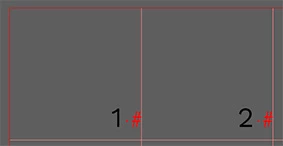
I am making a calendar in Indesign and have entered all the dates using a numbered list. For some reason a space appears after each number, preventing the dates from being placed as far out into the right margin of each cell as I would like (only "^#" is entered for the place of the number). Does anyone know how to remove this (the red dot in the picture)?


<Title renamed by MOD>

This topic has been closed for replies.
Correct answer jmlevy

That is normal since a numbered list only works if there is a character to trigger it. In your case, it is a space.

You could replace this space by a hair space or create a GREP style to reduce its size and its horizontal scale.

4 replies

Dave Creamer of IDEAS
Community Expert
Community Expert
October 8, 2024

There is a free script available for calendars:

https://creativepro.com/calendar-wizard-script-upgraded/


Also, since InDesign can view spreads left-to-right, you can select all the pages in the Pages panel and roate your view so they appear as a typical calendar. (For example, photo on top page, and dates on the bottom page. 


David Creamer: Community Expert (ACI and ACE 1995-2023)
Robert at ID-Tasker
Legend
October 7, 2024

@Lazizacereza 


Instead of using Table - you should rather create linked TextFrames - much greater flexibility and more options.


Participant
October 7, 2024

Thanks, I had trouble placing the numbers evenly (with the same space from the right margin in each cell) when I tried that before and thought a table would be the solution. But maybe I should give it another try!

Robert at ID-Tasker
Legend
October 7, 2024

@Lazizacereza


With linked TextFrames you can put a lot more info - but then you would've to prepare it in Excel first - or use some kind of a generator.


jmlevy
Community Expert
jmlevyCommunity ExpertCorrect answer
Community Expert
October 7, 2024

That is normal since a numbered list only works if there is a character to trigger it. In your case, it is a space.

You could replace this space by a hair space or create a GREP style to reduce its size and its horizontal scale.

Robert at ID-Tasker
Legend
October 7, 2024

@jmlevy 


Space - or any other character - isn't necessary - it can be just blank paragraph. 


jmlevy
Community Expert
Community Expert
October 7, 2024

@Robert at ID-Tasker 

No, if you leave the paragraph without any character, nothing happens.

Robert at ID-Tasker
Legend
October 7, 2024

Are you sure you have only "^#" in the ParaStyle definition?


How have you created paragraphs?