


Participant
July 3, 2021
Answered

How to remove text wrap (was "margins") from outside text box?

  • July 3, 2021
  • 3 replies
  • 5679 views

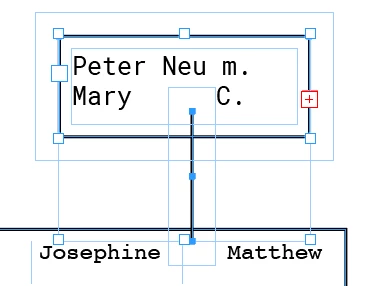
I'm using the 2021 version of InDesign and whenever I create a new text box, I get this padding that forces nearby text to wrap around it. I want to remove this. The padding even appears on lines that I draw within the document. The padding is pictured below. I've added inset spacing which I know how to remove, and removing it doesn't fix the problem. I haven't seen any other support threads/articles about this issue. Any ideas? Picture below.
 

Correct answer Barb Binder

As per @Willi Adelberger, you are showing us a text wrap issue and not frame insets. 


Use Window > Text Wrap to open the panel. Click the left button on the top row to disable it. You can disable it for the existing frames but it is on as a default either for this one document or for all documents, so it will continue to reoccur until you disable the default. 

https://www.rockymountaintraining.com/adobe-indesign-setting-and-removing-defaults/


~Barb 

3 replies

Barb Binder
Community Expert
Barb BinderCommunity ExpertCorrect answer
Community Expert
July 3, 2021

As per @Willi Adelberger, you are showing us a text wrap issue and not frame insets. 


Use Window > Text Wrap to open the panel. Click the left button on the top row to disable it. You can disable it for the existing frames but it is on as a default either for this one document or for all documents, so it will continue to reoccur until you disable the default. 

https://www.rockymountaintraining.com/adobe-indesign-setting-and-removing-defaults/


~Barb 

~Barb at Rocky Mountain Training
Willi Adelberger
Community Expert
Community Expert
July 3, 2021

Go to text warp and change the text warping there.


If you don't want text warping do the change when no object is selected for future new objects. If it is happening in every document you create, do it when no document is open. 


Work with object styles to avoid such problems and other related object related problems.

Jumpenjax
Community Expert
Community Expert
July 3, 2021

I agree with Willi, the text wrap is a great tool, you could control the amount of wrap.

Lee- Graphic Designer, Print Specialist, Photographer
Legend
July 3, 2021

Hello @eliasolsen 


Go under the Object menu > Text Frame Options > General and set the "Inset Spacing" to zero.

Regards,

Mike


Willi Adelberger
Community Expert
Community Expert
July 3, 2021

That is not the problem here. I think that eiliasolsen want to work with insets.