


New Participant
August 29, 2024
Answered

How to remove Thin Line Appearing Around Text Blocks in InDesign

  • August 29, 2024
  • 3 replies
  • 1474 views

How do I get rid of a thin box that is appearing around my text blocks, interfering with other things on the page. If I move "Contents," everything else moves, too.
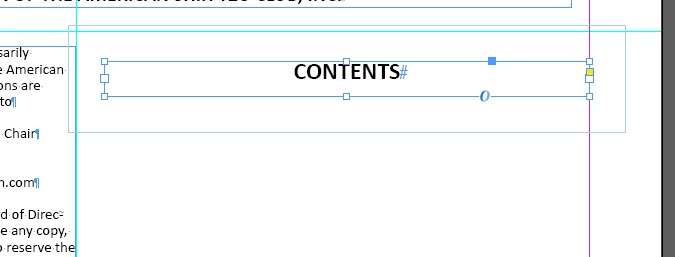


<Title renamed by MOD>


Correct answer Mike Witherell

I agree. It looks like Text Wrap is turned on for that frame.

If you want to hide frame edges, try the View menu > Extras > Hide Frame Edges

Ctrl+Cmd+H on macOS

3 replies

Mike Witherell
Mike WitherellCorrect answer
Community Expert
August 29, 2024

I agree. It looks like Text Wrap is turned on for that frame.

If you want to hide frame edges, try the View menu > Extras > Hide Frame Edges

Ctrl+Cmd+H on macOS

Mike Witherell
Susan Culligan
Inspiring
August 29, 2024

It looks like you have "Show frame edges" on. See screenshot. For PC, press Ctl/H and they'll disappear.

Uh oh--I reread James's answer and see that he's right. It's a text wrap. Ignore my previous answer!

New Participant
August 29, 2024

No, that wasn't it. Thanks anyway.

New Participant
August 29, 2024

It is the very thin box around the center, not the text wrap part.


Robert at ID-Tasker
Brainiac
August 29, 2024
New Participant
August 29, 2024

Yes!!! I didn't try that becasue I never set it to be a Text Wrap. Why in the world would it suddenly do that! Now I can fix all of them! (5 or 6)


Thank you!!!

rob day
Community Expert
August 29, 2024

Why in the world would it suddenly do that!


If you inadvertently set a wrap in the Text Wrap panel with nothing selected:


It would become the default for every new text frame you create:


So make sure with no text frames selected, you have the No text wrap icon set in the Text Wrap panel before creating new text frames