Parts4Arts
Inspiring
June 11, 2020
Answered

How to replace Adobe ExtendScript Toolkit CC (ESTK) with Visual Studio Code (VSC) on macOS 10.14?

  • June 11, 2020
  • 2 replies
  • 3196 views

Hello,

I tried to write my first javascript for Indesign CC 2020. I'm still on macOS 10.14. The old tool Adobe ExtendScript Toolkit CC (ESTK) has some problems since 2018. Adobe switched to Visual Studio Code (VSC), which worked fine under 10.15.


My Question: how can I force InDesign to open a javescript with Visual Studio Code?

I tried to uninstall ESTK, but InDesign will reinstall it 😞

Any ideas, how I can use VSC in macOS 10.14 automacticly?


Grettings, J.

This topic has been closed for replies.
Correct answer Charu Rajput

Hi Charu,

yes this page I found too. But I want to use the VSC instead. Any chance?


Is workaround solution that is mention at the link that we both found does not work for you?


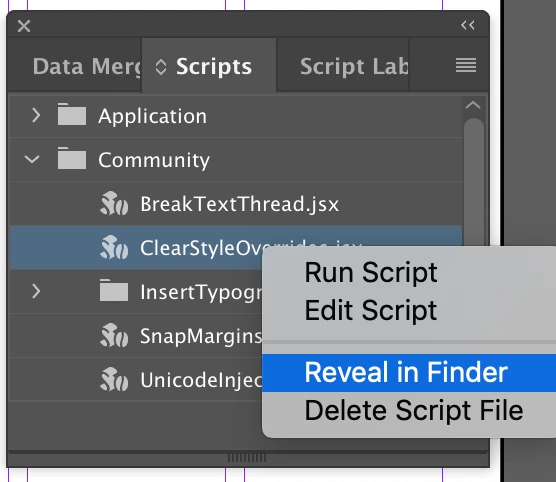
I am sorry, I am also not aware of this. But you can try workaround here as well use option "Reveal in finder" and just double click it. Yes this include one step extra but worth trying. When you double click, it will automatically open in VS Code, as you are successfully able to open the script in VS code from Finder. For option that I am talking ablout you can refer in the screenshot. Sorry screen shot is in English. But third option from the top.


I hope this helps you little bit.

2 replies

Charu Rajput
Adobe Expert
June 11, 2020

Hi,

As specified by LSH is correct method, here re the screenshots to help you more.

1. Select ant jsx file.

2. Right Click that file.

3. Select opton "Get Info" from the list of context menu as per below screenshot


4. Choose "Visual Studio Code" in dropdown "OpenWith". See screenshot

 5. Click on "Change All" button as highlighted in screenshot


Let us know if this works for you.

Best regards
Parts4Arts
Inspiring
June 11, 2020

Hi guys,

thanks for the answer. I done this already and it worked only in Finder.

But I want to edit a .js or .jsx from in InDesign.


(A) the script 'Willkommen.js' is an the folder '…/scripts/scripts Panel'

(B) Open with is set to Visual Studio Code.app

(C) In Indesign I go to the window 'scripts' and right click on  'Willkommen.js' to select 'edit'

(D) InDesign will start ESTK and not VSC 😞

(E) When I run the script in ESTK, I will get an error, because Adobe it not make an update since 2018 :-((

  - I found a way in the internet to correct this error - 

In Windows 10 there is no error and ESTK will used as well. Funny.

Parts4Arts
Inspiring
June 11, 2020

Ok, I got it. I am not sure what workaround did you find. But for this error try the following workaround, if this is not same as you tried at your end.


https://medium.com/adobetech/extendscript-toolkit-debugger-error-1116-67cce4d47af7


Let us know if you are able to resolve the issue.


Hi Charu,

yes this page I found too. But I want to use the VSC instead. Any chance?

Inspiring
June 11, 2020

Try this with any file ending in .jsx:


1. Right click

2. Get Info

3. Under "Use this application [etc]" choose VS Code

4. Click "Change All..."


Voila!