



Michael J. Hoffman
Community Expert
Community Expert
December 13, 2021
Answered

How to shade characters but not spaces

  • December 13, 2021
  • 7 replies
  • 1428 views

I'd like to create a paragraph style or even character style, if appropriate, where the text characters have a background color, but the spaces are unformatted space. Something like this effect:
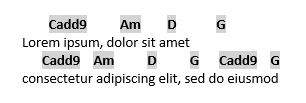


I can't figure out how to shade only the non-space characters. I have a GREP style in play that can detect and modify the character style, but I can't figure out how to shade only the non white spaces.


Any help is appreciated!


This topic has been closed for replies.
Correct answer pixxxelschubser

For example

\S+

character style underlined, thickness > font height with a negative offset

7 replies

janö58856049
Participant
March 22, 2022

spaces between sentences
Like


pixxxelschubser
Community Expert
Community Expert
March 22, 2022
quote

spaces between sentences
Like


By @janö58856049


???

pixxxelschubser
Community Expert
Community Expert
December 14, 2021

Glad to hear that.

Just out of curiosity - what's your grep?

In my opinion, there are only two efficient notations for your requirements:

\S+

or

[^\s]+

Both Grep means the same.

Michael J. Hoffman
Community Expert
Community Expert
December 14, 2021

Right now I'm using simply \w which matches all the "word characters" (letters, digits and underscore, but omits punctuation). This is working well. 

I considered \s\w+\s to pick up the spaces surrounding the word characters, but I think that underlining a white space doesn't create a visible underline (have to try that but I believe it will not highlight the white space). 

pixxxelschubser
Community Expert
Community Expert
December 14, 2021

@davecourtemanche 

Too bad. I'm afraid I don't get the joke. English is not my native language. And even worse, my English is not the best.

Michael J. Hoffman
Community Expert
Community Expert
December 14, 2021

I've got it sorted, thanks to @pixxxelschubser 's suggestion. My regular expression is working just fine, the trick for me was to use the underline as the background. Thanks everyone for your help!!

!

pixxxelschubser
Community Expert
Community Expert
December 14, 2021

Hi @davecourtemanche 

a good start. But for any grep style, it's useful to test it with a few examples. Try your own grep on a simple sample text like "my first $100,000.00".


What happens?

And what with \S+

davecourtemanche
Inspiring
December 14, 2021

But he's doing chord charts. I mean, even jazz doesn't have any million dollar chords. 😄

davecourtemanche
Inspiring
December 14, 2021

Create a character style with a custom underline. Apply that character style to any letter in the paragraph style.

James Gifford—NitroPress
Legend
December 13, 2021

I think the GREP style is your only option. I don't think ID has any option to exclude style from whitespace. Interesting notion for an option but I think the need is so slight (except for certain types of art/display type) it's not likely to happen.

pixxxelschubser
Community Expert
pixxxelschubserCommunity ExpertCorrect answer
Community Expert
December 13, 2021

For example

\S+

character style underlined, thickness > font height with a negative offset

Michael J. Hoffman
Community Expert
Community Expert
December 14, 2021
quote

For example

\S+

character style underlined, thickness > font height with a negative offset


By @pixxxelschubser


OK, with this, I think I'm on the right track! I knew there had to be a trick to the shading, I didn't think of ultra thick underlines! and with a little extra GREP tweaking, I can pick up a single space before and after the characters so there's a bit of a border.


Thanks!