


Participating Frequently
March 6, 2019
Answered

How to show checkmark if datamerge text is present

  • March 6, 2019
  • 2 replies
  • 1236 views

Hi all,

Unfortunately after a lot of searching, I cannot find the right answer to this specific problem.

For one of my clients I use the datamerge function in Indesign CC to fill a personalized user card.

Before a few of the entries I want to show a checkmark (in text or as a vector object), but only when this entry is present (column is filled) in the datamerge file.

I tried the following things:

- Applying a list-style to the datamerge placeholder with the checkmark as list symbol

- Add the checkmark as an anchored inline object

Both gave the same result. Also the empty entries got a checkmark, as shown in the screenshot below.

I also tried using conditional text in order to achieve this but unfortunately I don't really see a way to make this work using this tool.

My question: is this even possible to do? I guess so. Maybe somebody can help me out

Big thanks in advance!
This topic has been closed for replies.
Correct answer vinny38

luukm98637340  wrote

- Applying a list-style to the datamerge placeholder with the checkmark as list symbol

Yes!

That's the way to go...

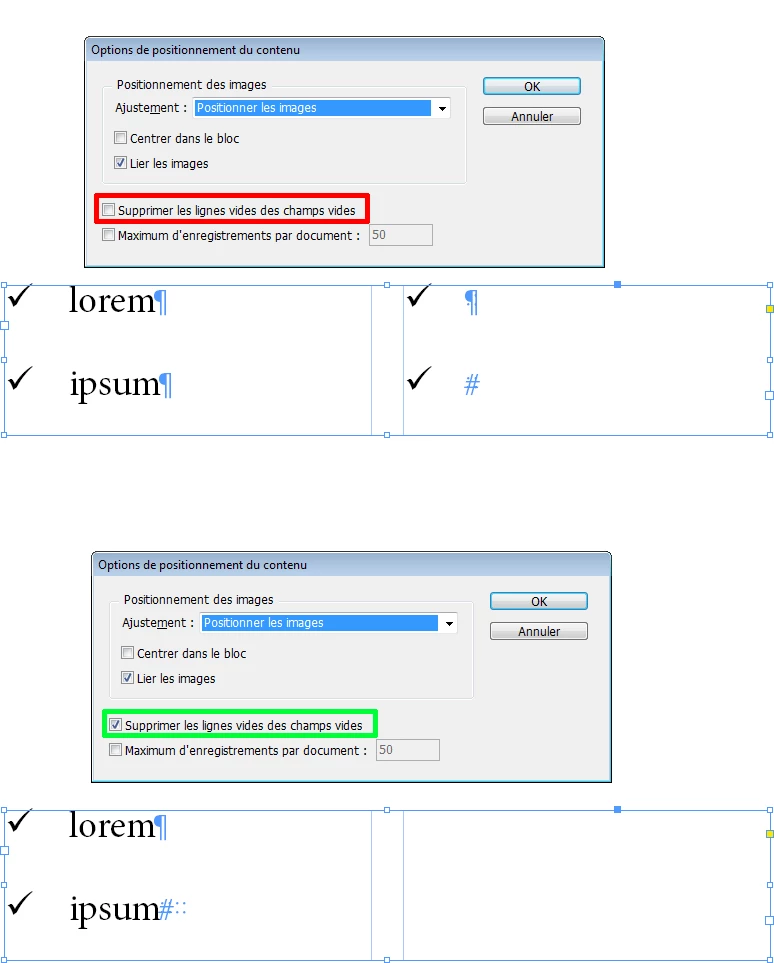
But, you must make sure "Remove blank lines for empty fields" is selected in the Content Placement Options from the Data Merge panel menu:

2 replies

vinny38
vinny38Correct answer
Brainiac
March 7, 2019

luukm98637340  wrote

- Applying a list-style to the datamerge placeholder with the checkmark as list symbol

Yes!

That's the way to go...

But, you must make sure "Remove blank lines for empty fields" is selected in the Content Placement Options from the Data Merge panel menu:

Participating Frequently
March 7, 2019

That seemed to be the perfect solution. But unfortunately this still doesn't work for me.

Are there maybe other settings which were different on your side? My list icon paragraph style looks like this:

Participating Frequently
March 7, 2019

Hmmm...

If you changed the option afterwards, you need to "refresh" data merging preview. Like unchecking and checking back the preview check box. But I assume you tried that...

So... can you share screenshot of your txt or csv file opened in a text editor (such as Notepad++) with hidden characters on?

For instance, a tab character in a csv file might not be considered as an "empty" character.

Could you also be more specific about your workflow? Do you use Excel ? TXT or CSV?...


Yes, I tried unchecking the preview check box a few times indeed

The data source file I want to used is in .TXT format as exported from Excel. The file looks like this:

I also tried a .CSV file as exported from Google spreadsheets. This one look like this:

They don't work both unfortunately..

John Mensinger
Community Expert
March 6, 2019

luukm98637340  wrote

My question: is this even possible to do?

Not in the way(s) you've approached it. InDesign and its Data Merge features do not offer this conditional visibility function. To make it work, you'd have to get the check-mark into (its own column in) the data source file. Whether or not that's feasible depends on the number of records involved, and how often the data changes.

Participating Frequently
March 7, 2019

Unfortunately to hear that. The checkmark is Fontawesome so that won't work in a data source file.

Think I will be checking out other possible unicode alternatives to add in this file.

Anyway, thanks a lot for your fast reply!