


Inspiring
November 27, 2021
Answered

How to Split Table Cells into multiple rows?

  • November 27, 2021
  • 4 replies
  • 14606 views

Hi all,


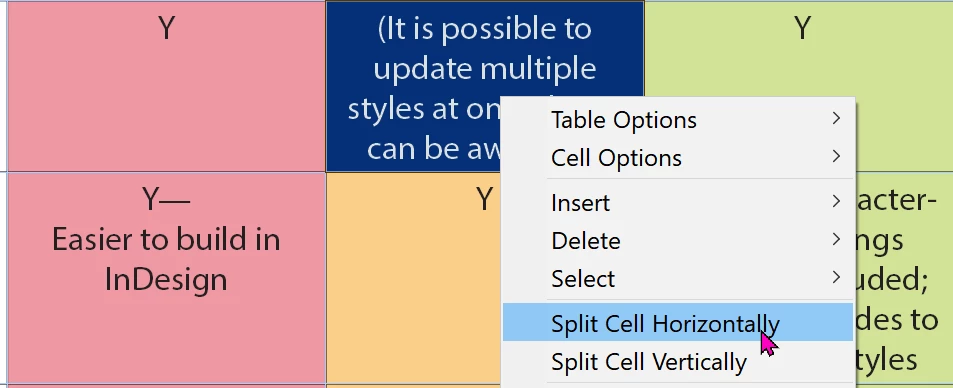
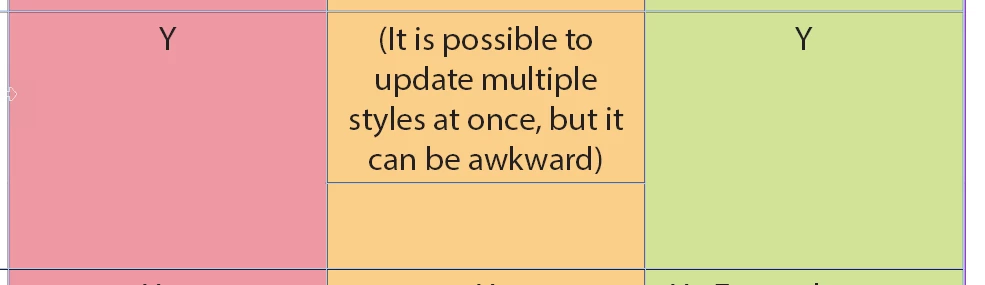
I have a Table with cells that need to be split into multiple rows (see attached files). What is the best practice for this? I tried right click on cell --> split, but you can't specify the numbers, and the two columns become independant of each other. Is this a limitation in InDesign and I should find a script for? If so, does anyone know a script that works well for this kind of task? I.e. splitting a cell into multiple columns, based on paragraph break.
Correct answer Dave Creamer of IDEAS

Sorry for being dense, but are you referring to splitting a cell? You can do that, but you have to manually cut-&-paste the text into the cell. (Technically, this feature simply adds a new row and merges the other cells automatically).

4 replies

FRIdNGE
Inspiring
November 30, 2021

Just For Comment! …


Scott Falkner
Adobe Expert
November 29, 2021

Create a new empty table with the number of rows and columns you want (in this case, 3 and 3). Select the text in column 2 of your current table and convert text to table (Table > Convert Text to Table…). Select the cells of the table (in this case, three cells) then select the corresponding cells in the empty table. Paste. Repeat for other columns.

Inspiring
November 29, 2021

Thank you Scott. How did you go from screencap 2 to 3? I.e. how did you delete the upper level table only leaving the inner tables?

Scott Falkner
Adobe Expert
November 29, 2021

That's one screen capture with three tables in one text frame.

Top: My reproduction of your table.

Middle: The same table after converting the contents of R1C2 and R1C3 to tables.

Bottom: A table created using Table > Create Table with 3 rows and three columns. I selected all the cells in each of the subtables from the middle image and pasted them into the corresponding cells of the empty table.

Diane Burns
Inspiring
November 28, 2021

If you can't find a script, and you have a lot of text to convert this way, see if this "brute force" technique might work.


1. Select the text in a cell


2. Go to the Table menu and choose "Convert Text to Table.."

3. The text will be converted to a table within that cell. Not ideal, but with the control of strokes, etc., it might be a partial workaround.


Diane Burns
Inspiring
November 28, 2021

Also, please do fill out the feature request as David Creamer mentions. 🙂

Dave Creamer of IDEAS
Adobe Expert
November 27, 2021

Rows don't split automatically. I do not know if there is a script or not. 


I went to get the link on InDesign User Voice to post the link and this feature was the first one listed:

https://indesign.uservoice.com/forums/601021-adobe-indesign-feature-requests

Direct link to feature request:

https://indesign.uservoice.com/forums/601021-adobe-indesign-feature-requests/suggestions/33854788-option-to-split-table-rows-across-pages


David Creamer: Community Expert (ACI and ACE 1995-2023)
Geоrge
Brainiac
November 28, 2021

>>  I do not know if there is a script or not. 

http://adobeindesign.ru/2021/02/14/%D0%B4%D0%B5%D0%BB%D0%B5%D0%BD%D0%B8%D0%B5-%D1%81%D1%82%D1%80%D0%BE%D0%BA%D0%B8-%D1%82%D0%B0%D0%B1%D0%BB%D0%B8%D1%86%D1%8B-%D0%BF%D0%BE-%D0%B3%D0%BE%D1%80%D0%B8%D0%B7%D0%BE%D0%BD%D1%82%D0%B0%D0%BB-2/

this is just workaround.


Adobe is not implemented this feature many years and even top-1 request feature not helps 😭 


Remember, never say you can't do something in InDesign, it's always just a question of finding the right workaround to get the job done. © David Blatner