


Known Participant
July 30, 2022
Answered

How to Target (or Select) the Text Frame with a specific TOC Style Name

  • July 30, 2022
  • 6 replies
  • 2798 views

Helloo,


Need your scripting(javascript) expertise with this. I am working on an INDB file where the Cover file contains 2 TOC TextFrames. Each with different TOC Style Name. Let's say "TOC_A" and "TOC_B".

Using the Update TOC Script (which I found online), it can select both textframe using a loop. But what I'm aiming is to select only the Textframe where it contains "TOC_B".

Any ideas?
This topic has been closed for replies.
Correct answer Kasyan Servetsky

Here are two scripts: mine and Mark’s (at the bottom).

You can do this by labeling your text frame(s).

In my script, you can change the label from ‘contents’ to ‘TOC_B’ to target only those text frames that have this label. All text frames you want to update should be labeled.


In Mark’s script, you can add a line or two of code to either skip certain labels (TOC_A) or process only certain labels (TOC_B).

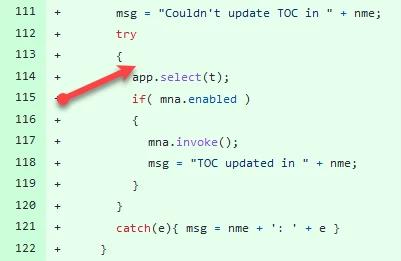
Off the top of my head, (totally untested; I just cast a glance at the code) you can check the label before the script selects the text frame, like so:

// skip it and continue to update all other frames: unlabeled/with a different label
if (t.label == "TOC_A") continue;

 or process only TOC_B

try
	{
		if (t.label == "TOC_B") {
			app.select(t);
			if( mna.enabled )
			{
				mna.invoke();
				msg = "TOC updated in " + nme;
			}
		}
	}
	catch(e){ msg = nme + ': ' + e }
}

Once again: it's totally untested!

— Kas

6 replies

Community Expert
August 2, 2022

Hi @Martin PH ,

well, what you can find is if a given story's storyType is of the kind StoryTypes.TOC_STORY.

And you could address the first frame of a given story with textContainers[0] from its textContainers array.

If you then have an additional indicator, like a paragraph style that is only used with a given TOC Style, then you could identify the text frames that were created with TOC Style "TOC_B" for example.


Regards,
Uwe Laubender
( Adobe Community Professional )

Kasyan Servetsky
Legend
August 2, 2022

Thanks for your useful tip, Uwe!
I didn't know this.

Kasyan Servetsky
Kasyan ServetskyCorrect answer
Legend
August 1, 2022

Here are two scripts: mine and Mark’s (at the bottom).

You can do this by labeling your text frame(s).

In my script, you can change the label from ‘contents’ to ‘TOC_B’ to target only those text frames that have this label. All text frames you want to update should be labeled.


In Mark’s script, you can add a line or two of code to either skip certain labels (TOC_A) or process only certain labels (TOC_B).

Off the top of my head, (totally untested; I just cast a glance at the code) you can check the label before the script selects the text frame, like so:

// skip it and continue to update all other frames: unlabeled/with a different label
if (t.label == "TOC_A") continue;

 or process only TOC_B

try
	{
		if (t.label == "TOC_B") {
			app.select(t);
			if( mna.enabled )
			{
				mna.invoke();
				msg = "TOC updated in " + nme;
			}
		}
	}
	catch(e){ msg = nme + ': ' + e }
}

Once again: it's totally untested!

— Kas

Dave Creamer of IDEAS
Community Expert
Community Expert
July 31, 2022

I'm not a scripter, but if you only want to update one of your TOCs, couldn't you just do it manually? Or is this step part of a larger script?


David Creamer: Community Expert (ACI and ACE 1995-2023)
Jeff Witchel, ACI
Community Expert
Community Expert
July 31, 2022

Hi David,

I'm not a scripter either, but I use the Scripts that come with InDesign and others amazing Scripts that I've downloaded all the time. I use scripts to do things that would take a lot of time that can be completed in seconds using a great Script.

A great example is Calendar Wizard. You can set up a calendar with holidays in seconds. Great script: http://calendarwizard.sourceforge.net  Can't imagine how long it would take to create a 12-month calendar with a variety of holidays. 

We don't know the purpose of the script the OP wants. But if it takes hours to figure out a script that saves five minutes, why bother?


Jeff Witchel, ACI
Community Expert
Community Expert
July 31, 2022

You do not need a script tp find instances of a Style. You can use Find//Change (Edit > Find/Change) to find formatting or a Style.

  1. Open all your Book documents.
  2. Go to Find/Change (Edit > Find/Change).
  3. In the Text Tab of the dialog that opens, click in the Find Format section.
  4. Select the Paragraph Style to find,
  5. Make sure you're Searching All Documents.
  6. Press Find Next.

InDesign should find the first use of your TOC_B Style immediately.

Hope this helps!

brian_p_dts
Community Expert
Community Expert
July 31, 2022

Not at my computer at the moment, but pretty sure you cannot find text or object with a given TOC Style through the find/change UI. This is the style applied through the TOC menu, not a paragraph, character or object style. Now if TOC B used a distinct paragraph style then you could potentially target it that way assuming the text with the pstyle is always present. 

Jeff Witchel, ACI
Community Expert
Community Expert
July 31, 2022

A Style is a Style, no matter how it's applied.

Please see attached screenshot.

It works!

brian_p_dts
Community Expert
Community Expert
July 31, 2022

Hmm, I'm not even sure how feasible it is to do. Typically we get the Update TOC menu item and invoke the menu command if it is active. But the TOC styles are just attached to the Document object, and unless you examine particular characteristics of text within the TOC, I don't think there's a way to only invoke the command with that style applied, like you can do with traditional styles. An alternative would be to name the target frames in the INDD doc and simply invoke the command on those frames. 


Community Expert
July 31, 2022

Hi @Martin PH,

Please share the script that you are using and reference to its source, only then will we be able to suggest if it can be edited or we would need a new solution. Did you try contacting the original author of the script?

-Manan