


Participating Frequently
August 3, 2020
Answered

How to Untag the Elements without removing processing Instruction
  • August 3, 2020
  • 3 replies
  • 1280 views

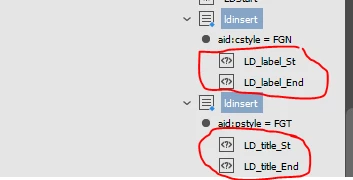
In javascript, I want to untag the selected elements(Element Name: ldinsert) without removing processing instruction(marked red color). Its possible while untagging manually but doing in ExtendScript toolKit i can't why???

Code used for untagging elements.

if(myElements[i].markupTag.name=="ldinsert")
{
  myElements[i].untag();
}


This topic has been closed for replies.
Correct answer Sunil Yadav

Unfortunately from code xml instruction also will be removed.

To tackle this you can try untagging like this:

///////////////////////////////////////////////////////////////////////////////////

if(myElements[i].markupTag.name=="ldinsert"){
    var myNode = myElements[i];
    for(var p = 0; p < myNode.xmlInstructions.length; p){
        myNode.xmlInstructions[p].move(LocationOptions.BEFORE, myNode);
        }
    myNode.untag();
    }

///////////////////////////////////////////////////////////////////////////////////

Best

Sunil

3 replies

New Participant
January 4, 2021

Unfortunately 

Sunil Yadav
Sunil YadavCorrect answer
Braniac
August 5, 2020

Unfortunately from code xml instruction also will be removed.

To tackle this you can try untagging like this:

///////////////////////////////////////////////////////////////////////////////////

if(myElements[i].markupTag.name=="ldinsert"){
    var myNode = myElements[i];
    for(var p = 0; p < myNode.xmlInstructions.length; p){
        myNode.xmlInstructions[p].move(LocationOptions.BEFORE, myNode);
        }
    myNode.untag();
    }

///////////////////////////////////////////////////////////////////////////////////

Best

Sunil

New Participant
October 19, 2022

hi bro 

 i have a dout in un tag single xml element plz provide source code for this......

kindly send to  my mail.id suriyag1210@gmail.com.

brian_p_dts
Braniac
August 3, 2020

Not sure if this would help, but you could try just removing the tag. 


https://www.indesignjs.de/extendscriptAPI/indesign-latest/#XMLTag.html


if(myElements[i].markupTag.name=="ldinsert")
{
  myElements[i].markupTag.remove();
}


Participating Frequently
August 4, 2020

Thanks for your reply.

Remove() function is contains replacewith parameter(its required, not optional) but i want to untag element without removing processing instruction and also content inside the untagged elements.