Inspiring
June 29, 2022
Answered

How to use custom color profiles

  • June 29, 2022
  • 4 replies
  • 11444 views

I am working with a new printer and they want me to use their color profiles. They sent me a couple files (see attached image). I have no idea how to instal or use these color profiles. I am looking for help to learn how to install/use these profiles, especially when converting from RGB to cmyk for print. I am not sure what to even google to make sure I do this correctly.... 
This topic has been closed for replies.
Correct answer rob day

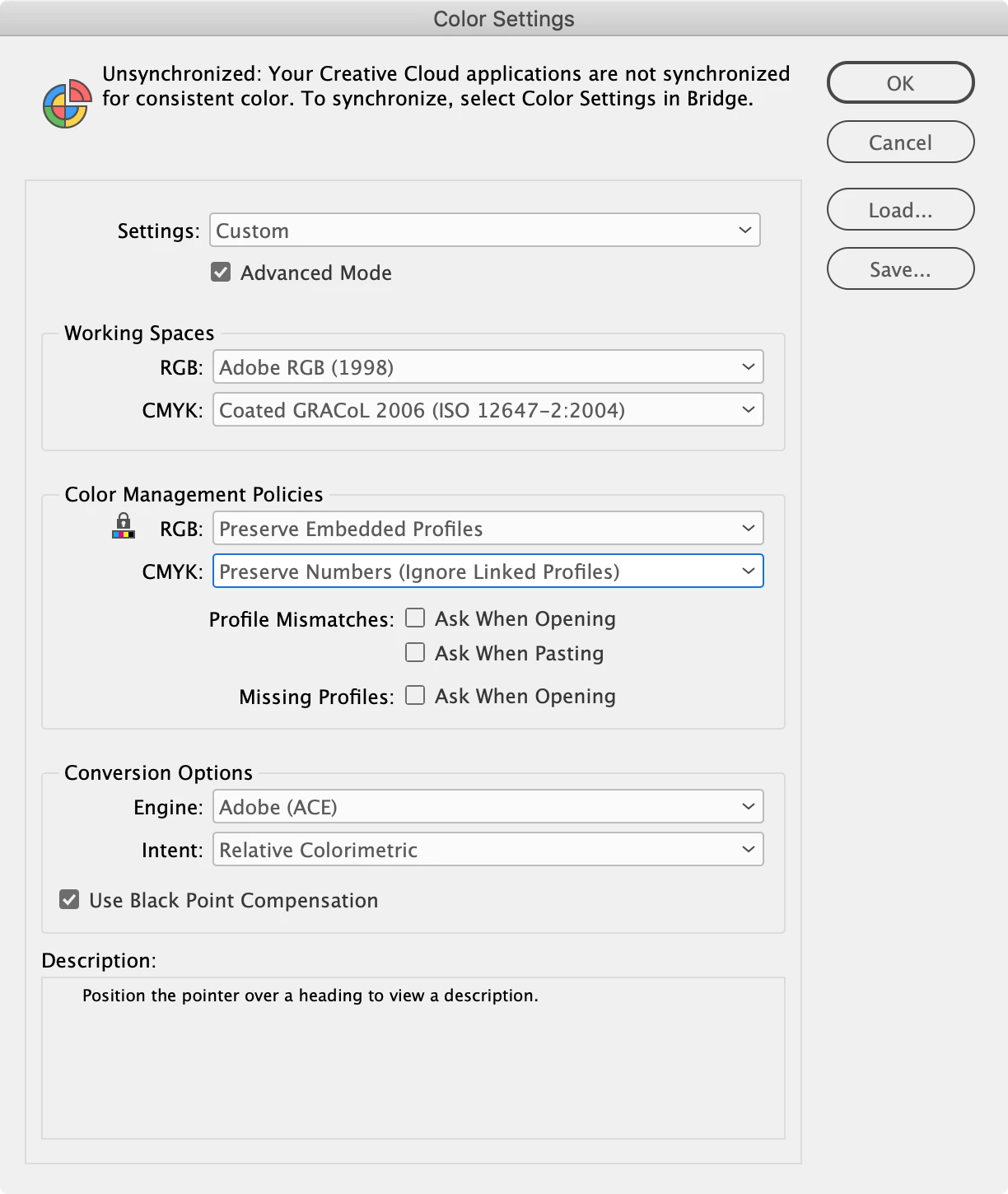
Hi @DexAlpenglow , also the printer isn’t providing a Color Settings file (.CSF). Before you create your document it is important to setup your Color Settings so the correct profiles are assigned. For new documents printing on coated your Color settings should be this:


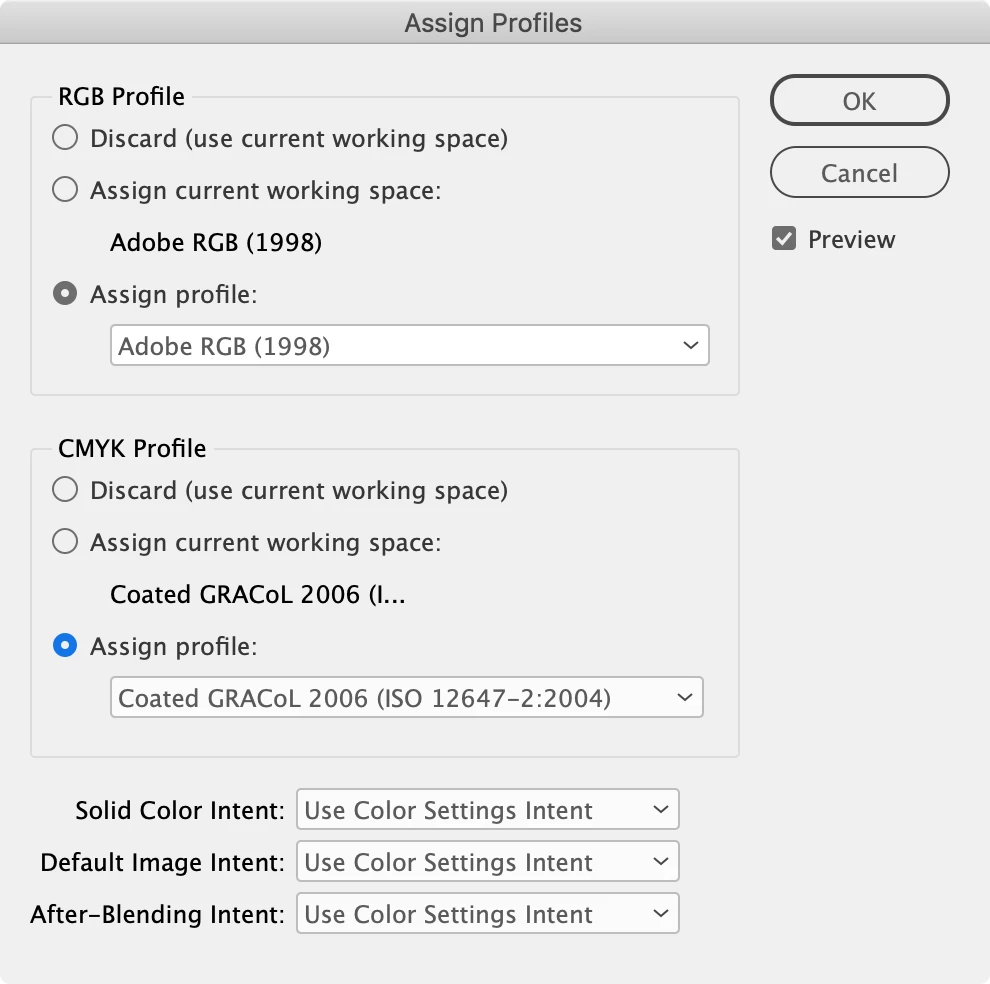
And for existing documents printing to a coated sheet your Edit>Assign Profiles... should be this (Color Settings doesn’t update existing docs):


And you can place profiled RGB images, there’s normally no need to make conversions to CMYK in Photoshop. The PDF/X-1a .joboptions file the printer supplied will make color managed conversions to CMYK on the export.


4 replies

rob day
rob dayCorrect answer
Community Expert
June 30, 2022

Hi @DexAlpenglow , also the printer isn’t providing a Color Settings file (.CSF). Before you create your document it is important to setup your Color Settings so the correct profiles are assigned. For new documents printing on coated your Color settings should be this:


And for existing documents printing to a coated sheet your Edit>Assign Profiles... should be this (Color Settings doesn’t update existing docs):


And you can place profiled RGB images, there’s normally no need to make conversions to CMYK in Photoshop. The PDF/X-1a .joboptions file the printer supplied will make color managed conversions to CMYK on the export.


Inspiring
June 30, 2022

Wow! thanks for all the screen shots, just what I was looking for, thanks! If I have already converted to cmyk in photoshop, will that cause any issues when indesign converts them again?


rob day
Community Expert
June 30, 2022

What destination CMYK profile did you use in Photoshop?


Ideally you do not want to make extra CMYK to CMYK conversions, e.g. AdobeRGB>US WebCoated SWOP> Coated GRACoL 2006

Inspiring
June 30, 2022

Heres a helpful video for installing profiles:

https://www.youtube.com/watch?v=CM9jtRng04k


And here is how to install the pdf conversion files:

  1. Open Adobe InDesign.
  2. On the "Edit" menu select "Adobe PDF Presets..."
  3. In the resulting window click "Load..."
  4. Navigate to and select the "AD-VantageMarketing. joboptions" file that you downloaded and click "Load"
  5. Click "Done"
Community Expert
June 30, 2022

The last two look like JobOptions files


  1. Open Adobe InDesign.
  2. On the "Edit" menu select "Adobe PDF Presets..."
  3. In the resulting window click "Load..."
  4. Navigate to and select the "AD-VantageMarketing. joboptions" file that you downloaded and click "Load"
  5. Click "Done"


The others look like colour profiles

There's info here

https://www.onlineprinters.ie/magazine/installing-icc-profiles-indesign-photoshop/#:~:text=Installing%20colour%20profiles%20on%20Windows&text=Right%2Dclick%20on%20the%20corresponding,Done!


------------------------

Surely - if they supplied these you - cannot you ask them?


Inspiring
June 30, 2022

Thanks!!

Inspiring
June 29, 2022

I forgot to mention I am on a PC, not sure if that matters at all 🙂