



dublove
Legend
June 21, 2022
Answered

How to write with grep: delete the space except the first one in the paragraph?

  • June 21, 2022
  • 6 replies
  • 1923 views

There is a paragraph with many spaces inside. I need to keep the first space in each paragraph and replace all the spaces behind with none. How grep writes.
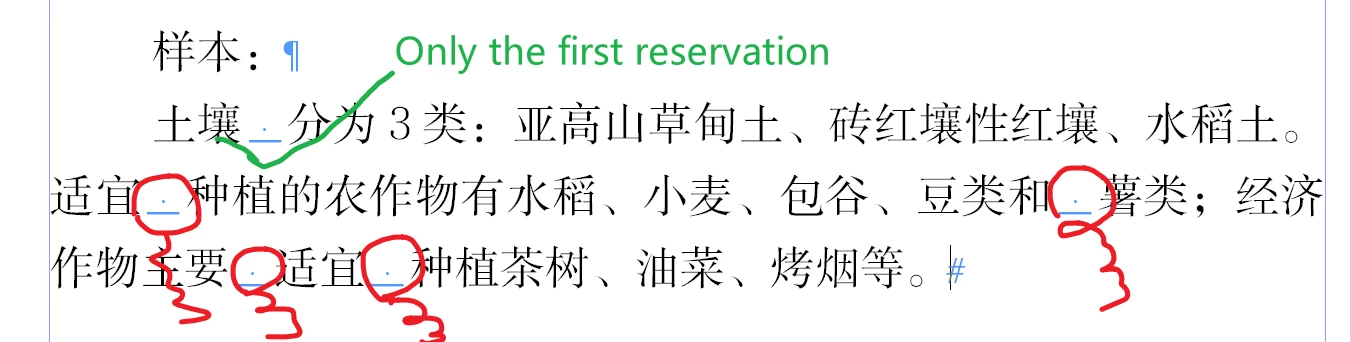
 

------------------------------------------------

Sample:
土壤 分为3类:亚高山草甸土、砖红壤性红壤、水稻土。适宜 种植的农作物有水稻、小麦、包谷、豆类和 薯类;经济作物主要 适宜 种植茶树、油菜、烤烟等。

------------------------------------------------


Thanks


This topic has been closed for replies.
Correct answer Peter Kahrel

Your ^.+? \K.+$ does work in 2022, Uwe. So you can apply a character style to everything after the first space (safest to do this as a GREP style), but if you don't want to use a GREP style it's safest to use a text condition. But you need to define the  style or the condition, apply it, do whatever you want with the captured spaces, then remove the style or the condition.


Anyway, as Brian suggested, a script would be easiest, something like this:


par = app.selection[0].parentStory.paragraphs.everyItem().findGrep();

for (i = 0; i < par.length; i++) {
  for (j = 1; j < par[i].length; j++) {
    par[i][j].contents = '';
  }
}


 In other words, get all spaces per paragraph, then delete them all except the first one in each paragraph.

6 replies

who denied to be named
Participating Frequently
June 23, 2022

grep      (^~K+ )(.*)( )(.*)( )(.*)( )(.*)( )

replace   $1$2$4$6$8

dublove
dubloveAuthor
Legend
June 23, 2022

It is not fixed. There are two Chinese characters in front of it. The number of spaces is not fixed.

who denied to be named
Participating Frequently
June 24, 2022

@dublove -- I modified the code I posted so that it deletes spaces after the first space (the underlines in my original example were just for illustration).


can you reissue the code you modified, thank you

Peter KahrelCommunity ExpertCorrect answer
Community Expert
June 22, 2022

Your ^.+? \K.+$ does work in 2022, Uwe. So you can apply a character style to everything after the first space (safest to do this as a GREP style), but if you don't want to use a GREP style it's safest to use a text condition. But you need to define the  style or the condition, apply it, do whatever you want with the captured spaces, then remove the style or the condition.


Anyway, as Brian suggested, a script would be easiest, something like this:


par = app.selection[0].parentStory.paragraphs.everyItem().findGrep();

for (i = 0; i < par.length; i++) {
  for (j = 1; j < par[i].length; j++) {
    par[i][j].contents = '';
  }
}


 In other words, get all spaces per paragraph, then delete them all except the first one in each paragraph.

Community Expert
June 22, 2022

Hi Peter,

well, all text in a paragraph after the first white space can be found this way:

^.+?\s\K.+$

If you want to find the first space only, one could do this like that:

^.+?\K\s


But there are two phenomenons with both find patterns that I cannot explain.

Below the results in yellow that I can see in various situations for my second pattern:

[1] It seems that an "end of line" special character can interfere the result.

[2] Initially I thought that .+? stands for one instance or more with shortest result for a character.

But here it seems, that it stands for two instances or more with shortest result.


Important: Both obstacles also can be found in my first pattern.


Regards,
Uwe Laubender
( Adobe Community Professional )

Community Expert
June 22, 2022

It's nothing to do with the forced paragraph break, Uwe. Because of \K InDesign finds every other instance, not every instance. I think that that's a bug.

P.

Community Expert
June 22, 2022

Aha!

Ok. The other thing with .+? could be perhaps seen in conjunction with the new behavior that a simple ^ could find an insertion point at the beginning of a paragraph. Or after the first line break special character in a paragraph. ( InDesign 2021 and above. )

My pattern

^.+?\s\K.+$

will not work at all with InDesign 2020. Just tested this.


Regards,
Uwe Laubender
( Adobe Community Professional )

Community Expert
June 22, 2022

Hi Peter,

I have no idea how the rest of the text is structured.

If paragraph styles are used; or not.

So let's see what dublove has to say.


My assumption in my last post was of course that only one full width colon is used per paragraph.

I could be wrong. So I would change my first GREP Find pattern to:

^.+?\x{FF1A}\K.+$


Or we could also look for the first white space in a paragraph and format all following text in the same paragraph.

But that pattern could be too general, perhaps. OP dublove should know…


Regards,
Uwe Laubender
( Adobe Community Professional )

Peter Spier
Community Expert
Community Expert
June 22, 2022

Uwe, I think you've misinterpreted the request. OP has aske to retain first space in paragraphn o mention of colons (and there is none preceding the first space in illustration above).

Might not be possible to do the nested style, depending on the complexity of the other text styling, but worth a look. My GREP is kind of rusty so I'm having trouble isolating the first space to use Find/Change if a nested style won't work, but maybe you have a way.

Community Expert
June 22, 2022

Hi dublove,

is it possible to apply a new character style to the text after the full width colon?

( At least I assume your screenshot is showing a full width colon with Unicode value FF1A. )

If yes this could be a two-step process with GREP Find/Change.


First find all text after the full width colon to the end of the paragraph:

^.+\x{FF1A}\K.+$

Apply a new unique character style which is just a helper format. No particular text formatting.


Then do a second GREP Find/Change.

Find text formatted with that new unique character style. And all white spaces with that style.

\s

Replace with nothing.


Remove the new character style with character style [None].


Regards,
Uwe Laubender
( Adobe Community Professional )

Peter Spier
Community Expert
Community Expert
June 22, 2022

Think I'd go the opposite way -- apply the character style to the first space, then replace all spaces with character style None with nothing. I'm a bit leery of applying a character style to so much text, and a style applied to only one space seems more innocuous. That could even be set up as a nested style in your paragraph style so you wouldn't need to run Find/Change to apply it.

dublove
dubloveAuthor
Legend
June 22, 2022

Yes, I did later.

The first space is easy to find.

I will replace the first blank with @k

Then, delete all spaces, and finally replace @k with full width spaces

brian_p_dts
Community Expert
Community Expert
June 21, 2022

Don't think can be done with GREP alone. You'd need a script. 

dublove
dubloveAuthor
Legend
June 21, 2022

Why, it doesn't work:


(?<!(^~K+))(\s)


I seem to know that (? < (^~k+)) will not work.


But=~ K is sometimes feasible


That is, reverse query can only specify one character, while forward query can specify multiple characters.

Community Expert
June 22, 2022

~k is a discretionary line break. What does ~K stand for?