


Known Participant
December 21, 2017
Answered

Hyperlink to any Linkedin url's are not working!

  • December 21, 2017
  • 2 replies
  • 13651 views

Hi,

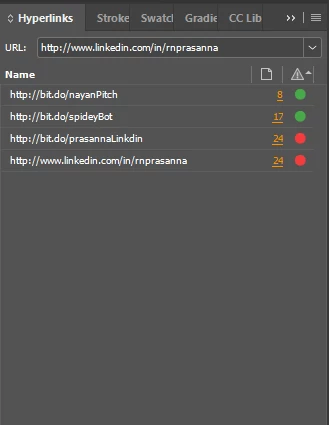
All my hyperlinks are working except anything that points to linkedin (the url shows up as a red dot eventhough the link is working). It's really frustrating. People have had this problem in the past and I could not find any solutions.
This topic has been closed for replies.
Correct answer Steve Werner

Nope, it still doesnt work. The weird thing is that it works in the pdf (last page): http://www.mechdesignengineer.com/wp-content/uploads/2017/12/Portfolio_PrasannaNatarajan.pdf 

but not in the indesign file. I even tried removing the shortener, still see the red dot. Clicking on the red dot opens the link. I guess its a bug


Report your apparent bug here:

Feature Requests/Bugs

2 replies

New Participant
March 21, 2021

Hi. Doesnt work in İnDesign. İf you export to pdf. you can it. add web url from pdf.

manal shanableh
Community Expert
December 21, 2017

are you sure all options are set correctly.

Known Participant
December 21, 2017

I tried linkedin.com too. Its doesnt work. another post on the same problem: Can't hyperlink to LinkedIn profile in InDesign CC

Steve Werner
Community Expert
December 21, 2017

http://bit.do/prasanna/Linkdin is what you have entered in the Edit Hyperlink dialog.

It appears that gives a 404 Not Found error when you type it in directly in a browser:

I think it's spelled Linkedin not Linkdin