annabelleh73317692
New Participant
July 25, 2017
Answered

Hyperlinked Text Anchors that Highlight when you click on them?

  • July 25, 2017
  • 2 replies
  • 1671 views

hi everyone, I'm brand new to InDesign so sorry if my question is super simple!

I've created text anchor hyperlinks which work great, but I was wondering if, when exported to PDF, the text anchor can be highlighted when the hyperlink is pressed. e.g. if linking to a single sentence in a chunk of prose, can this sentence be highlighted so it stands out?

hope this makes sense thanks so much.

This topic has been closed for replies.
Correct answer barbara_a7746676

You need to do this with a button rather than a hyperlink.

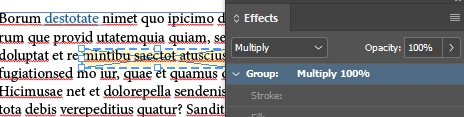
Draw a frame around the text that you want to hyperlink.

In the Buttons and Forms panel, Type: Button. At the bottom of the panel, you can choose an appearance for 3 states: Normal Rollover, and Click. It's very cool.

If you choose a highlight color for Rollover or Click, you'll want to make it semi-transparent or maybe use Multiply mode.

2 replies

Community Expert
July 25, 2017

For simple click effects, hyperlinks can have an appearance applied to them.

barbara_a7746676
barbara_a7746676Correct answer
Community Expert
July 25, 2017

You need to do this with a button rather than a hyperlink.

Draw a frame around the text that you want to hyperlink.

In the Buttons and Forms panel, Type: Button. At the bottom of the panel, you can choose an appearance for 3 states: Normal Rollover, and Click. It's very cool.

If you choose a highlight color for Rollover or Click, you'll want to make it semi-transparent or maybe use Multiply mode.

Participating Frequently
September 23, 2021

InDesign CC 2021


The problem I have found with this method is that the button supercedes the hyperlink in the final PDF. Once I place the button, even if on a new layer below the text, the hyperlink no longer works. The exported PDF makes the button the priority and the hyperlink is lost. This particular case is for text hyperlinks in a TOC that link to a page in the document. (Don't know how it works with a URL because I have not tried that.)


Is there any solution to this problem?