


Hyperlinks in a typeset URL that breaks at the end of a line
Hi, folks! This is a bit complicated. I hope I can explain it properly.
I have a document in which URLs must sometimes break at the end of a line because they are too long. The problem I describe happens no matter how the break is created (either automatically by InDesign or if I insert hard line breaks). No hyphenation is inserted at these breaks.
The hyperlinks of the "line-broken" URLs do not export properly in a PDF (for print), even if I have manually created each one in the text (Type > Hyperlinks & Cross References > New Hyperlink). So, for example, if I have to break "en.wikipedia.org/wiki/Adobe_InDesign" after the ".org/", the hyperlink goes to the Wikipedia homepage, not the Adobe InDesign entry. I have tried inserting a hard line break (return key) and aassigning each segment a complete-URL hyperlink, but that doesn't solve the problem. I have even tried copying and pasting the "broken" segments of an URL from a plain-text document onto separate lines of text and assigning each one its own complete-URL hyperlink. InDesign still "links them together" with an incomplete URL.
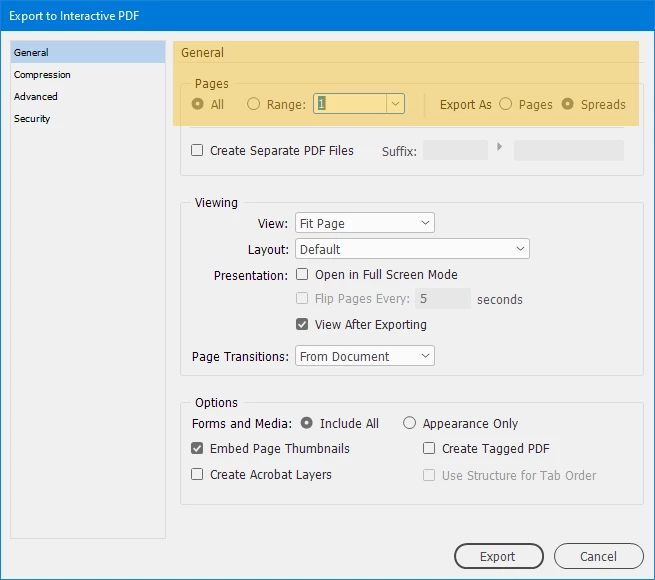
They do, however, export correctly if I export as an interactive PDF. But the interactive PDF results in a spread rather than single pages, and it remains a spread even when I specify "single page" view in Adobe Acrobat (or Preview). The document must be single pages.
(Tinyurls are not a suitable workaround. And this happens whether or not the typeset text begins with "http".)
Can you suggest either how to get the broken-line hyperlinks to behave correctly in a "print" PDF or how to export an interactive PDF in which each "single page" is a spread?
 AdChoices