


Participant
January 8, 2024
Answered

Hyperlinks not working on PDF when using the "package" option to export file in InDesign

  • January 8, 2024
  • 2 replies
  • 531 views

When I export an InDesign file via the "package" option, hyperlinks are not working on the exported PDF. I mean by that, when I open the PDF I am not able to click on the links. Any idea on how to solve this issue?


This topic has been closed for replies.
Correct answer Peter Kahrel

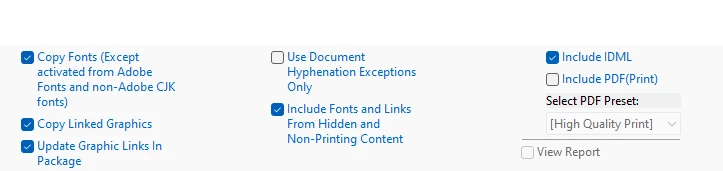
The 'Include PDF' option states it exports Print PDF. You'll need to enable the hyperlink option in the job option.

2 replies

Peter KahrelCommunity ExpertCorrect answer
Community Expert
January 8, 2024

The 'Include PDF' option states it exports Print PDF. You'll need to enable the hyperlink option in the job option.

dougl77390883
Participating Frequently
January 8, 2024

You may have to export an Interactive PDF separately. I think the "Select PDF Preset" option when packaging only allows "PRINT" pdfs.

You screenshot is using the Hight Quality Print setting