


I need a GREP or script to remove specific sequences or paragraph styles.
I'm still far too new to scripting to understand how to write this out and i don't believe find/change or GREP can do what i want but what needs to happen is to look at a selected text frame, find whenever a paragraph with style A is directly followed by a paragraph with style B, and remove both paragraphs, while ignoring any other combination of styling.
For the background here, I'm using data merge to import a list of terms (Term) and definitions (Def), with a another set of columns specifying if the Term/Def is used in a specific book. This is defined by a character (X) placed in the cell if its included in the book. I then use the Inline Merge script by Loic to fill a text frame with all the data, each having a para style.
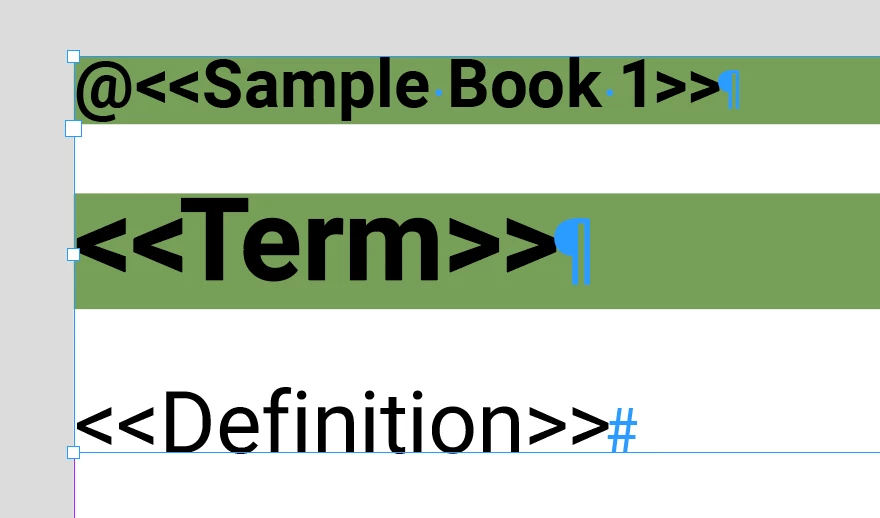
The Merge fields look like this:
<<Book>> (style A)
<<Term>> (style C)
<<Def>> (style B)
On words that are included in the book the styling works as intended with 3 paragraphs generated:
X (style A)
Sample Term (style C)
Sample Def (style B)
However when using the Inline Merge script with the option to Remove Blank Lines for Empty Fields checked a curious thing happens for words that aren't included in the book that i want to take advantage of; the term now gets styled with style A followed by the definition styled properly as style B, example below:
Sample Term (style A)
Sample Def (style B)
So now i want to remove all terms and definitions not included in the book which can be seen as a paragraph styled A followed by a paragraph styled B, while leaving any sequences of para styles A-C-B.
Can this be done within indesign natively? and if not can someone help with writing a script for this? Bonus points if activating the script can initially run the Inline merge script, followed by the above actions, and the again followed by removing any paragraph with styling A, as that paragraph is only necessary for determining if the word should be included.
Thanks
-Austin
 AdChoices