October 27, 2010
Answered

I need to number 20,000 tickets in InDesign and have them in order when I cut them

  • October 27, 2010
  • 9 replies
  • 29311 views

I need to number 20,000 tickets in InDesign and have them in order when I cut them, I know there is a way to use data merge or something. I just can't get it to work. Any help would be greatly appreciated.

I saw a post similar, answered by Peter Spier which explained this, but I still can't get it to work.

    This topic has been closed for replies.
    Correct answer macinbytes

    If you figure how many you have on a sheet that will be printing and the location it is pretty easy. I just do a quick round of numbering with Excel so the stacks come out in order. I haven't found a way to get InDesign to do this, but I regularly have to do this for a couple of tickets and gift certificates.

    Information you need: Number of tickets one a sheet. Number format (need leading zeros?)

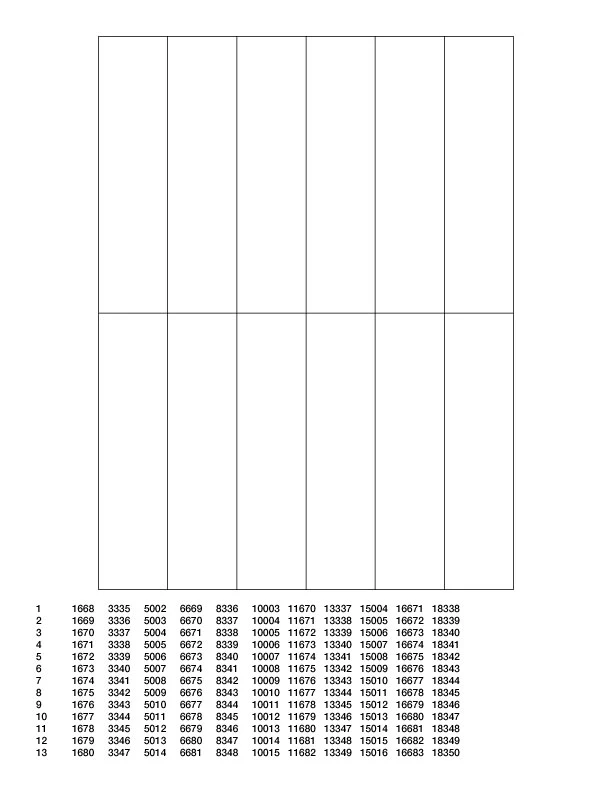
    It's pretty easy in Excel. Take your number of tickets you'll get on a sheet, divide 20000 by that number. That will be your number of rows. Type a 1 in the A1 cell location, type =(A1+1) in the A2 cell location. Paste that in as many rows as you determined. Copy the last cell in your first column. Paste that in cell B1. Copy B1 and paste in as many rows as you had in Column A. Copy column B and paste in column C. Copy C and paste in Column D. Repeat as many times as you have tickets on a sheet until you have enough columns as you do tickets on a sheet. Save as Tab deliminated text and bring into data merge on an imposed sheet. Data merge should be able to build you a document easily with as many sheets as you need and on a 1 knife trimmer you should have neatly stacked tickets in order.

    9 replies

    joet082964
    Inspiring
    March 10, 2016

    I have been through this exact scenario.  It's a pain unless you can impose them for north-south stacking and cutting.  I ended up having a local printer impose my single-page files, then send me a print quality PDF at my desired page size, then we printed them, and sent them back to the printer to cut.  Worked like a charm and I didn't week trying to make it work.

    Granted, this has to be a printer you have a good relationship with as you are basically cutting them out of the place they make money - paper and printing.

    Let technology work for you. :-)

    Participant
    March 10, 2016

    The easiest way to number would be to use the data merge function in indesign. This will require a data merge file. One of the easiest to use is Number-Pro.

    It can be found at http://www.number-pro.com

    This application can create a data merge file quickly that can be used with Indesign's data merge function. You can check out the video tutorial on there website. Hope this helps.

    Participant
    October 29, 2010

    The same problem gets into the news also in Japanese Blogs now.

    I wrote a Script :

    http://d.hatena.ne.jp/seuzo/20101029/1288287509

    1. Select target Text Frames on Master Page.

    2. Run the Script.

    3. Input start and end number.

    Participant
    October 29, 2010

    Quite Imposing Plus does Cut Stacks and Double cut stacks.

    Check out our tech sheets on the subject at www.quite.com/imposing/techsheet

    Just go to Shuffle pages for imposing...

    Put in a group of 12

    And a RULE of 1 2 3 4 5 6 7 8 9 10 11 12

    then do n-up pages.


    Here is a temporary number to test drive us live:
    Quite Imposing Plus
      Expires end 11/2010  Serial 4626-8727-8912-4682  Code 6456


    cheers,

    Charles


    Charles James

    Technical/Marketing Director

    Quite

    USA

    858.581.9143

    macinbytes
    macinbytesCorrect answer
    Inspiring
    October 27, 2010

    If you figure how many you have on a sheet that will be printing and the location it is pretty easy. I just do a quick round of numbering with Excel so the stacks come out in order. I haven't found a way to get InDesign to do this, but I regularly have to do this for a couple of tickets and gift certificates.

    Information you need: Number of tickets one a sheet. Number format (need leading zeros?)

    It's pretty easy in Excel. Take your number of tickets you'll get on a sheet, divide 20000 by that number. That will be your number of rows. Type a 1 in the A1 cell location, type =(A1+1) in the A2 cell location. Paste that in as many rows as you determined. Copy the last cell in your first column. Paste that in cell B1. Copy B1 and paste in as many rows as you had in Column A. Copy column B and paste in column C. Copy C and paste in Column D. Repeat as many times as you have tickets on a sheet until you have enough columns as you do tickets on a sheet. Save as Tab deliminated text and bring into data merge on an imposed sheet. Data merge should be able to build you a document easily with as many sheets as you need and on a 1 knife trimmer you should have neatly stacked tickets in order.

    Participant
    May 9, 2019

    Thank you!

    Colin Flashman
    Community Expert
    Community Expert
    May 13, 2019

    I have also prepared a script that assists with cut and stack style impositions and numbering. Have a look at this video to see the technique in action: Episode 9: Cut and Stack Assistant script - YouTube

    If the answer wasn't in my post, perhaps it might be on my blog at colecandoo!
    Community Expert
    October 27, 2010

    There is a good chance that the digital printer that you will use, has a cut and stack imposition method. This is a method that replicates Peter's description, except it is done at the RIP and automatically. If this is the case, all you would need to do is supply a file from your data merge (20,000 single pages), and the imposition is taken for you.

    Peter Spier
    Community Expert
    Community Expert
    October 27, 2010

    I'll run throough my method one more time to see if it helps.

    The first thing you need to know is how many tickets you plan to put on a page. That determines the number of columns, or fields, you need in the data file. Next you need to divide the total number of tickets (20,000 in this case), by the number of tickets per page. Round up to the next whole number. This is the number of rows, or records, in the data file. Each record represents a single page in the merged file.

    To make the data file you fill the first column starting with the first number in the first row and put the second number in the first columen second row, and soforth, filling the column downward in in consecutive order until the correct number of rows is reached, then you start with the next number in the first row of the second column and work down again. This should make it clear that every row represents a stack of ticket. A spreadsheet like Excel can auto-fill the grid for you once you have enough numbers in place to establish the pattern, generally three in either direction.

    After the grid of numbers is done, you need to insert a new row at the top to hold the field labels (Stack 1, stack 2, stack 3... or whatever) and then save as .csv or tab delimited text to use as the Data Source file for the merge.

    Set up your tickets as a full grid on the page in ID and drag one field name into each ticket, then do the merge as a Single Record per Page.

    East Bay Printing
    Participant
    March 28, 2016

    Awesome Awesome

    Thank you sooo muxh

    p_taz
    Inspiring
    October 27, 2010

    What previous poster says applies to offset print, but if you are looking to digital print:

    You could set up a series of numbers in excel and save as 'csv' (comma separated) data which you could then add to a doc using data merge.

    Say you had 20 on a page, you could sort the numbers into 20 columns in excel with the first row being 1,1001,2001,3001 etc and so on to 19001 with 1000 rows.

    Then you name each column at the top as 'a' 'b' 'c' etc

    then your Indesign page would be set up with 20 tickets on a page with <<a>> going in position one and <<b>> in position two, then your first page after merging would contain each of the ticket numbers in the first row, the second page would contain the second row numbers and when printed and cut down, the stacks would be in order.

    Hope that makes sense...  that's how I would do it without scripting.  Very achieveable for the average user!  ( I don't know what your level is )

    Scott Falkner
    Community Expert
    Community Expert
    October 27, 2010

    This can be done digitally as well. Not all digital print shops can do it, but any decent one can (so not Kinko’s). I assume they will handle the cutting as well, so they can determine the best way to arrange the numbers.

    Participating Frequently
    October 27, 2010

    What about Auto Page Numbering to number the tickets for you.

    How many tickets per page have you got.

    Scott Falkner
    Community Expert
    Community Expert
    October 27, 2010

    Ask your printshop about “Crash Numbering”.
