



dublove
Brainiac
February 22, 2014
Question

ID cs6:How to Fit Frame to Version heart(or Page) with script?

  • February 22, 2014
  • 2 replies
  • 2520 views

More times, I need my Frame fit to my Version,or fit to my page,
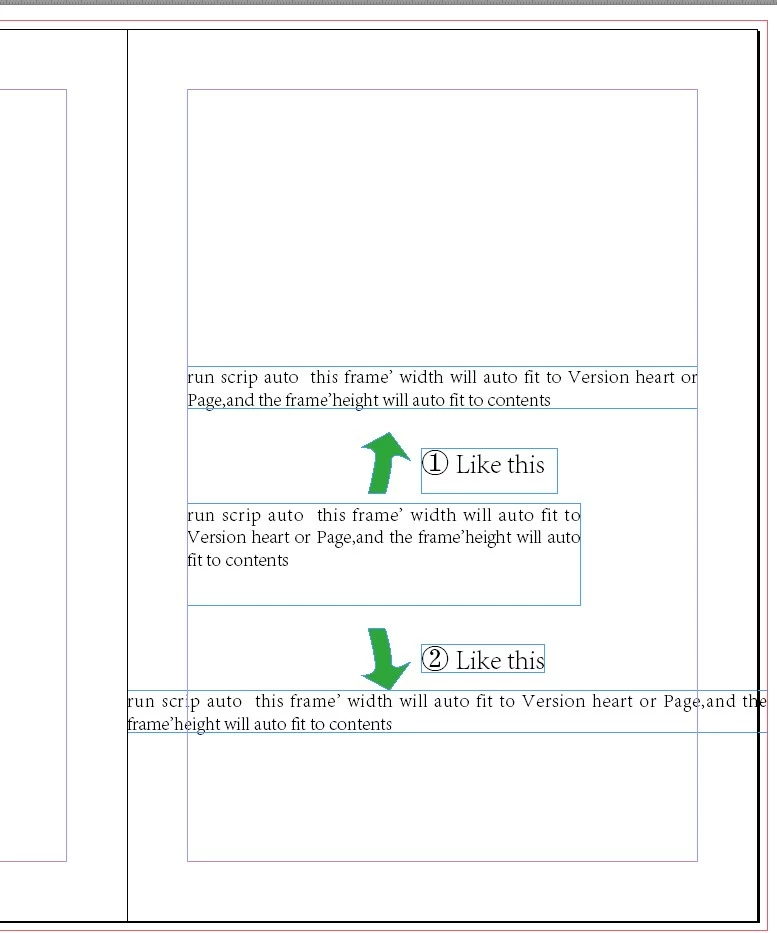
I looking for the scrip in the Internet, only see "frames  to content"

Who would like to help me?

Thank you very much~

This topic has been closed for replies.

2 replies

Kai Rübsamen
Participating Frequently
February 22, 2014

Hi,

you can try the following lines:

var curDoc = app.activeDocument;

if ( app.selection.length != 1 ) {

    ( alert ( "Something wrong with your selection!" ) );

    exit();

    }

var curSel = app.selection[0];

var curPage = curSel.parentPage;

var rO = curDoc.viewPreferences.rulerOrigin;

if (rO != 1380143215) {

    curDoc.viewPreferences.rulerOrigin = RulerOrigin.pageOrigin;

}

var pW = curDoc.documentPreferences.pageWidth;

var y1, x1, y2, x2;

if ( curPage.side == PageSideOptions.leftHand ){

    x2 = curPage.marginPreferences.left;

    x1 = curPage.marginPreferences.right;

}

else {

    x1 = curPage.marginPreferences.left;

    x2 = curPage.marginPreferences.right;

}

x2 = pW - x2;

var gB = curSel.geometricBounds;

// fit to margins

gB[1] = x1;

gB[3] = x2;

curSel.geometricBounds = gB;

// fit to page

/* gB[1] = 0;

gB[3] = pW;

curSel.geometricBounds = gB; */

curSel.fit ( FitOptions.FRAME_TO_CONTENT );

resetAsBefore();

function resetAsBefore() {

    if ( rO != 1380143215 ) {

            curDoc.viewPreferences.rulerOrigin = rO;

    }

}

Everything in /* */ will not executed. So at the moment your selection will fit to the page margins. If you put the lines under // fit to margins in /* */ and delete those under // fit to page, your textframe will fit to the page.

best

Kai

dublove
dubloveAuthor
Brainiac
February 23, 2014

Hi  Kai Rübsamen

Thank  you very much.

Some times I must press Ctrl+Z, It will  be ok?


and ,I want to select more than one text frame.


and, the script is wrong in some document ,Tested, I find  should be make the Coordinate origin to the The upper left corner

Could you like to add this Function into the scrip.

thanks


fit to margins

-------------------------------------------------------------------------------------------------------------------------------------------------------------

var curDoc = app.activeDocument;

if ( app.selection.length != 1 ) {

    ( alert ( "Something wrong with your selection!" ) );

    exit();

    }

var curSel = app.selection[0];

var curPage = curSel.parentPage;

var rO = curDoc.viewPreferences.rulerOrigin;

if (rO != 1380143215) {

    curDoc.viewPreferences.rulerOrigin = RulerOrigin.pageOrigin;

}

var pW = curDoc.documentPreferences.pageWidth;

var y1, x1, y2, x2;

if ( curPage.side == PageSideOptions.leftHand ){

    x2 = curPage.marginPreferences.left;

    x1 = curPage.marginPreferences.right;

}

else {

    x1 = curPage.marginPreferences.left;

    x2 = curPage.marginPreferences.right;

}

x2 = pW - x2;

var gB = curSel.geometricBounds;

// fit to margins

gB[1] = x1;

gB[3] = x2;

curSel.geometricBounds = gB;

curSel.fit ( FitOptions.FRAME_TO_CONTENT );

resetAsBefore();

function resetAsBefore() {

    if ( rO != 1380143215 ) {

            curDoc.viewPreferences.rulerOrigin = rO;

    }

}

-------------------------------------------------------------------------------------------------------------------------------------------------------------

fit to page

-------------------------------------------------------------------------------------------------------------------------------------------------------------

var curDoc = app.activeDocument;

if ( app.selection.length != 1 ) {

    ( alert ( "Something wrong with your selection!" ) );

    exit();

    }

var curSel = app.selection[0];

var curPage = curSel.parentPage;

var rO = curDoc.viewPreferences.rulerOrigin;

if (rO != 1380143215) {

    curDoc.viewPreferences.rulerOrigin = RulerOrigin.pageOrigin;

}

var pW = curDoc.documentPreferences.pageWidth;

var y1, x1, y2, x2;

if ( curPage.side == PageSideOptions.leftHand ){

    x2 = curPage.marginPreferences.left;

    x1 = curPage.marginPreferences.right;

}

else {

    x1 = curPage.marginPreferences.left;

    x2 = curPage.marginPreferences.right;

}

x2 = pW - x2;

var gB = curSel.geometricBounds;

// fit to page

gB[1] = 0;

gB[3] = pW;

curSel.geometricBounds = gB;

curSel.fit ( FitOptions.FRAME_TO_CONTENT );

resetAsBefore();

function resetAsBefore() {

    if ( rO != 1380143215 ) {

            curDoc.viewPreferences.rulerOrigin = rO;

    }

}

-------------------------------------------------------------------------------------------------------------------------------------------------------------

best wishes

Kai Rübsamen
Participating Frequently
February 23, 2014

Hi,

the script is not wrong. You get, what you showed in your screen: One frame that fits either to the type area or to the bounds of the page.

If you want to select more than one frame or want to change all frames in a story, this is probably also possible, but: If you draw your frames correct from the beginning, in most cases there is no need for aligning them afterwards.

Peter Spier
Community Expert
February 22, 2014

I've moved your question to the scripting forum. I think you'll get more help here.