


Participating Frequently
November 3, 2021
Answered

Import multiple PDF to Pages that already exist

  • November 3, 2021
  • 2 replies
  • 564 views

Hello, is there a way so I can import a pdf with 100 pages to my indesign file that I already have all the pages set?


For example, lets say I want to import a pdf with 3 pages, and I want each page to go in order to the pages that are already created in the document. So page 1 would go to the page that is apply the master page A and so on.


Image :
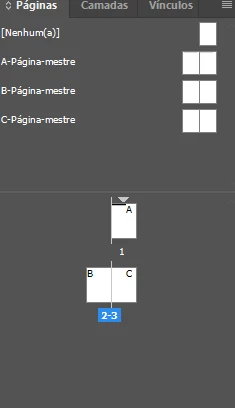
 

Any way I can do this? Thank you.
This topic has been closed for replies.
Correct answer Laubender

Well yes. You can do it with a script.


MultiPageImporter.jsx

https://github.com/mike-edel/ID-MultiPageImporter/releases


Originally written by Scott Zanelli, now curated by Mike Edel.

You can import multi-page PDFs and also multi-page InDesign document pages for example.

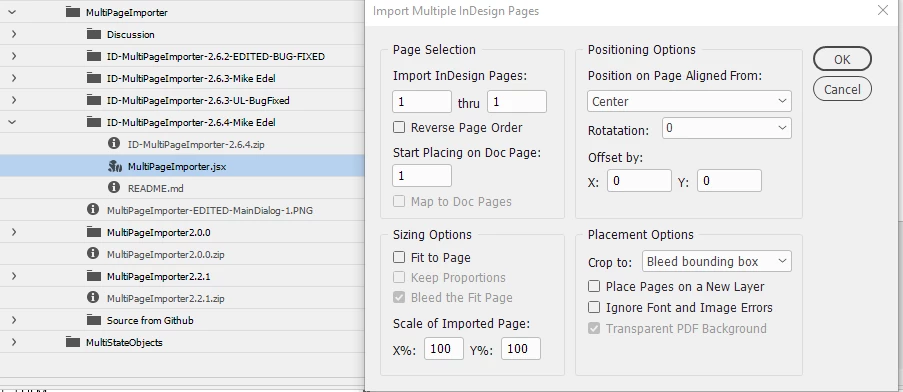
With various options:


Regards,
Uwe Laubender

( ACP )

2 replies

Colin Flashman
Community Expert
Community Expert
November 3, 2021

100% What Uwe said. I use this script almost on a daily basis.

If the answer wasn't in my post, perhaps it might be on my blog at colecandoo!
LaubenderCommunity ExpertCorrect answer
Community Expert
November 3, 2021

Well yes. You can do it with a script.


MultiPageImporter.jsx

https://github.com/mike-edel/ID-MultiPageImporter/releases


Originally written by Scott Zanelli, now curated by Mike Edel.

You can import multi-page PDFs and also multi-page InDesign document pages for example.

With various options:


Regards,
Uwe Laubender

( ACP )

Participating Frequently
November 4, 2021

Thank you a lot Uwe.

Saved me a lot of time.


Cheers.