


New Participant
August 12, 2024
Answered

IMPORTING PDF INTO INDESIGN NOT POSITIONED CORRECTLY

  • August 12, 2024
  • 3 replies
  • 437 views

Hi All,


I just recently updated indesign. I print from CAD 11 X 17 page or two plan options. I should be able to swap out OPT 1 with OPT 2 so that they are in the same place in the INDESIGN page. But when I swap out link the PDF position completely changes. As if the PDF is importing bounding box and not media box. I can't find any control in indesign that would  control this setting. Does anyone have any idea?? Is it just a glitch??


Thanks,

Cy
This topic has been closed for replies.
Correct answer rob day

I can't find any control in indesign that would control this setting


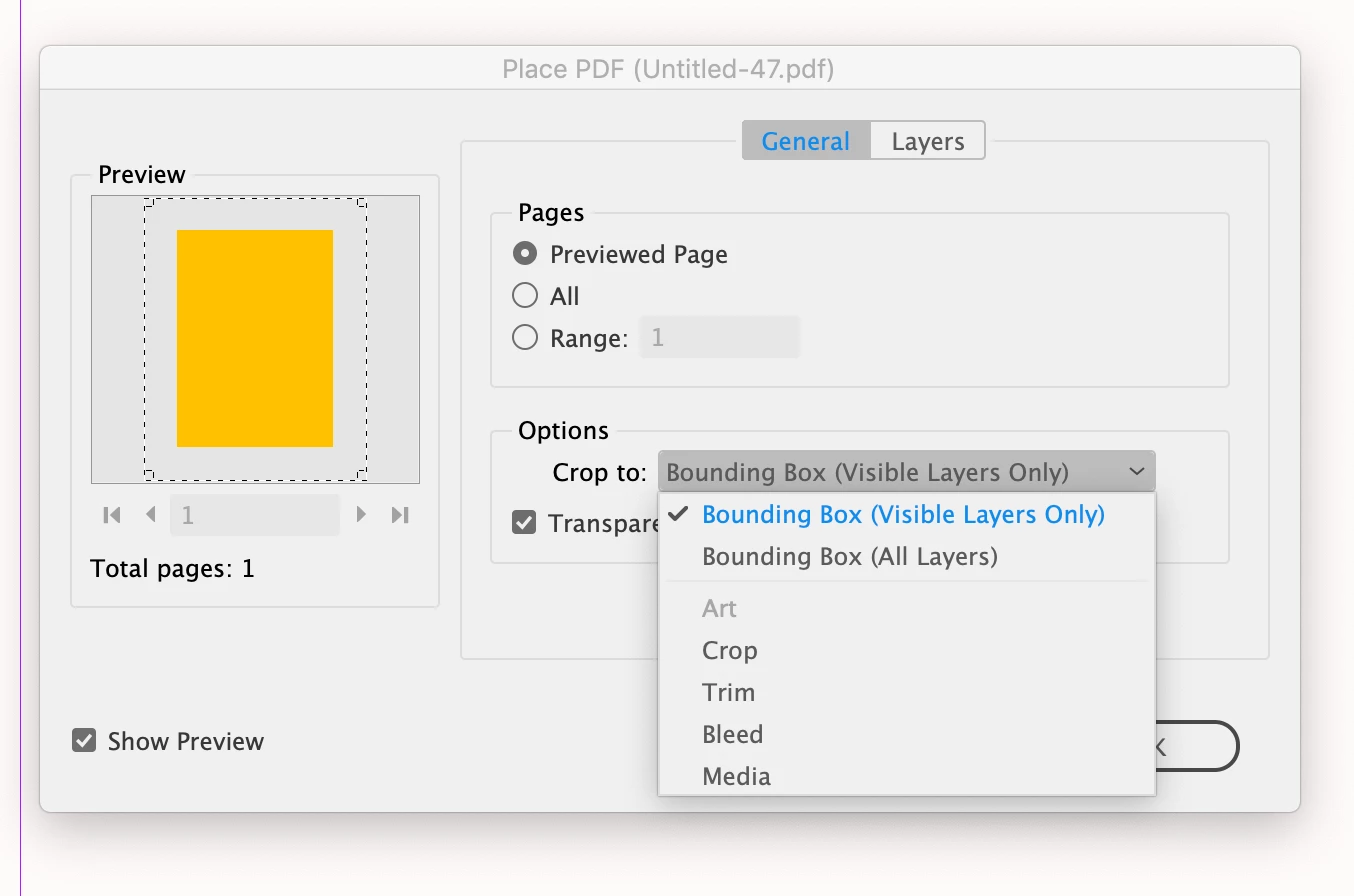
Hi @cy_3143 , When you replace the link are you checking Show Import Options in the Place dialog—that would let you choose the bounding box:


3 replies

rob day
rob dayCorrect answer
Community Expert
August 12, 2024

I can't find any control in indesign that would control this setting


Hi @cy_3143 , When you replace the link are you checking Show Import Options in the Place dialog—that would let you choose the bounding box:


cy_3143Author
New Participant
August 12, 2024

omgoodness. Thansk Rob. Media is the setting that I was looking for!! Thanks so much : )

James Gifford—NitroPress
Brainiac
August 12, 2024

PDFs exported from CAD/design systems (such as using Bluebeam) are quite often between wonky and utterly nonstandard. Those systems are meant as convenience tools for AutoCAD, Revit, SolidWorks etc. environments and don't follow many general guidelines for PDF creation. I would not be surprised if your system just doesn't reliably create a document bounding box, or some such, but just a PDF good for emailing and printing out.


Try opening and resaving the PDFs in Acrobat Pro — with and without some small "revision" to help force rewriting it — and see if the placement problem goes away.

leo.r
Community Expert
August 12, 2024

First, how exactly do you swap out the links?


Also, what versions of InDesign and the operating system are you using?